
Best overall: Salesforce Lightning base components. Best packaged option: Avonni. Best for full implementation control: a team-owned shared LWC library. For developers choosing an LWC component library in 2026, start with Salesforce’s native components, evaluate packaged components against specific gaps, and build custom components where your requirements demand them.
- Salesforce Lightning base components are the best default LWC component library for standard Salesforce interfaces.
- Avonni is best for teams seeking packaged Salesforce UI components rather than building every component themselves.
- A team-owned shared LWC library fits specialized interactions when developers can own maintenance and documentation.
- Evaluate component behaviour, supported environments, accessibility and upgrade responsibilities before committing.
Why this matters
An LWC component library determines more than how quickly you assemble a screen. It also affects how you handle data, enforce access, test interactions and maintain the interface after requirements change.
The wrong decision often starts with a screenshot. A component looks right, but its configuration, event model or deployment requirements do not fit your application. Judge the implementation contract before the visual polish.
This guide compares native components, a packaged component subscription and a team-owned library. These are different delivery models, not interchangeable products. The right choice depends on which responsibilities you want Salesforce, a package vendor or your own developers to carry.
What makes the best LWC component library
Use these criteria for your 2026 shortlist. A library belongs in your application only when it meets the requirements of the screen you are actually shipping.
- Environment fit: Confirm the component supports its intended destination, including any required record page, Flow screen or Experience Cloud context. Support in one context does not establish support in another.
- Interaction coverage: Match the actual task: selecting records, editing related data, presenting a hierarchy or guiding a workflow. A similar-looking component is not necessarily a functional match.
- Data and security fit: Identify how the component reads and writes Salesforce data. Check access handling across the complete implementation, including custom server-side code.
- Accessibility: Evaluate keyboard operation, focus behaviour, labels and error announcements. Appearance alone does not establish that a component is usable.
- Extension model: Understand which properties, events and composition points you can use. Distinguish supported configuration from changes that require source ownership.
- Maintenance ownership: Establish who documents, tests, updates and supports the component. A reusable library needs a release process, not just a folder of code.
LWC component libraries at a glance in 2026
| Option | Best for | Standout characteristic | Key limitation |
|---|---|---|---|
| Salesforce Lightning base components | Standard Salesforce interface building blocks | Native components in the lightning namespace | Their public APIs define the supported customization boundary |
| Avonni | Teams seeking packaged Salesforce UI components | No-code/low-code components distributed through AppExchange managed packages | Package evaluation and subscription management become part of the decision |
| Team-owned shared LWC library | Specialized interactions and internal reuse | Direct ownership of component source and interfaces | Your team owns testing, accessibility, documentation and maintenance |
The table ranks starting points, not mutually exclusive architectures. You can use native components inside custom LWCs and introduce a managed package for a particular requirement. Avoid adopting another dependency when an existing component already solves the task.
1. Salesforce Lightning base components: best for standard UIs
Salesforce Lightning base components are the default foundation for Lightning Web Component development. They provide native building blocks such as buttons, inputs and data tables through the lightning namespace.
Choose them when the required interaction fits the documented component interface. Starting here keeps your first decision focused on Salesforce’s existing building blocks rather than immediately introducing a package or creating a parallel component system.
Best for: Salesforce developers building standard forms, actions and record-oriented interfaces.
Salesforce Lightning base components pros
- They provide established building blocks for common interface tasks.
- Their documented properties and events give developers an explicit integration contract.
- They can form the foundation of larger, task-specific custom LWCs.
- Salesforce documentation provides component references and usage guidance.
Salesforce Lightning base components cons
- Customization must stay within supported APIs and styling mechanisms.
- A base component does not supply your application’s complete business workflow.
- A component’s supported environments still need checking against the intended destination.
When to choose native components
Start with the smallest native implementation that can complete the user’s task. For an editing screen, assess the relevant input and record-editing components before designing a custom form system.
Do not equate native with finished. You still own application-level validation, appropriate data access choices and testing of the complete interaction. A collection of suitable controls can still produce a confusing workflow.
If the documented API cannot express a required behaviour, record the gap precisely. “Needs more flexibility” is not enough; “must preserve a multi-record selection while the user changes filters” gives you something concrete to evaluate.
Verdict: Use Salesforce Lightning base components first; hold additional dependencies until a specific requirement justifies them.
2. Avonni: best for packaged Salesforce UI components
Avonni’s LWC component offering is best for teams seeking packaged Salesforce UI building blocks instead of owning every component implementation. The subscription covers no-code/low-code Salesforce UI components distributed as AppExchange managed packages.
The offering includes Flow Screen, Dynamic, Experience Cloud, LWC and App Builder components. Evaluate the relevant component family against your delivery context rather than treating those categories as proof that every component works everywhere.
Best for: Salesforce admins, developers, ISVs and partners evaluating packaged components for Salesforce interfaces.
Avonni pros
- The offering spans several Salesforce UI component categories.
- AppExchange managed packages provide a packaged distribution model.
- No-code/low-code components give teams an alternative to implementing every interface element themselves.
- The stated audience includes both administrators and developers, matching mixed Salesforce delivery teams.
Avonni cons
- A subscription and managed-package dependency become part of your application planning.
- Packaged components are not equivalent to owning their implementation source.
- You must verify each selected component’s configuration, interfaces and supported environments against your requirements.
When to choose packaged components
Evaluate a package when a named UI requirement remains unresolved after reviewing native components. Define the required interaction first, then inspect the relevant documentation and build a representative implementation.
For a 2026 rollout, include administrators and developers in the evaluation. The administrator should assess the configuration workflow; the developer should assess integration boundaries, data handling and deployment implications. Neither review substitutes for the other.
Ask how the component behaves with empty results, invalid input and restricted access. Also establish how package updates enter your release process. These questions assess fit without assuming capabilities that have not been demonstrated.
Verdict: Buy Avonni only after the relevant packaged components pass your application’s acceptance checks.
3. Team-owned shared LWC library: best for specialized workflows
A team-owned shared LWC library is a collection of components your developers build and maintain for reuse. It is an architectural option, not a third-party product you install.
Choose this route when your interaction requirements exceed the supported interfaces of suitable native or packaged components. It also fits cases where direct control over source code and component contracts is a firm requirement.
Best for: Development teams with specialized Salesforce workflows and an assigned maintenance owner.
Team-owned shared LWC library pros
- Your developers control source code, public properties and emitted events.
- Components can reflect your application’s specific interaction requirements.
- You can separate shared presentation logic from application-specific orchestration.
- Your release process determines when implementation changes reach users.
Team-owned shared LWC library cons
- Your team owns accessibility, tests, documentation and defect resolution.
- Reusable components require more design discipline than isolated screen code.
- Changes to shared interfaces can affect several consuming applications or screens.
When custom ownership earns its place
Build custom components around a clear contract. Specify inputs, outputs, error states and data responsibilities before extracting shared code. Otherwise, a reusable component can become a collection of exceptions for individual screens.
Keep business-specific decisions outside a general-purpose component unless those decisions genuinely belong in every consuming application. For example, a shared selection interface and a department-specific approval rule have different reasons to change.
Do not build a library merely because your team can write LWC. Start with a demonstrated requirement, then expand reuse when another implementation needs the same contract.
Verdict: Hold custom library development until the requirement needs source-level control and a maintenance owner is assigned.
Validate the choice with a representative screen
A component catalogue cannot answer every implementation question. Before committing, build 1 representative screen that includes the interaction most likely to expose a mismatch. Do not choose the simplest screen just because it is quick to demonstrate.
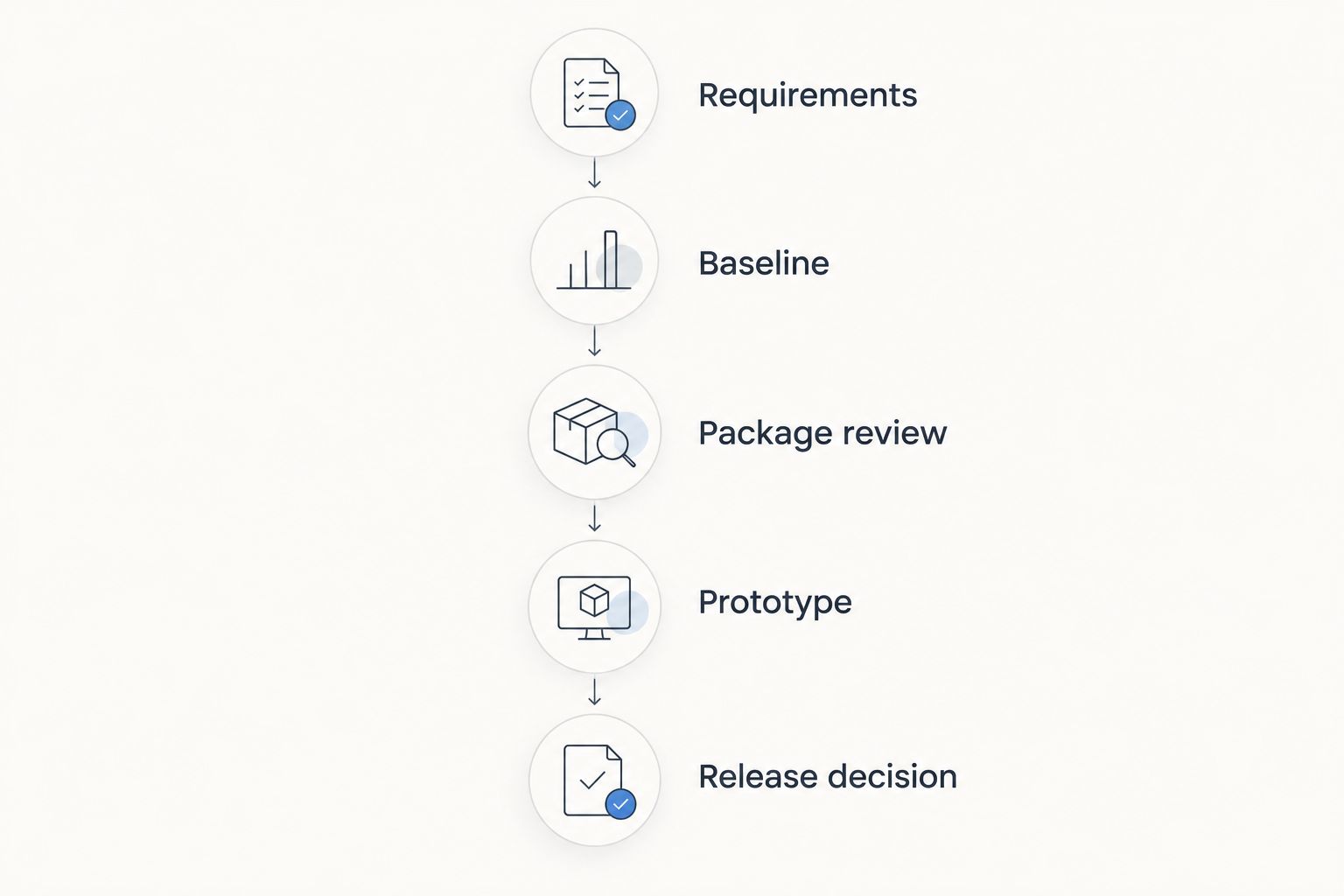
Use this sequence to turn a shortlist into a decision:
- Requirements: Write the user task and required behaviours without naming a library. Include the failure states that users must recover from.
- Baseline: Implement the task with native components where practical. Record the precise gaps rather than general preferences.
- Package review: Assess the relevant packaged components against those gaps. Check documented interfaces and supported contexts.
- Prototype: Exercise the complete interaction with realistic data, access conditions and keyboard use.
- Release decision: Assign ownership for configuration, dependencies, testing and future changes before approving adoption.
The sequence separates a genuine capability gap from a preference for a different appearance. It also leaves your team with a reproducible reason for choosing a dependency or accepting custom maintenance.
Run these acceptance checks
Use 3 acceptance checks before approving the component choice. These are a practical evaluation structure, not a claim about any library’s performance.
- Task completion: Can the user finish the intended workflow, correct mistakes and understand the result? Test empty states and invalid input, not just successful submissions.
- Access behaviour: Use 2 user roles with deliberately different permissions in your prototype. Confirm that the complete implementation handles the intended differences without exposing inappropriate data or actions.
- Change ownership: Can the assigned owner explain how to configure, test and update the implementation? If that knowledge exists only with the original author, the handover is incomplete.
For a 2026 evaluation, keep the acceptance criteria alongside the implementation. A package update or custom refactor should be checked against the same user requirements that justified the original choice.
Know what is not an LWC component library
Salesforce Lightning Design System, or SLDS, supplies design guidance and component blueprints. A blueprint is not the same thing as a ready-made LWC with JavaScript behaviour, a public API and application integration already implemented.
That distinction matters when estimating ownership. Adopting blueprint markup does not eliminate responsibility for interaction logic, accessibility behaviour or maintenance. Treat it as implementation material, not proof that you have selected a complete component.
Likewise, a code example is not automatically a reusable library. Before adopting sample code, identify its intended scope, dependencies and maintenance owner. A working demonstration answers a narrower question than a supported application component.
How the ranking works
This 2026 ranking prioritizes environment fit, interaction coverage, security boundaries, accessibility, extension options and maintenance ownership. Native components rank first because they are the starting point for assessing standard Salesforce UI requirements.
The packaged option ranks next for teams that want an alternative to implementing components themselves. A team-owned library follows because source-level control also transfers implementation and maintenance responsibility to your developers.
This is a decision framework, not a performance benchmark. The recommendation changes when your documented requirements change; catalogue size alone does not determine the winner.
Which LWC component library should you choose?
Choose Salesforce Lightning base components when you have no documented reason to choose otherwise. They give you a concrete baseline for evaluating whether another component source adds something your application needs.
Evaluate the packaged option when a specific requirement remains unresolved and you want to assess configuration instead of building everything yourself. Choose a team-owned library when direct source control or specialized behaviour justifies the ongoing work.
The strongest 2026 architecture is not the one with the most component sources. It is the one where each dependency has a clear purpose, a tested interface and an accountable owner.
FAQ
What's the best LWC component library for Salesforce developers?
Salesforce Lightning base components are the best default for standard Salesforce interfaces. Evaluate a packaged or team-owned library when a documented requirement exceeds the relevant native component APIs.
Is Avonni an LWC component library?
Avonni offers LWC components as part of a subscription of no-code/low-code Salesforce UI components. Its stated offering also includes Flow Screen, Dynamic, Experience Cloud and App Builder components distributed as AppExchange managed packages.
Is SLDS the same as an LWC component library?
No. Salesforce Lightning Design System provides design guidance and component blueprints, while an implemented LWC includes component behaviour and an integration interface. Using a blueprint does not remove responsibility for implementing and testing the interaction.
Should I build my own shared LWC library?
Build a shared LWC library when specialized requirements or source ownership justify maintaining it. Assign responsibility for accessibility, testing, documentation and component interface changes before expanding reuse.
Can I combine native components with packaged and custom LWCs?
Yes, a Salesforce application can use native components alongside suitable packaged and custom LWCs. Check each component's supported context and interfaces, then test the complete interaction rather than assuming compatibility.
How do I evaluate an LWC component library before adopting it?
Build a representative screen and test task completion, access behaviour and change ownership. Compare the result against written requirements, including error recovery and the intended Salesforce environment.
Do all LWC components work in Flow and Experience Cloud?
No, you should not assume that every LWC supports every Salesforce destination. Check the selected component's documented targets, configuration requirements and environment support before designing around it.
One last thing
A reusable component is also a promise to its consumers. When you change an input, event or error behaviour, another screen can depend on the old contract.
Before approving your chosen library, write down who owns that promise. A named owner and a clear component contract are more useful than another impressive demo.