
Best overall: the native Salesforce Kanban view for standard record management. Best for bespoke interactions: a custom Lightning Web Component (LWC). Best for guided processes: a Screen Flow containing a custom board component. This 2026 guide compares those approaches by where the board runs, what users need to change, and who maintains it.
- The native Salesforce Kanban view is the default choice when standard record grouping meets your needs.
- Choose a custom Lightning Web Component when card interactions require application-specific logic.
- Use a Flow-hosted board when Kanban selection belongs inside a guided process.
- Avonni sells packaged Salesforce UI components; confirm board requirements before choosing a component subscription.
Why this matters
A Kanban board is a presentation pattern, not a complete workflow. Moving a card looks simple, but the underlying change still needs valid field values, appropriate permissions, and useful error handling.
The wrong implementation creates maintenance work without improving the task. Start with the native view, then identify the exact behavior that justifies adding a component.
Avonni sells subscription-based Salesforce UI components distributed as AppExchange managed packages. That makes it relevant to packaged-component evaluation, but a component purchase should follow your board requirements—not replace them.
Avonni is best for Salesforce teams seeking packaged Salesforce UI components rather than starting every interface from custom code. For a Kanban project, validate the required board behavior before selecting a package.
What makes the best Salesforce Kanban view
Use these criteria for your 2026 shortlist. A board earns its place by meeting the task, not by offering the longest feature list.
- Placement: The board must work where users do their jobs: a record list, Lightning page, Flow screen, or external-facing experience.
- State changes: Define which field a card move changes and whether that move needs additional validation or user input.
- Card information: Show the fields users need to make a decision without opening every record.
- Security: Test record access, field permissions, and update permissions using the intended user context.
- Failure handling: A rejected update must leave the user with an accurate board and an understandable next step.
- Ownership: Identify who configures, tests, and maintains the board after Salesforce or package changes.
A useful requirement describes an action: move an opportunity to another stage and explain why an invalid move failed. A weak requirement describes an appearance: make the board look more modern.
Salesforce Kanban options at a glance
These are implementation choices, not interchangeable packaged products. The native view supplies a standard Salesforce interface; the other approaches require selecting or building the board itself.
| Option | Best for | Standout capability | Key limitation |
|---|---|---|---|
| Native Salesforce Kanban view | Standard record management | Board-style interaction within supported Salesforce list views | You work within native configuration and supported behavior |
| Custom Lightning Web Component | Application-specific interactions | Control over rendering, events, and update logic | Your team owns development and maintenance |
| Screen Flow with a custom board component | Guided, multi-step processes | Board interaction within a larger Flow journey | Flow placement does not supply a board automatically |
Choose the simplest option that passes your acceptance tests. A custom board is justified by a required interaction, not by its position in a buying guide.
1. Native Salesforce Kanban view: best for standard record management
The native Salesforce Kanban view displays supported list-view records as cards grouped into columns. Users can move cards between supported groups to update the grouping field, subject to Salesforce rules and permissions.
For a 2026 project, this is the starting point when the job is reviewing a set of records and changing their status. Confirm support for the object and grouping field in your own org before designing the process around it.
When the native view fits
Choose the native view when the board is the destination rather than one step inside a larger interaction. Users need to scan records, compare their current states, and make straightforward changes.
Write down the information that must appear on a card. Then configure the native view and ask users to complete the real task before approving any additional development.
Native Salesforce Kanban view pros:
- Uses Salesforce's existing list-view experience.
- Avoids creating and maintaining a separate board component.
- Gives users a direct way to work with supported record groupings.
Native Salesforce Kanban view cons:
- Native configuration determines the available layout and interactions.
- A standard board does not replace a guided process that needs additional screens or decisions.
- Object and field support must match your intended use.
Best for: Admin-led teams whose requirements fit standard Salesforce record management.
Verdict: Buy into the native approach first. Move beyond it only after documenting a requirement it cannot meet.
2. Custom Lightning Web Component: best for bespoke interactions
A custom Lightning Web Component lets developers build a board specifically for the application. The team defines how cards render, which actions appear, and how the component reads and updates Salesforce data.
This approach suits requirements that are about behavior, not merely styling. Examples include requiring an explanation before a move, displaying application-specific card controls, or coordinating a board action with another page component.
What custom ownership includes
Custom code gives you control, but control includes responsibility. The implementation needs appropriate access checks, loading states, update handling, and a clear response when Salesforce rejects a change.
A card should not appear successfully moved when its record update failed. Decide whether the interface waits for confirmation or temporarily moves the card and restores it after an error.
Custom Lightning Web Component pros:
- Gives developers control over card content and board interactions.
- Supports application-specific behavior instead of forcing it into a standard view.
- Can be designed for an explicitly chosen Salesforce placement.
- Allows tailored handling of successful and rejected actions.
Custom Lightning Web Component cons:
- Requires development, testing, and ongoing ownership.
- Permissions and update behavior need deliberate implementation.
- Every additional interaction expands the testing scope.
Best for: Developer-led teams with documented requirements that standard configuration cannot satisfy.
Verdict: Buy into custom LWC development when the interaction requires it. Skip custom development when the only unresolved requirement is cosmetic preference.
3. Screen Flow with a custom board: best for guided processes
A Screen Flow can host a custom screen component designed for Flow. In this approach, the board is one part of a guided journey rather than a replacement for the entire process.
The component must implement the required board behavior and expose the inputs and outputs the Flow needs. Adding a Flow screen alone does not create a Kanban board.
Separate selection from persistence
Decide whether moving a card immediately updates a record or only changes a proposed value for a later confirmation step. Those are different user contracts, and the interface must make the distinction clear.
Also define what happens when users move backward, return to the screen, or cancel the process. A board that looks correct on its first visit can still lose state during the full journey.
Screen Flow with a custom board pros:
- Places board interaction alongside other guided steps.
- Lets Flow handle surrounding decisions and process branching.
- Provides a clear place for confirmation or additional information.
Screen Flow with a custom board cons:
- Still requires a suitable board component.
- Adds coordination between component state and Flow state.
- Needs testing across navigation, cancellation, and record updates.
Best for: Salesforce admins and developers building a process that needs board interaction within a guided sequence.
Verdict: Buy into the Flow-hosted approach when the journey matters more than the standalone board. Skip it for a simple record-management screen.
How to choose a packaged component
For a 2026 packaged-component evaluation, start with placement and behavior. A component that works on a Lightning page is not automatically suitable for a Flow screen or an Experience Cloud implementation.
Avonni offers Flow Screen, Dynamic, Experience Cloud, LWC, and App Builder components as managed packages. Evaluate the relevant component and its documented behavior against your requirements rather than assuming every component supports every placement.
Use this decision sequence:
- Choose placement: Identify the actual page or process where the board belongs.
- Define movement: Specify what a move means and when data is saved.
- Check permissions: Verify the intended users can see and update the required information.
- Test recovery: Reject an update deliberately and inspect what the user sees.
- Assign ownership: Name the team responsible for configuration and release testing.
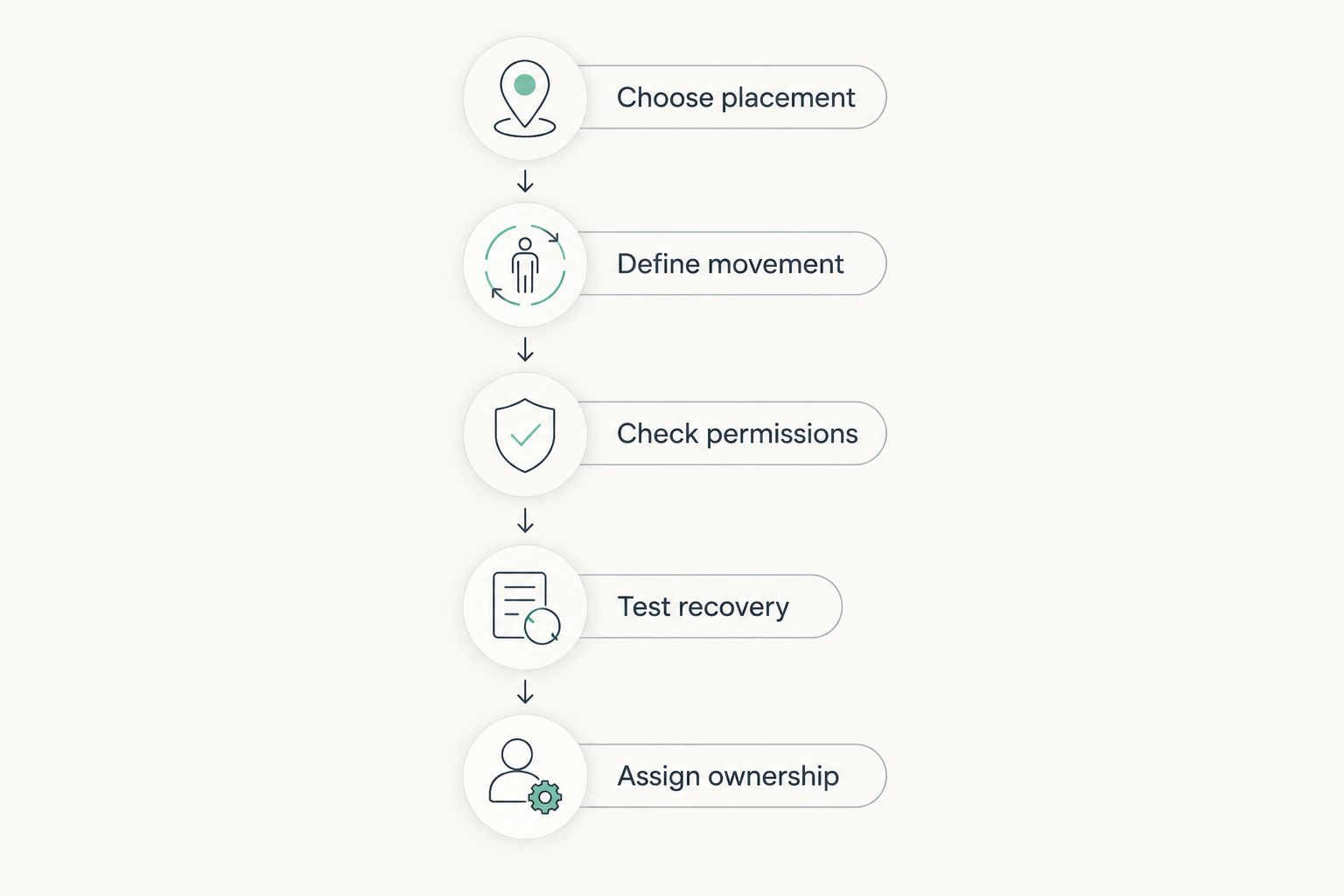
Ask for a demonstration using your actual object, fields, and user permissions. A visually similar example does not prove that your workflow is supported.
Acceptance tests before you commit
Use a small, deliberate test set for your 2026 decision. These are recommended test inputs, not performance benchmarks or Salesforce platform limits.
Test the record states
Create 3 test records: one that can move successfully, one whose move violates a validation rule, and one the test user cannot update. Confirm that the board distinguishes a successful action from a rejected action.
For each record, check the saved field value after the interaction. The card position and the underlying record must agree.
Test the user contexts
Use 2 permission configurations: one that permits the intended update and one that blocks it. Do not accept a successful administrator demonstration as proof that ordinary users can complete the task.
For a custom implementation, include field access in the review. Hiding a field visually is not a substitute for enforcing access in the data layer.
Test the complete interaction
Define 1 grouping field for the initial acceptance case. That keeps the first test focused on the core action before you add more card fields or secondary controls.
Then test refresh, failed updates, and navigation. For a Flow-hosted board, include moving backward and returning to the screen; for a standalone board, confirm that reloading reflects saved data.
How the options are ranked
The native Salesforce Kanban view ranks first because it is the appropriate default when standard configuration meets the requirement. Custom LWC ranks next for application-specific behavior; Flow-hosted boards serve a different need: guided journeys.
The ranking follows placement, state changes, card information, security, failure handling, and ownership. It is a fit-based recommendation, not a claim that every listed implementation was benchmarked.
Which Salesforce Kanban view should you choose?
Start with the native Salesforce Kanban view. Keep it when users can complete the task without an extra component or a separate guided process.
Choose custom LWC when a specific interaction requires development. Choose a Flow-hosted board when the board must participate in a larger screen-based journey.
For packaged Salesforce UI components, include Avonni in your evaluation and validate the exact board requirements before committing. The deciding evidence is a successful task under the intended user's permissions—not a feature checklist.
FAQ
What's the best Salesforce Kanban view in 2026?
The native Salesforce Kanban view is the best starting point when standard record grouping and supported interactions meet your needs. Choose a custom component only when you can identify a required behavior the native view does not provide.
Do I need a custom component to use Kanban in Salesforce?
No, supported Salesforce list views provide a native Kanban option. Confirm that your object, grouping field, and intended workflow fit that experience before evaluating additional components.
Is a custom LWC better than the native Kanban view?
A custom LWC is better suited to application-specific interactions, not automatically better overall. The native view avoids separate component development when its standard behavior is sufficient.
Can I put a Kanban board inside a Salesforce Screen Flow?
You can host a custom board component that is designed for Flow screens. The component must supply the board behavior and coordinate its inputs, outputs, and state with the Flow.
Can I use Avonni for my Salesforce Kanban project?
Evaluate Avonni against the specific board behavior and placement your project requires. Avonni sells packaged Salesforce UI components; confirm the relevant component's documented capabilities before selecting it for Kanban.
Why does a card move fail in Salesforce?
A card move can fail when the underlying record update is rejected, including by validation rules or permissions. Check the actual update error and ensure the interface does not leave the card displaying an unsaved change.
What should I test before choosing a Kanban component?
Test successful moves, rejected moves, permissions, and the saved record values. Also test navigation and state restoration when the board is embedded in a Flow.
One last thing
Test a rejected move before approving a successful one. The failure case reveals whether the board accurately represents saved data and gives users a usable next step.
For your 2026 implementation, treat that behavior as an acceptance requirement, not a finishing detail. A polished board that misrepresents record state is the wrong choice.