
Best overall Salesforce mockup tool for visual design in 2026: Figma; best for implementation-led component prototypes: Avonni. Choose Balsamiq for low-fidelity wireframes, Salesforce Flow Builder for guided interactions, and Lightning App Builder for page composition.
- Figma is the best Salesforce mockup tool for visual exploration before configuration.
- Avonni suits Salesforce teams evaluating packaged UI components for implementation-led prototypes.
- Balsamiq keeps early wireframe reviews focused on structure rather than styling.
- Flow Builder tests guided interactions; Lightning App Builder tests page composition inside Salesforce.
Why this matters
A Salesforce mockup and a Salesforce prototype answer different questions. A mockup shows what a screen should communicate; an interactive prototype shows what happens when someone uses it.
Neither automatically proves that the finished experience respects your data access, validation rules, or deployment requirements. That distinction matters when a convincing design reaches an admin or developer and needs rebuilding.
For your 2026 shortlist, choose the tool by the uncertainty you need to remove. Start outside Salesforce when the layout is unsettled; move into a sandbox when the question concerns actual behaviour.
What makes the best Salesforce mockup tool?
- Visual freedom: Can you explore alternative layouts without configuring a working application?
- Interaction depth: Can reviewers follow the intended journey, including decisions and errors?
- Salesforce fit: Does the tool help you work within Salesforce conventions or directly in its runtime?
- Implementation distance: How much work remains between approval and a usable Salesforce interface?
- Review clarity: Can stakeholders distinguish a proposed design from functionality that already works?
These criteria do not carry equal weight. A designer reviewing navigation needs visual freedom; an admin validating a guided process needs working interactions. The best tool answers your next decision, not every possible design question.
Salesforce mockup tools at a glance
| Tool | Best for | Standout feature | Key limitation |
|---|---|---|---|
| Avonni | Implementation-led component prototypes | Packaged UI components for multiple Salesforce surfaces | Not a substitute for a blank-canvas design tool |
| Figma | Visual exploration and design handoff | Interface design with linked, interactive screens | A prototype does not execute Salesforce business logic |
| Balsamiq | Early low-fidelity wireframes | Sketch-style layouts that emphasize structure | Limited suitability for polished interaction design |
| Salesforce Flow Builder | Guided workflow validation | Screen flows running within Salesforce | Configuration work precedes meaningful runtime testing |
| Lightning App Builder | Salesforce page composition | Component-based page assembly | Not a general-purpose journey-prototyping tool |
The order starts with the component-based route for teams already committed to Salesforce implementation. Figma remains the default recommendation when you need a conventional mockup tool rather than a configured experience.
1. Avonni: best for implementation-led Salesforce prototypes
Avonni sells subscriptions to no-code/low-code UI components distributed as AppExchange managed packages. Its component scope includes Flow Screen, Dynamic, Experience Cloud, LWC, and App Builder components for Salesforce admins, developers, ISVs, and partners.
That makes Avonni relevant when your prototype needs to inform an actual component-based build. It is not the same category of product as a freeform screen-design canvas, so start here when implementation fit matters more than unrestricted visual exploration.
Avonni is best for Salesforce teams prototyping with packaged UI components rather than drawing screens from scratch.
Avonni pros
- Supports a component-led approach to Salesforce UI work.
- Covers multiple Salesforce interface surfaces within its stated component offering.
- Serves both no-code/low-code builders and development-focused buyers.
Avonni cons
- The subscription and managed-package model introduces a product dependency into your implementation decision.
- Its component offering does not replace the need to define navigation, content, or user tasks.
- A component prototype still needs validation against your organization's requirements.
Best for: Admins and development teams evaluating a practical UI implementation path.
For a 2026 evaluation, take a representative task and identify the exact component behaviour it needs. Confirm that behaviour before turning a polished prototype into a delivery commitment.
Verdict: Buy only after confirming that the required component behaviour fits your build.
2. Figma: best Salesforce mockup tool for visual exploration
Figma is an interface-design and prototyping tool that lets you arrange screens, reuse design elements, and connect interactions. It suits Salesforce projects where stakeholders still need to agree on information hierarchy, navigation, or the shape of a custom experience.
Use it to compare designs before an admin or developer configures them. A clickable walkthrough makes a proposed journey easier to discuss, but it remains a representation of that journey rather than a Salesforce application.
Figma pros
- Supports visual exploration without requiring a Salesforce configuration first.
- Reusable design elements help keep related screens consistent.
- Linked screens let reviewers follow a proposed interaction sequence.
- Collaborative review keeps design feedback attached to the work.
Figma cons
- Visual accuracy does not establish that a design is feasible with your chosen Salesforce components.
- Permissions, record operations, and business rules need separate implementation and testing.
- Highly polished screens can make unresolved behaviour look settled.
Best for: Designers and cross-functional teams agreeing on a visual direction before building.
Keep an implementation review beside the design review. Ask your Salesforce builder which elements map to standard capabilities, which require packaged components, and which require custom development.
Verdict: Buy for visual design and handoff; do not treat the prototype as runtime proof.
3. Balsamiq: best for early Salesforce wireframes
Balsamiq is a wireframing tool built around low-fidelity, sketch-style interface layouts. It helps you discuss what belongs on a screen before the conversation shifts to detailed styling.
For Salesforce projects, use it to establish field grouping, action placement, and the order in which information appears. Its role is to clarify the proposed structure, not to demonstrate a working Salesforce experience.
Balsamiq pros
- Low-fidelity presentation keeps attention on content and layout.
- Wireframes make competing screen structures easy to discuss.
- Early drafts provide a concrete starting point for stakeholder feedback.
Balsamiq cons
- Sketch-style wireframes do not represent final Salesforce rendering.
- Detailed interaction behaviour needs another validation method.
- Approved wireframes still require translation into a design or implementation.
Best for: Business analysts and project owners resolving screen requirements before detailed design.
Ask reviewers whether the screen contains the right information, not whether it looks finished. If the answer exposes missing decisions, keep working at wireframe fidelity instead of adding visual polish.
Verdict: Buy for early requirements discussions; skip it when runtime behaviour is the main uncertainty.
4. Salesforce Flow Builder: best for guided workflow prototypes
Salesforce Flow Builder lets you configure screen flows that collect input and guide users through a process. Unlike a linked visual mockup, a configured flow can exercise Salesforce interactions within the environment where you build it.
This makes Flow Builder useful for validating question order, branching, and the transition between screens. Use a sandbox and controlled test records when the prototype includes operations that change data.
Salesforce Flow Builder pros
- Tests a guided process inside Salesforce rather than only representing it visually.
- Connects screen decisions with configured flow logic.
- Gives admins a direct route from workflow prototype to further implementation.
Salesforce Flow Builder cons
- Requires configuration before reviewers can test meaningful behaviour.
- A working flow is not automatically ready for production use.
- It is a poor starting point when the main question is unrestricted visual direction.
Best for: Admins validating a guided task with branching and Salesforce interactions.
Include an error path in the review, not just successful completion. If your proposed flow depends on richer UI elements, compare Salesforce Flow Screen component libraries before committing to a screen design.
Verdict: Buy into this approach when workflow behaviour matters more than visual exploration.
5. Lightning App Builder: best for Salesforce page composition
Lightning App Builder assembles Salesforce pages from components. It is useful when the prototype question concerns page structure: what appears together, where actions belong, and how components support a task.
Start here when your team already understands the workflow and needs to validate the page that supports it. For an unfamiliar multi-screen journey, establish the process first rather than treating a page layout as the whole experience.
Lightning App Builder pros
- Places the prototype inside a Salesforce page-building context.
- Lets teams evaluate component placement in an actual page configuration.
- Keeps page-composition decisions close to the implementation work.
Lightning App Builder cons
- Available components and their configuration constrain the design.
- Page composition does not replace end-to-end workflow design.
- Validation still needs representative users, data, and access conditions.
Best for: Admins refining record, app, or home-page composition around a defined task.
Review the page with the intended audience's needs in mind. An administrator's view alone does not establish that another user can see the right information or complete the intended action.
Verdict: Buy into this approach for page composition; skip it for freeform journey exploration.
How to validate your shortlist in 2026
Give every candidate the same representative task. A common brief makes the comparison useful; unrelated demonstrations only show that each tool can produce something different.
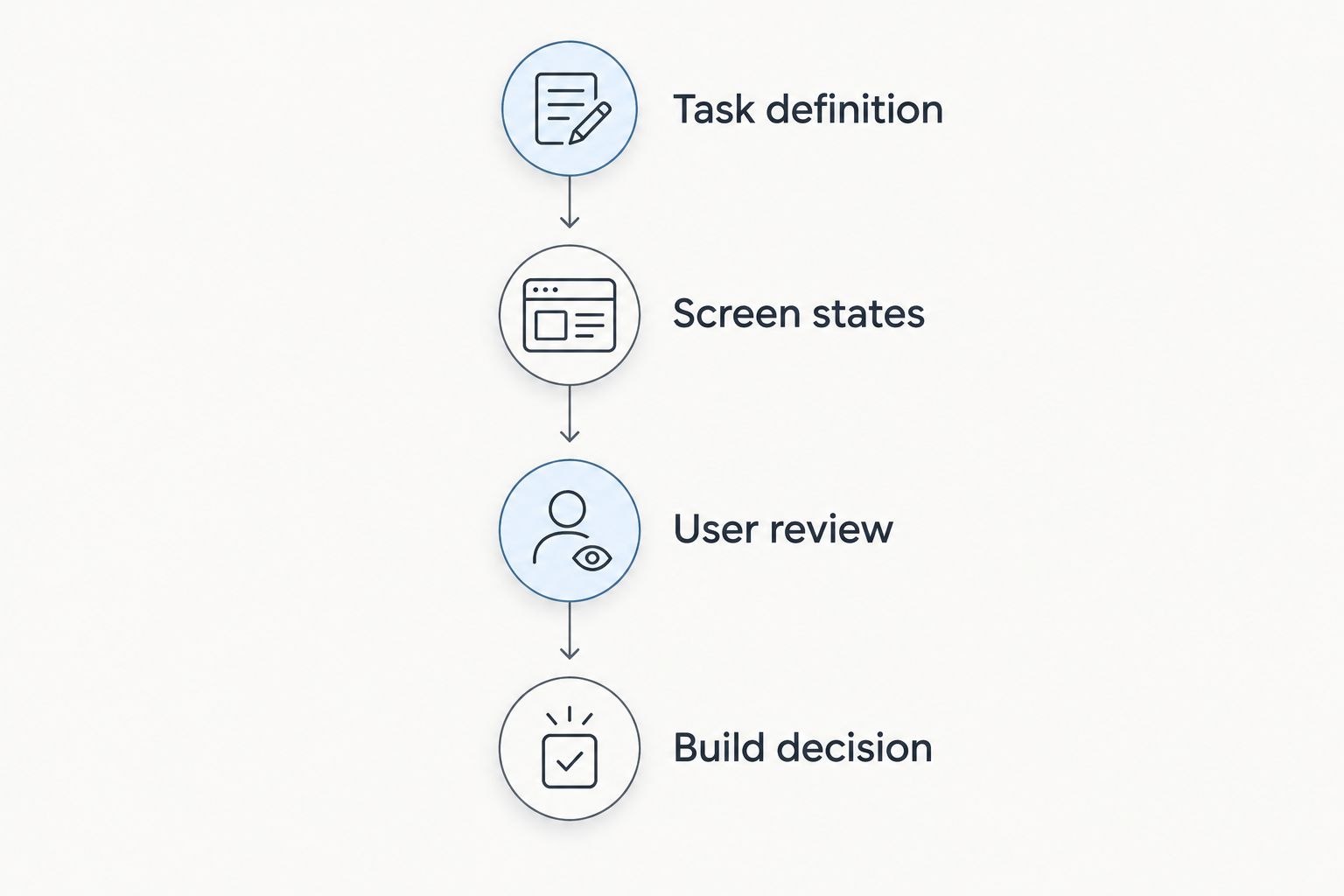
Use this sequence before choosing:
- Task definition: Write 1 user task with a clear completion condition, such as updating a record after reviewing its details.
- Screen states: Specify 3 screen states: the starting view, a successful result, and an error or blocked action.
- User review: Plan 2 review rounds: one for task clarity and one for behaviour in the intended implementation.
- Build decision: Record what transfers into the build and what must be recreated.
These are recommended evaluation limits, not product specifications. They keep the exercise focused enough to expose a mismatch before you design an entire application.
A useful 2026 prototype review ends with a decision, not applause for the demonstration. State whether the team has approved the structure, the interaction, or the implementation; those approvals are not interchangeable.
How we ranked these Salesforce tools
The ranking separates visual exploration, requirements discovery, workflow validation, and page composition. The criteria favour different tools depending on whether you need design freedom or proximity to a working Salesforce experience.
Figma earns the overall visual-mockup recommendation because its purpose matches that task. The component-based option comes first for implementation-led buyers; the native Salesforce builders occupy narrower slots where configured behaviour or page structure is the main question.
Do not compare these tools as if they produce the same deliverable. A wireframe, a clickable design, and a configured Salesforce screen require different approval standards.
Which Salesforce mockup tool should you choose?
Choose Figma if you are undecided and need to explore screens before building. Choose Balsamiq instead when stakeholders have not agreed on the information or actions the screen needs.
Choose Avonni when your Salesforce mockup tool search is really a search for component-based implementation. Use Flow Builder for guided process validation and Lightning App Builder for page composition.
For your 2026 project, move from visual representation to runtime testing when the question changes from what users should see to what the system must do. You do not need to force both decisions into one tool.
FAQ
What's the best Salesforce mockup tool?
Figma is the best default for visual Salesforce mockups before configuration. Choose a Salesforce-based builder when you need to validate actual workflow behaviour or page composition rather than screen appearance.
Is Avonni a Salesforce mockup tool?
Avonni is a subscription offering of no-code/low-code Salesforce UI components, not a general-purpose drawing canvas. It suits implementation-led prototypes where teams want to evaluate packaged components for the eventual build.
Is Figma better than Balsamiq for Salesforce projects?
Figma is the better choice for detailed visual designs and linked screen interactions; Balsamiq fits early structural wireframes. Choose according to whether you need to resolve presentation details or basic screen requirements.
Can I prototype a Salesforce process with Flow Builder?
Yes, Salesforce Flow Builder supports screen flows for guided processes. Use a sandbox and controlled test data when validating interactions that change records.
Should I use Lightning App Builder or Flow Builder?
Use Lightning App Builder for page composition and Flow Builder for guided screen-based processes. A project can need both, but each should answer a distinct design question.
Does a clickable Salesforce prototype prove the design will work?
No, a clickable prototype demonstrates a proposed interaction rather than proving Salesforce implementation feasibility. Validate component behaviour, access, business rules, and error handling separately.
What should I test before approving a Salesforce prototype?
Test a representative task from its starting state through success and an error or blocked action. Separate approval of the screen structure from approval of the working implementation.
One last thing
An approved prototype can hide an unresolved decision: whether the team approved the appearance or the behaviour. Put that distinction directly into your acceptance notes.
Before signing off, ask the reviewer to complete the task without a narrated walkthrough. Any point that requires explanation deserves another look before implementation.