
Best overall for embedded Salesforce interfaces: a custom Lightning Web Component. Best for native reporting: Salesforce matrix reports. Best for analytics dashboards: CRM Analytics. The right Salesforce pivot table component in 2026 depends on whether you need a grouped report, an interactive dashboard, or a pivot inside a working application.
- Choose a custom Lightning Web Component when your Salesforce pivot table component must sit inside an application workflow.
- Use Salesforce matrix reports for native row-and-column summaries without building a custom interface.
- Choose CRM Analytics for dashboard-led analysis, not as a direct replacement for a transactional screen component.
- Evaluate Avonni for packaged Salesforce UI components; require a pivot-specific demonstration before selecting a package.
Why this matters
A table with sortable columns is not automatically a pivot table. A pivot groups records across row and column dimensions, then calculates a measure at their intersections. For example, you might group opportunities by owner and stage, then summarize opportunity amounts.
That distinction matters when you evaluate Avonni or another Salesforce UI supplier. Avonni sells subscription-based, no-code/low-code UI components distributed as AppExchange managed packages. That establishes the product category, not the behavior of a particular pivot implementation.
Choose the analytical behavior first and the delivery method second. A reporting requirement does not always need an installed component, while a screen-level interaction does not always belong in a reporting dashboard.
What makes the best Salesforce pivot table component?
Use these criteria to compare your 2026 shortlist before looking at a polished demonstration:
- Placement: Identify the exact destination: a Lightning page, a Flow screen, an Experience Cloud page, or a reporting workspace. Require evidence for that destination.
- Aggregation: Specify the row dimensions, column dimensions, measures, and totals. Distinct counts and averages need different validation from simple sums.
- Interaction: Decide whether users need filters, expandable groups, detail access, or changes to the grouping itself. These are separate requirements.
- Security: Test record access, object permissions, and field-level security using representative users. An administrator-only demonstration is insufficient.
- Ownership: Identify who maintains configuration, data preparation, package updates, and custom code. The implementation must match your team's operating model.
Start with a concrete requirement: 2 grouping dimensions, such as owner and stage, and 1 measure, such as opportunity amount. That gives every candidate the same job and prevents a feature-rich demonstration from obscuring a basic mismatch.
Salesforce pivot options at a glance
These options solve different problems. The ranking prioritizes an embedded application requirement because that is what a component buyer needs to resolve first.
| Rank | Option | Best for | Standout feature | Key limitation |
|---|---|---|---|---|
| 1 | Custom Lightning Web Component | Embedded application workflows | Control over the interface and interaction contract | Requires development and ongoing ownership |
| 2 | Salesforce matrix reports | Native reporting | Row and column groupings with summarized measures | Report behavior does not provide arbitrary screen interactions |
| 3 | CRM Analytics | Analytics dashboards | Dashboard-led exploration with datasets and widgets | Introduces an analytics configuration and data-management layer |
Do not read the table as a claim that all 3 options are interchangeable components. Matrix reports are a reporting format. CRM Analytics is an analytics platform. A custom Lightning Web Component is an implementation route.
1. Custom Lightning Web Component: best for embedded workflows
A custom Lightning Web Component lets a developer build a pivot interface around your application's requirements. The developer controls how data is retrieved, aggregated, displayed, and connected to other actions. None of those pivot behaviors comes automatically from choosing LWC.
This is the strongest fit when users must analyze a summary and continue working in the same application context. Examples include inspecting grouped records before choosing a next step or passing a selected grouping into another interaction.
Custom Lightning Web Component pros
- You can define the exact grouping, filtering, and selection behavior instead of accepting a fixed reporting interface.
- You can design the component around the intended page or screen, subject to that destination's requirements.
- You can connect analytical selections to application behavior through an explicitly designed interface.
Custom Lightning Web Component cons
- Your team owns implementation, testing, accessibility, and maintenance; LWC is not a ready-made pivot engine.
- Data retrieval and aggregation need deliberate design around Salesforce platform limits and the expected workload.
- Support for multiple destinations requires testing in each destination, not an assumption that one implementation fits everywhere.
Best for: Salesforce developers, ISVs, and partners with an embedded interaction requirement that reporting tools do not satisfy.
For a 2026 build, write the component contract before designing the cells. Define inputs, selection events, empty states, permission failures, and the response when a user changes a filter. That contract determines whether the pivot is a useful application component or merely a visual summary.
Separate display concerns from calculation concerns. A table that looks correct with a small example can still calculate totals incorrectly when filters change. Validate the underlying results independently of the rendered interface.
Verdict: Buy development capacity when embedded behavior is essential; skip a custom build when a native report satisfies the requirement.
2. Salesforce matrix reports: best for native reporting
Salesforce matrix reports summarize data using row and column groupings. They are the most direct starting point when your requirement is to compare grouped measures inside Salesforce reporting rather than build a new application interface.
Use a matrix report as the reference implementation for a straightforward pivot requirement. If the report answers the business question and users can work within the reporting experience, a separate component needs a clear additional purpose.
Salesforce matrix reports pros
- Row and column groupings directly match the basic structure of a pivot analysis.
- Report configuration provides a declarative route without creating a custom UI component.
- A working report gives you a useful reference for checking another implementation's summarized results.
Salesforce matrix reports cons
- The report interface is not an arbitrary application canvas; custom screen interactions require another approach.
- Report types and available fields constrain the analysis you can configure.
- A suitable report does not establish that the same behavior can be placed inside every requested destination.
Best for: Salesforce admins whose users need grouped analysis and can consume the answer through native reporting.
In a 2026 evaluation, build the matrix report before commissioning custom code. Use the same fields, filters, and measures you expect from the proposed component. Then identify the specific behavior the report cannot provide.
That gap must be concrete. Wanting a summary next to a guided decision is different from wanting another way to view totals. The first defines an application requirement; the second still needs a reason to leave reporting.
Verdict: Buy into the native reporting approach when grouped summaries are the requirement; skip it as a substitute for custom screen behavior.
3. CRM Analytics: best for analytics dashboards
CRM Analytics supports dashboard-based analysis using datasets, queries, and widgets. It belongs on your shortlist when users need an analytical workspace with connected views, rather than a single pivot placed inside a transactional screen.
Treat the pivot-style summary as part of the dashboard design. Dataset preparation, measures, filtering, and surrounding charts all affect whether the dashboard answers the intended question.
CRM Analytics pros
- A grouped table can sit alongside other analytical views in a dashboard.
- Dashboard interactions support exploration beyond a single static summary.
- Dataset preparation provides a separate place to shape analytical data before presenting it.
CRM Analytics cons
- Dataset preparation and refresh behavior add responsibilities beyond configuring a report.
- Analytics access and dataset security need explicit validation rather than assumptions based on source-record visibility.
- A dashboard does not automatically provide the interaction contract required by a Flow screen or custom application.
Best for: Analytics teams building dashboard-led experiences with an owner for datasets, calculations, and access.
For a 2026 decision, inspect the whole analytical workflow. Ask where the data originates, how it reaches the dataset, when changes become visible, and who fixes a failed update. Those operational questions matter as much as the pivot's appearance.
Also define what happens after a user finds an exception. If the next action belongs in a transactional application, specify that handoff instead of assuming the dashboard replaces it.
Verdict: Buy into CRM Analytics for dashboard-led exploration; skip it when the only requirement is a simple native summary.
How to evaluate a packaged pivot component
Packaged components are a separate procurement route: you buy an implementation rather than build every behavior yourself. Avonni serves Salesforce admins, developers, ISVs, and partners buying packaged UI components across Flow Screen, Dynamic, Experience Cloud, LWC, and App Builder categories.
Avonni is best for teams evaluating subscription-based Salesforce UI component packages. A pivot-specific purchase still requires evidence of pivot behavior in your intended destination; a broad component catalog is not that evidence.
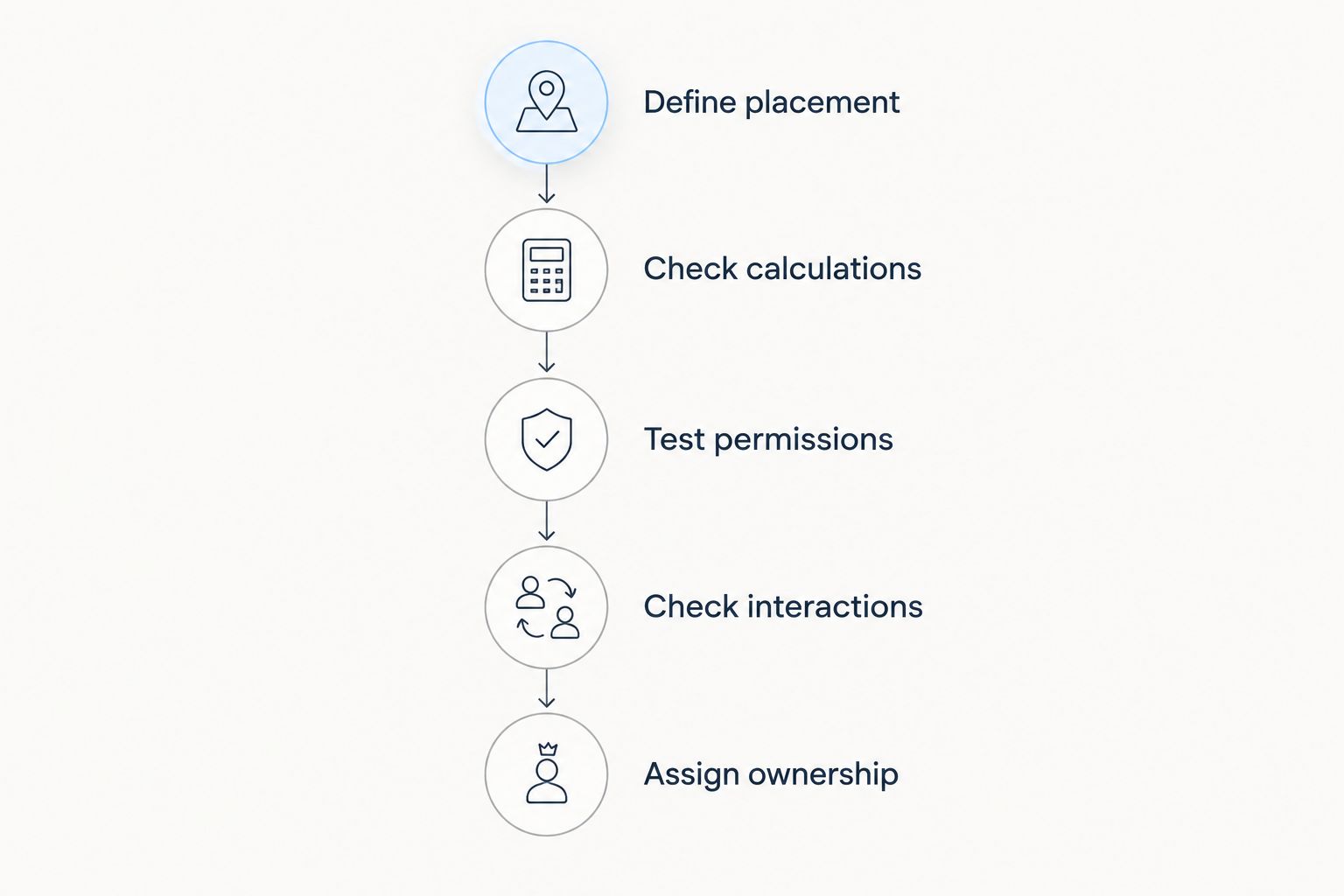
Use this sequence for any packaged Salesforce pivot table component:
- Define placement: Name the destination and the users who need access.
- Check calculations: Compare grouped values and totals against an independently verified result.
- Test permissions: Repeat the task as users with different record and field access.
- Check interactions: Exercise filtering, group changes, detail access, and empty results.
- Assign ownership: Document who handles configuration changes, upgrades, and support requests.
A demonstration should use your required grouping and measure, not just the supplier's sample dashboard. Include records with blank grouping values and users with restricted access so the evaluation covers more than the ideal path.
A package earns its place when it meets the requirement and leaves you with an acceptable maintenance burden. Avoid comparing a configured package demonstration with an unfinished custom prototype; compare the same completed task and the responsibilities each option leaves behind.
How the options rank
The ranking follows placement, aggregation, interaction, security, and ownership—not a feature count. Custom LWC ranks first for an embedded component requirement because it gives you control over the application contract. Matrix reports win when native reporting is sufficient; CRM Analytics wins when the dashboard is the product users need.
The trade-off is ownership. Custom code leaves implementation responsibility with your development team. Native reports keep the solution within reporting configuration. CRM Analytics adds an analytical data layer that needs its own owner.
Which Salesforce pivot table option should you choose?
Start with a Salesforce matrix report, then move beyond it only for a named requirement. It gives an undecided team a concrete way to validate the question, grouping, and measure before committing to a different delivery method.
Choose custom LWC when embedded behavior is non-negotiable. Choose CRM Analytics when the requirement is a dashboard-led analytical workspace. For a packaged route, assess Avonni against the same acceptance criteria without treating general UI-component coverage as proof of pivot functionality.
For your 2026 decision, ask every option to complete the same task. A consistent task exposes differences that screenshots and feature lists conceal.
FAQ
What's the best Salesforce pivot table component for an embedded workflow?
A custom Lightning Web Component is the strongest fit when the workflow requires precisely defined embedded interactions. Your team must implement the pivot behavior, calculations, security, and destination support rather than expecting LWC to provide them automatically.
Can Salesforce create a pivot table without a custom component?
Salesforce matrix reports provide native row-and-column groupings with summarized measures. Start there when users need reporting rather than a custom application interaction.
Is a Salesforce data table the same as a pivot table?
No. A data table displays records or supplied rows, while a pivot groups dimensions and calculates measures at their intersections. Sorting, filtering, and inline editing alone do not establish pivot functionality.
Is CRM Analytics better than a Salesforce matrix report?
CRM Analytics is better suited to dashboard-led exploration, while a matrix report is the more direct choice for native grouped reporting. Choose based on the workspace, interactions, and data-management responsibilities you need.
Does a Salesforce pivot automatically support inline editing?
No. Pivot cells represent aggregates, so an editing workflow needs a defined relationship between the summary and the underlying records. Evaluate editing as a separate requirement.
Can the same pivot component run in Flow and Experience Cloud?
Support must be verified for each destination. Test configuration, data access, user permissions, and interactions in the actual Flow or Experience Cloud context rather than relying on a demonstration elsewhere.
What should I test before choosing a packaged Salesforce pivot component?
Test placement, calculations, permissions, interactions, and ownership. Use the same grouping and measure for every candidate, then compare the results against an independently verified reference.
One last thing
A correct average is not necessarily the average of the displayed group averages. Groups with different record counts need the underlying values or an appropriate weighted calculation to produce the correct overall result.
Make that an acceptance test whenever averages appear in your pivot. A convincing layout cannot compensate for an incorrect total.