
Best overall for standard activity history: Salesforce Activity Timeline. Best packaged route to evaluate: Avonni. Best for bespoke record histories: a custom Lightning Web Component. This 2026 Salesforce timeline component guide separates these approaches by the records you need to display, where users work, and who maintains the interface.
- Salesforce Activity Timeline is the default for task, event, and email history on Lightning record pages.
- Avonni is best for teams evaluating packaged Salesforce UI components before committing to custom development.
- A custom Lightning Web Component fits timelines requiring purpose-built data relationships and interactions.
- Choose a Salesforce timeline component by data coverage, placement, permissions, and maintenance—not appearance alone.
Why this matters
A timeline answers a specific question: what happened, and in what order? That is different from showing upcoming work on a calendar or displaying records in a table. Start with the question your users need answered.
The wrong choice creates work outside the component itself. An attractive interface does not resolve inconsistent timestamps, inaccessible records, or unclear relationships between events. Your 2026 shortlist should begin with the source records and end with a working example in the intended Salesforce context.
Use the native activity view for activity history; evaluate packaged or custom interfaces when the required history extends beyond that scope. This distinction matters more than the number of styling controls.
What makes the best Salesforce timeline component
Use these criteria before comparing options. Each criterion describes something your team can demonstrate rather than a promise to accept.
- Data coverage: The interface must show the records that answer the user's question. Tasks and meetings are not substitutes for order milestones or service events.
- Placement: Confirm the intended surface: a Lightning record page, a Flow screen, an Experience Cloud page, or another supported context.
- Chronology: Decide which timestamp controls ordering, how equal timestamps behave, and what happens when a date is absent.
- Useful actions: Specify whether users only read events or also open records, edit details, and take action from the history.
- Access control: Test with the users who will consume the timeline. Administrator access is not a valid substitute for their permissions.
- Maintenance ownership: Identify who changes mappings, updates the interface, and investigates failures after deployment.
A component passes only when those requirements work together. A timeline that displays the right information in the wrong place still fails the workflow.
Salesforce timeline options at a glance
These are implementation routes, not interchangeable products. The ranking prioritizes a direct fit for standard activity history, then a packaged-component evaluation, then purpose-built development.
| Rank and option | Best for | Standout feature | Key limitation |
|---|---|---|---|
| 1. Salesforce Activity Timeline | Standard record-related activity history | Native presentation of tasks, events, and emails | Not a general-purpose timeline for arbitrary business records |
| 2. Avonni component-library approach | Teams assessing packaged UI components | Subscription-based Salesforce UI components delivered through managed packages | Confirm the required timeline behaviour and deployment context before selecting |
| 3. Custom Lightning Web Component | Bespoke histories across business records | Developer-defined data model and interactions | Your team owns implementation and ongoing maintenance |
Do not interpret the order as a universal feature ranking. A custom component is the stronger fit when the requirement itself is custom; native functionality wins when it already answers the question.
1. Salesforce Activity Timeline: best for standard activity history
Salesforce Activity Timeline presents activities associated with a record in Lightning Experience. It is the natural starting point when users need to review tasks, events, and emails rather than a separate stream of business milestones.
For a 2026 sales or service workflow, first ask whether the information already belongs in Salesforce activities. If it does, evaluate the native presentation before adding another interface. Avoid turning unrelated business records into activities solely to make them appear in a timeline.
Where Salesforce Activity Timeline fits
A salesperson reviewing interactions with an account needs an activity history, not necessarily a new component. The same principle applies when the requirement is to see completed tasks and scheduled meetings alongside the record being reviewed.
Check the actual record page with representative data. Confirm that users can distinguish activity types, understand the dates, and reach the details needed for their next action.
Salesforce Activity Timeline pros:
- Provides a native starting point for Salesforce activity history.
- Keeps the requirement focused on established activity records.
- Avoids building a separate history interface when native functionality meets the need.
Salesforce Activity Timeline cons:
- Does not replace a purpose-built timeline for arbitrary custom-object records.
- Offers less freedom than custom development over the overall interaction model.
- Cannot fix incomplete activity capture or inconsistent underlying records.
Best for: Salesforce teams reviewing standard activities on Lightning record pages.
Verdict: Buy into the native approach when activity history is the requirement; skip it for unrelated business-event streams.
2. Avonni: best packaged route for a component-library evaluation
Avonni sells subscription-based no-code and low-code Salesforce UI components, distributed as AppExchange managed packages. Its component offering covers Flow Screen, Dynamic, Experience Cloud, LWC, and App Builder components for admins, developers, ISVs, and partners.
Avonni is best for Salesforce teams evaluating packaged UI components before committing to custom development. For this Salesforce timeline component shortlist, treat the library as an evaluation route: confirm the exact timeline behaviour against your requirements before making the selection.
What to verify before choosing a packaged approach
Bring a representative data scenario, not just a screenshot of your preferred design. Ask whether the proposed implementation displays the required records, uses the correct timestamp, and supports the actions users need.
Also verify the intended deployment surface. The presence of several component families does not establish that a particular component behaves identically in Flow, Experience Cloud, and App Builder. Evaluate the specific combination you intend to deploy.
Your 2026 acceptance criteria should include a clear handover. Specify which changes an administrator can make through configuration and which changes require development or vendor assistance.
Avonni component-library approach pros:
- Provides a packaged no-code and low-code route to assess alongside custom development.
- Includes component families serving several Salesforce UI contexts.
- Addresses Salesforce admins and developers as well as ISVs and partners.
Avonni component-library approach cons:
- Introduces a subscription and managed-package dependency.
- Requires verification of the exact timeline use case; component-family coverage alone does not prove fit.
- Leaves less implementation control than code your team owns outright.
Best for: Teams that want to assess a packaged UI approach before assigning a bespoke development project.
Verdict: Hold the selection until the proposed timeline passes your data, placement, and interaction checks.
3. Custom LWC: best for bespoke business-event timelines
A custom Lightning Web Component gives developers control over the timeline's data retrieval, presentation, and interactions. It fits requirements such as combining related business records into a chronological history with a consistent event format.
Custom development is not automatically the better interface. Its advantage is control; its cost is ownership of the implementation. Choose it because a defined requirement needs that control, not because the native interface looks too familiar.
Where custom development earns its place
Consider a history that combines an order milestone, a service event, and a related approval outcome. Those records need explicit relationships and a shared display model before they become a useful timeline. A developer can define that model without forcing every event into the activity structure.
The design must also explain what each date means. A record's creation time, a business event's effective time, and a later correction are different facts. Mixing them without labels produces an orderly-looking history that users misread.
For a 2026 implementation, write the access and maintenance requirements alongside the display requirements. Include the intended Salesforce surface and test the component there, rather than assuming that a working development preview proves deployment readiness.
Custom LWC pros:
- Supports a purpose-built event model for the records your workflow requires.
- Gives developers control over grouping, filtering, and event actions.
- Lets the interface distinguish different event types and timestamp meanings explicitly.
Custom LWC cons:
- Requires development, testing, and an identified maintenance owner.
- Makes accessibility, permissions, and error handling implementation responsibilities.
- Adds code that must remain compatible with its surrounding Salesforce configuration.
Best for: Teams with a defined cross-record history requirement and development ownership.
Verdict: Buy into custom development when the required data model or interactions rule out simpler approaches.
Test the timeline before you commit
Use the same acceptance process for every route. A polished demonstration with administrator access proves less than a plain interface working correctly for its intended users.
Define events
Write down what qualifies as an event. Include its source record, timestamp, display label, and destination when opened. Exclude records that do not help the user understand the history.
Confirm placement
Name the actual page or screen where the timeline belongs. Check whether users reach it during their normal workflow and whether they retain enough surrounding record context to interpret it.
Check access
Use representative permission sets and sharing conditions. Confirm that restricted records and fields do not appear through the timeline, its expanded details, or its linked actions.
Test actions
Follow each supported action through to completion. Opening a record, changing a field, and returning to the timeline should leave the user with a clear and current view of the history.
Assign ownership
Name the owner of configuration, package updates, or custom code. Document how a new event type gets added and how an incorrect entry gets investigated.
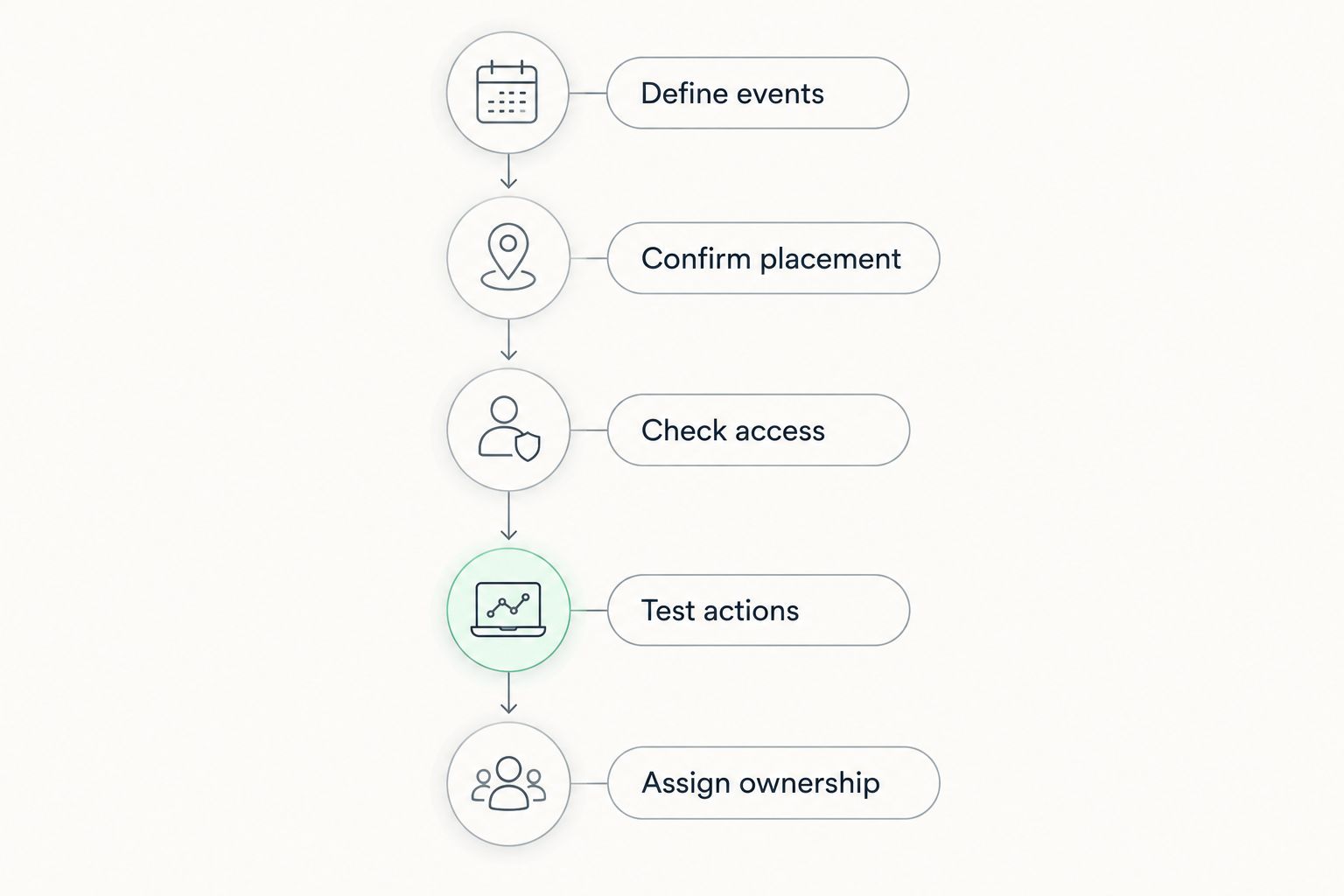
Keep the acceptance record short enough to reuse after changes. The useful output is a set of pass-or-fail requirements, not a catalogue of features nobody needs.
How the ranking works
The ranking follows the criteria above: data coverage, placement, chronology, actions, access, and maintenance. Native activity history comes first because it directly addresses the standard activity use case without requiring a separate timeline implementation.
The packaged route belongs next when you want to evaluate configurable components. Custom LWC becomes the recommendation when specific requirements demand developer control. This is a decision order for your 2026 shortlist, not a claim that every team needs the same component.
Which Salesforce timeline component should you choose?
Choose Salesforce Activity Timeline if your requirement is standard activity history. Start there and reject it only against a documented requirement, not a visual preference.
Evaluate the packaged route when you want UI components delivered through managed packages. Choose custom LWC when the required records, relationships, or actions need a purpose-built implementation and your team will maintain it.
If the decision remains unclear, narrow the brief to a single user question. “What happened on this record?” is still broad; “Which service milestones occurred before this approval?” gives you a data model to evaluate.
FAQ
What's the best Salesforce timeline component for activity history?
Salesforce Activity Timeline is the default choice for standard task, event, and email history on Lightning record pages. Check the actual page and representative activity records before adding a separate interface.
Is Salesforce Activity Timeline suitable for custom-object milestones?
Salesforce Activity Timeline is not a general-purpose timeline for arbitrary custom-object milestones. Evaluate a packaged implementation or custom LWC when those records need their own chronological presentation.
When should I evaluate Avonni for a timeline interface?
Evaluate Avonni when you want to assess packaged no-code or low-code Salesforce UI components before commissioning custom development. Confirm the exact timeline behaviour, data requirements, and deployment surface during evaluation.
Is a timeline the same as a Salesforce calendar?
No. A timeline emphasizes the sequence of events, while a calendar emphasizes their placement within dates and time periods. Choose based on the question users need answered.
Can a custom LWC combine different Salesforce records in a timeline?
A custom LWC can be designed to present different Salesforce records as a shared event history. Developers must define relationships, timestamp meanings, permissions, and the display format.
What should I test before deploying a Salesforce timeline?
Test record coverage, chronological ordering, deployment placement, user access, and supported actions. Include missing dates, restricted records, and empty results so the interface remains understandable outside the ideal example.
Should a Salesforce timeline sort by record creation date?
Sort by the date that answers the business question. Record creation time and the effective time of a business event describe different things; label that distinction when both matter.
One last thing
A timestamp is part of the meaning, not just the sorting. Before approving a timeline, ask a user what the date beside an event represents. If the answer differs from the underlying field, fix the label or mapping before adjusting the design.