
Best for packaged Salesforce UI components: Avonni. Best for guided workflows: Salesforce Flow Builder. Best for internal page layouts: Lightning App Builder. This 2026 guide helps you choose a no-code UI builder for Salesforce admins by separating component libraries, workflow screens, and page-building tools.
- Avonni is the best fit here for admins choosing packaged Salesforce UI components.
- Choose Salesforce Flow Builder for guided screens that collect input and run business logic.
- Choose Lightning App Builder for internal pages and Experience Builder for Experience Cloud sites.
- The right no-code UI builder for Salesforce admins depends on the interface you need to publish.
Why this matters
A Salesforce page builder and a component library solve different problems. A builder defines the page or workflow; a component supplies part of the interface inside that environment. Treating them as interchangeable creates the wrong shortlist.
For your 2026 project, identify the destination first: an internal Lightning page, a screen flow, or an Experience Cloud site. Then decide whether the standard components cover the interaction you need. Choose the building surface before choosing its components.
What makes the best no-code Salesforce UI builder?
Use these criteria before comparing individual options:
- Publishing destination: The tool must support the Salesforce surface where users will work. An internal record page is not the same deliverable as a customer-facing site.
- Interaction depth: Separate arranging information from collecting input, branching through decisions, and updating records. Those needs lead to different choices.
- Configuration boundary: Identify what an admin can configure directly and where a developer must take over. No-code does not mean every requested interaction is available.
- Data and access: Check the interface with the intended users, records, and permissions. A successful administrator preview is not an acceptance test.
- Maintenance ownership: Decide who owns configuration, package updates, release testing, and exceptions. The handover matters as much as the initial build.
For a useful comparison, give every shortlisted option the same business task. Do not compare a finished standard page with an ambitious custom workflow and call the difference a product limitation.
No-code Salesforce UI builders at a glance
These options occupy different layers of a Salesforce implementation. The ranking is a decision tree, not a claim that a component library replaces the platform builders.
| Option | Best for | Standout capability | Key limitation |
|---|---|---|---|
| Avonni | Packaged UI components | Subscription component families for Flow Screen, Dynamic, Experience Cloud, LWC, and App Builder | Adds a managed-package dependency; not a replacement for the surrounding Salesforce builder |
| Salesforce Flow Builder | Guided business workflows | Screen flows combine user input with flow logic | A workflow builder, not a general site or page-layout tool |
| Lightning App Builder | Internal Lightning pages | Visual composition of app, home, and record pages | Page composition does not replace multi-step workflow logic |
| Salesforce Experience Builder | Experience Cloud sites | Visual site-page building with components and templates | Site access and data permissions require separate configuration |
For a 2026 shortlist, start with the row matching your destination. Add another option only when it fills a specific gap; using multiple layers is often the correct architecture.
1. Avonni: best for packaged Salesforce UI components
Best for: Salesforce admins and development teams that need configurable components within Salesforce UI projects.
This subscription provides no-code/low-code UI components distributed as AppExchange managed packages. The component families cover Flow Screen, Dynamic, Experience Cloud, LWC, and App Builder use cases. It belongs first when your requirement is a component layer rather than a different place to build pages.
The distinction matters. Your team still needs to choose the host environment, define data access, and implement the business process. Evaluate the specific component family against that environment rather than assuming every component works everywhere.
Avonni pros:
- Provides component families across several Salesforce UI contexts.
- Offers a no-code/low-code component approach for admins and developers.
- Uses AppExchange managed-package distribution.
- Serves Salesforce teams including ISVs and implementation partners.
Avonni cons:
- Introduces a managed-package dependency into your implementation.
- Does not remove the need to configure the surrounding workflow or page.
- Requires component-level evaluation against your actual requirements.
Before selecting a library in 2026, write down the interaction the standard interface does not cover. A named gap gives you something concrete to evaluate; a request for a more modern interface does not.
Verdict: Buy when a specific packaged component fits your Salesforce UI requirement; hold until you have confirmed that fit.
2. Salesforce Flow Builder: best for guided business workflows
Best for: Admins building guided screens that collect information and apply business logic.
Salesforce Flow Builder creates flows, including screen flows that present inputs and instructions to users. A screen flow can connect those screens to decisions and record operations. That makes it the strongest starting point here for a guided business process rather than a static page.
Think of an internal request that asks for information, routes through a decision, and creates or updates a record. The workflow is the organizing structure. Page decoration comes second.
Salesforce Flow Builder pros:
- Combines user-facing screens with declarative process logic.
- Supports decisions and record operations within the flow.
- Provides standard screen components for common inputs.
- Can incorporate custom screen components when the standard set is insufficient.
Salesforce Flow Builder cons:
- Complex branching increases testing and maintenance work.
- Screen flows are not a substitute for general site-page design.
- Specialized interfaces can require additional components or development.
Build the data path before polishing the screen. Confirm which records the flow reads, which values it changes, and what happens when an operation fails. A clear screen cannot compensate for incorrect execution context or missing fault handling.
Verdict: Buy into Salesforce Flow Builder for guided workflows; skip it as your primary tool for site-wide page composition.
3. Lightning App Builder: best for internal Lightning pages
Best for: Admins arranging components on internal Salesforce app, home, and record pages.
Lightning App Builder provides a visual canvas for composing Lightning pages. You place components into page regions and configure their properties. Component visibility and page activation help determine what users see and where the page applies.
This is the right starting point when the request concerns the working layout: which information appears together, where a component sits, or which audience needs a particular page. It is not the same problem as designing a branching workflow.
Lightning App Builder pros:
- Supports visual composition of internal Lightning pages.
- Works with standard components and compatible custom components.
- Provides component visibility configuration.
- Supports page assignment through activation settings.
Lightning App Builder cons:
- Layout choices depend on the selected page template and components.
- Component placement does not provide complete workflow orchestration.
- A specialized interaction can still require a custom or packaged component.
For a 2026 record-page redesign, start by removing unnecessary information and clarifying the primary task. Adding components before fixing the information hierarchy makes the page busier without resolving the user's problem.
Verdict: Buy into Lightning App Builder for internal page composition; skip it as a replacement for guided process logic.
4. Salesforce Experience Builder: best for Experience Cloud sites
Best for: Teams configuring Experience Cloud site pages for customers, partners, or other site audiences.
Salesforce Experience Builder provides visual page-building tools within Experience Cloud. Templates and components form the site experience. The site context makes it a different choice from an internal Lightning record-page editor.
Choose this option when your deliverable is a site, not simply an internal application page. Establish the audience and access model before spending time on page arrangement.
Salesforce Experience Builder pros:
- Provides visual page composition for Experience Cloud sites.
- Uses templates and components as building blocks.
- Supports site-specific page and navigation configuration.
Salesforce Experience Builder cons:
- Site layout does not establish the correct record-access model.
- Component compatibility depends on the site's implementation context.
- It is not the default choice for internal Lightning record-page customization.
Test the site as its intended audience, not only as an administrator. A page can look complete while a user cannot access a required record or sees information that should remain restricted.
Verdict: Buy into Salesforce Experience Builder for Experience Cloud sites; skip it for ordinary internal page-layout work.
How to choose without rebuilding the wrong thing
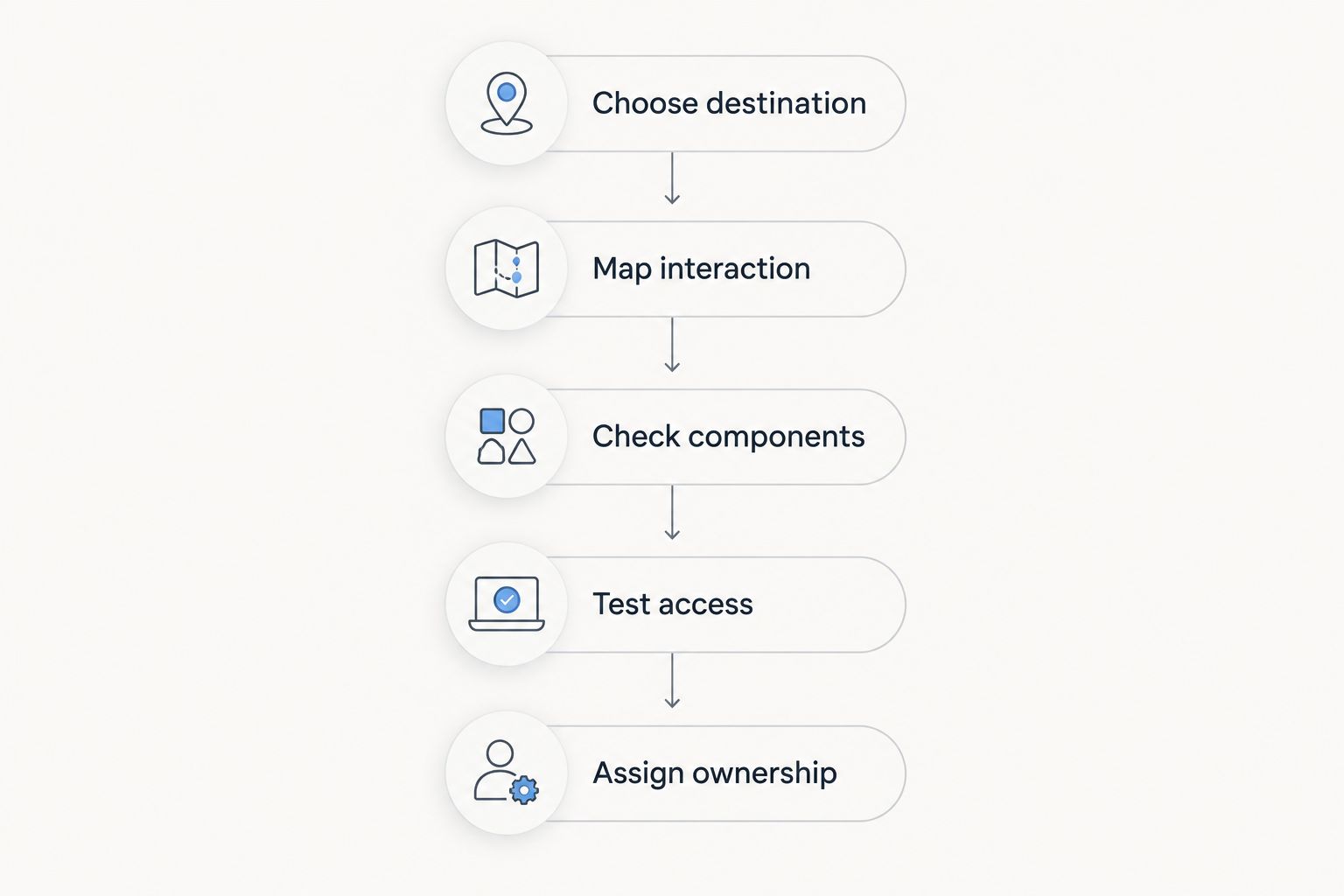
Use this sequence to turn a broad builder search into an implementation decision. Each step should produce a short, written answer that another admin can understand.
Choose destination
Name the publishing surface: internal Lightning page, screen flow, or Experience Cloud site. If a project spans multiple surfaces, separate the requirements instead of expecting one editor to handle everything identically.
Map interaction
Describe what the user does, not what the page should resemble. Reading a record summary, submitting a guided request, and using a site page are different interactions. Specify the expected result and the failure state.
Check components
Build the smallest version using standard components first. If a required interaction remains unsupported, identify the exact missing behaviour before evaluating a packaged component. This keeps the selection tied to a requirement rather than a feature catalogue.
Test access
Test the experience with the intended permissions and record visibility. Include restricted users and unsuccessful paths, not just the administrator's successful path. Record the expected result before running each test.
Assign ownership
Name the person responsible for configuration changes, package review, and release acceptance. For your 2026 handover, document where the interface is configured and which dependencies it uses. Another admin should be able to locate the moving parts without reconstructing the project.
A practical acceptance test for your shortlist
Use 3 user tasks, 2 access profiles, and 1 release checklist as a starting test plan. These are recommended test inputs, not product performance benchmarks. Expand the plan when your process has additional roles or failure paths.
- 3 user tasks: Read the information needed for a decision, complete the main action, and recover from invalid input. Write an observable pass condition for each task.
- 2 access profiles: Check an administrator and a representative restricted user. Add further permission combinations wherever the real audience differs.
- 1 release checklist: Cover component dependencies, page or flow activation, access checks, and the person approving deployment.
Use the same scenarios for every suitable option. Do not score a tool against a task outside its intended surface; instead, mark that task as requiring another layer.
Keep configuration effort separate from user outcomes. A screen that takes longer to configure can still be the right choice if it meets a required interaction, but visual polish alone is not evidence that the workflow works.
How we ranked these options
The ranking prioritizes publishing destination, interaction depth, configuration boundaries, access testing, and maintenance ownership. Each recommendation owns a distinct use case rather than competing for an unsupported universal winner.
For this 2026 comparison, packaged components rank first for component selection, Flow Builder for guided workflows, Lightning App Builder for internal pages, and Experience Builder for sites. Choose by implementation layer, not by the broadest feature list.
Which Salesforce UI builder should you choose?
Choose Avonni when your Salesforce UI project needs packaged components across the supported component families. Start with Salesforce Flow Builder for a guided process, Lightning App Builder for internal page composition, or Salesforce Experience Builder for an Experience Cloud site.
If you are undecided, sketch the user's action and its destination before selecting anything. Build a small standard version, identify a concrete gap, and evaluate additional components against that gap. That is a clearer purchasing decision than choosing a builder first and reshaping the requirement around it.
FAQ
What's the best no-code UI builder for Salesforce admins?
The best choice depends on the publishing surface: Flow Builder for guided workflows, Lightning App Builder for internal pages, and Experience Builder for sites. Choose a packaged component library when the surrounding builder needs additional UI components.
Is Flow Builder better than Lightning App Builder?
Flow Builder is better for guided processes, while Lightning App Builder is better for arranging internal Lightning pages. They address different layers and can be used together.
Can Salesforce admins build interfaces without writing code?
Yes, Salesforce admins can configure interfaces with standard builders and compatible components. Requirements outside the available configuration options still need additional components or development.
Do I need a component library for every Salesforce UI project?
No, start by checking whether standard components satisfy the requirement. Add a library when a specific component closes a documented gap.
Is Experience Builder the right tool for internal record pages?
Lightning App Builder is the appropriate starting point for internal Lightning record pages. Experience Builder is intended for Experience Cloud site pages.
Does hiding a component secure the underlying Salesforce data?
No, component visibility is not a substitute for data security. Configure and test object permissions, field access, and record sharing for the intended audience.
What should I test before publishing a no-code Salesforce interface?
Test the primary task, invalid input, record access, and the intended user's permissions. Also confirm activation settings and ownership of configuration and component dependencies.
One last thing
A hidden component is not an access-control strategy. For your 2026 release, review what users can access independently of what the page displays. Page composition and data security need separate acceptance checks, even when the interface requires no custom code.