
Best for configurable, managed-package Salesforce UIs: Avonni. Best for developer-built interfaces: Salesforce Lightning base components. Best for conditional record-page fields: Salesforce Dynamic Forms. This 2026 guide compares these approaches to salesforce dynamic components and explains where a component library ends and custom development begins.
- Avonni is the best fit for teams seeking salesforce dynamic components through no-code/low-code managed packages.
- Salesforce Lightning base components suit developers building custom Lightning Web Components.
- Salesforce Dynamic Forms suits conditional record-page fields, not a general-purpose component library.
- Choose by interface requirements, configuration ownership, and maintenance responsibility—not by the word dynamic.
Why this matters
Salesforce dynamic components describes several different needs: configurable packaged interfaces, fields that appear conditionally, and components instantiated at runtime. Those are different architectural decisions. Buying a library for one does not automatically solve the others.
For a 2026 shortlist, start with the behaviour your users need. A record page that hides irrelevant fields needs a different solution from an application that selects and loads a component during execution.
The right choice is the smallest implementation that meets the interaction requirement and leaves a clear maintenance owner. A native configuration is not automatically sufficient; a custom component is not automatically justified.
What makes the best Salesforce dynamic components?
Judge the options against these criteria before comparing names:
- Interface fit: Identify whether you are building a record page, Flow screen, Experience Cloud interface, or custom Lightning application.
- Configuration ownership: Decide whether admins must change the interface themselves or developers will maintain it.
- Behaviour required: Separate conditional visibility, data-driven configuration, and runtime component instantiation. Do not treat them as interchangeable.
- Package governance: Review installation, permissions, dependencies, and upgrade responsibilities for managed packages.
- Security boundaries: Confirm that data access follows the intended sharing and permission model. Hiding a field is not access control.
- Maintenance scope: Compare what the option supplies with the application logic, testing, and documentation your team still owns.
Before selecting a library in 2026, write the acceptance criteria as user actions: select a record, reveal relevant inputs, validate a change, and save it. Product descriptions alone do not establish whether that sequence works in your intended Salesforce surface.
Salesforce dynamic components at a glance
These are implementation options, not three interchangeable commercial libraries. The distinction matters: the packaged option supplies configurable components, the developer library supplies building blocks, and the native feature addresses record-page composition.
| Option | Best for | Standout capability | Key limitation |
|---|---|---|---|
| Avonni | Managed components | Subscription-based no-code/low-code components distributed as AppExchange managed packages | Validate the exact component and target surface before selecting a package |
| Salesforce Lightning base components | Developer primitives | Standard interface building blocks for custom Lightning Web Components | Developers must implement the application-specific behaviour |
| Salesforce Dynamic Forms | Record-page fields | Field placement and conditional visibility on supported Lightning record pages | Not a general-purpose component library or runtime component loader |
The ranking prioritizes the request for configurable components, then separates the developer and record-page alternatives. It does not claim a performance winner or treat different interface requirements as equivalent.
1. Avonni: best Salesforce dynamic components for managed UIs
Avonni provides a subscription of no-code/low-code UI components distributed as AppExchange managed packages. Its component offerings cover Flow Screen, Dynamic, Experience Cloud, LWC, and App Builder use cases for Salesforce admins, developers, ISVs, and partners.
This is the most direct fit on the shortlist when you want packaged UI components rather than a development framework. Start by identifying the relevant component family, then check the specific interaction against your requirements. A broad portfolio does not establish that every component works in every surface.
Where the managed-package approach fits
Choose this approach when configuration should carry more of the interface work and your organization accepts managed-package dependencies. Keep the evaluation concrete: use the actual fields, actions, and navigation your users need, rather than judging an isolated demonstration.
For a 2026 implementation, distinguish the package's configuration responsibilities from your team's responsibilities. Record who handles permissions, business logic, deployment, and validation after package updates. Do not assume a configurable interface eliminates those tasks.
Avonni pros:
- Provides a packaged route to no-code/low-code Salesforce UI components.
- Covers several Salesforce interface categories within the stated offering.
- Serves admins and developers as well as ISVs and implementation partners.
Avonni cons:
- Introduces a managed-package dependency that belongs in your installation and upgrade process.
- Requires component-level validation; the product category alone does not prove support for a particular interaction.
Best for: Teams seeking configurable Salesforce interfaces delivered through managed packages.
Verdict: Buy only after validating the required component, target surface, and permission behaviour against a representative workflow.
2. Lightning base components: best for custom LWC interfaces
Salesforce Lightning base components provide standard building blocks for Lightning Web Components, including inputs, buttons, and data presentation components. Developers compose those primitives with JavaScript, templates, and application logic to build an interface.
This is a developer library, not a replacement for a configurable managed-package product. It fits when the team needs to own the interaction model and has developers responsible for implementation and maintenance.
Separate reusable controls from dynamic loading
A reusable input or table does not, by itself, make an application dynamically load components. Salesforce supports dynamic LWC instantiation through its dynamic-component mechanism, with platform prerequisites and restrictions. Treat that as a separate architecture decision, not a feature implied by using base components.
For a 2026 build, consult the current Salesforce documentation for the intended execution context before committing to dynamic instantiation. If conditional rendering solves the requirement, avoid adding runtime component selection without a clear reason.
Lightning base components pros:
- Supply standard Salesforce interface primitives for custom development.
- Let developers compose controls around application-specific interactions.
- Allow the team to keep its custom interface logic in its own codebase.
Lightning base components cons:
- Require development work for the application behaviour beyond the supplied controls.
- Leave custom-code testing, accessibility checks, and maintenance with the implementing team.
Best for: Salesforce developers building interfaces whose behaviour requires custom code.
Verdict: Buy into this development approach when code ownership is intentional; skip it when supported configuration already meets the requirement.
3. Dynamic Forms: best for conditional record-page fields
Salesforce Dynamic Forms lets you place individual fields and field sections on supported Lightning record pages and apply visibility rules. It addresses record-page composition, rather than supplying a general-purpose library of interactive widgets.
Start here when the problem is that users see too many irrelevant fields. Do not start here when the requirement is a custom interaction outside the supported record-page model.
Use visibility for presentation, not security
Conditional visibility changes what the page displays. It does not replace field-level security, object permissions, or record access controls.
Check current object and page support before committing to the design. Then test how the page behaves as record values change and as users move between viewing and editing. A field appearing in the intended place is only part of acceptance.
Dynamic Forms pros:
- Addresses field-level layout requirements through native record-page configuration.
- Supports conditional presentation of fields and sections on supported pages.
- Avoids introducing a third-party component package for a field-layout-only requirement.
Dynamic Forms cons:
- Has a narrower purpose than a general UI component library.
- Requires verification of support for the intended object, page, and usage context.
Best for: Admins improving supported Lightning record pages through field placement and visibility rules.
Verdict: Buy into the native approach for record-page field composition; skip it as a substitute for a broader component library.
How we ranked these options
The criteria are interface fit, configuration ownership, required behaviour, package governance, security boundaries, and maintenance scope. The order reflects a buyer looking for configurable Salesforce dynamic components, not a claim that one approach wins every task.
Managed components come first because they directly address the packaged-component requirement. Developer primitives come next for custom implementation. Record-page fields form a narrower alternative when the underlying need is conditional layout rather than a library.
There is no performance score, user-rating average, or feature-count ranking here. Those measures would not establish whether an option supports your required workflow.
Match the implementation to the requirement
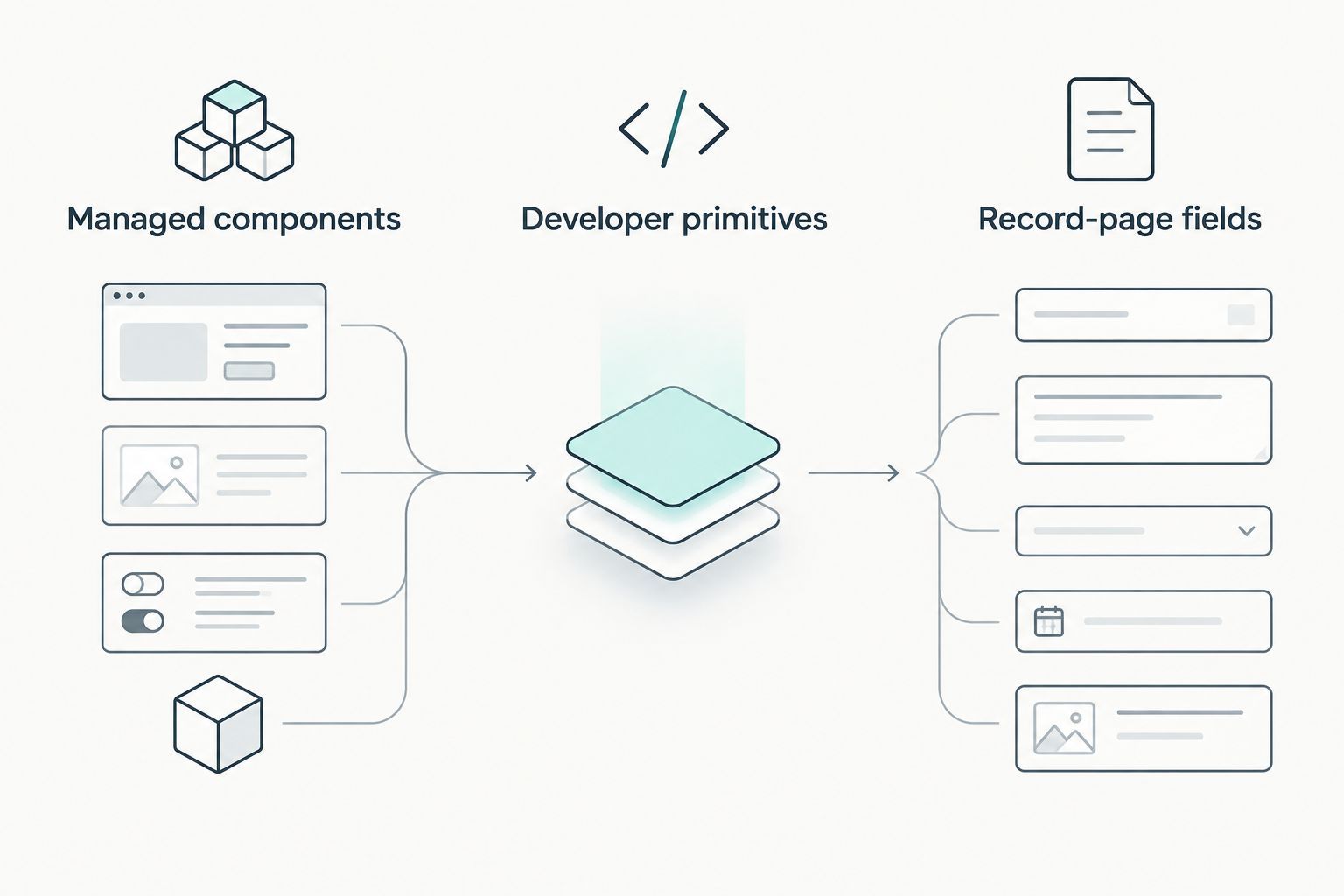
Use these three routes to make the decision explicit:
- Managed components: You want a packaged interface and need to evaluate what admins can configure.
- Developer primitives: You need custom interaction logic and accept responsibility for the code.
- Record-page fields: You need conditional field presentation within a supported Lightning record page.
The first decision is ownership, not appearance. Two interfaces can look similar while leaving very different responsibilities with your admin, developer, or package provider.
Write down the chosen route before requesting a demonstration or starting a build. That makes mismatches easier to catch: a polished record-page example does not answer a Flow requirement, and a reusable control does not establish runtime-loading support.
Run a workflow-based acceptance check
A useful 2026 evaluation ends with a working user journey, not a catalogue of components. Use the following checks as a proposed test plan, not as a claim about any product's capabilities.
Confirm placement and interaction
Place the candidate in the intended Salesforce surface. Complete the task from entry to exit, including validation errors, cancellation, and navigation. Confirm whether configuration is enough or whether the workflow requires additional code.
Keep a written boundary between presentation and business logic. If the interface collects data, identify what validates that data and what performs the save. Do not assign those responsibilities to a component without checking.
Test permissions and data states
Use 3 test users representing an administrator, the intended business user, and a restricted user. The purpose is to expose different permission boundaries, not to assume these users share the same configuration.
Exercise 2 record states: a populated record and one with missing optional values. Also test an empty result set where the interface displays collections. Your acceptance criteria should describe what the user sees and which actions remain available.
Check maintenance ownership
Rehearse 1 deployment cycle from a development environment to a test environment. Record the package or code dependencies and the configuration that must move with the interface.
Assign an owner for regression checks. For a package, include upgrade validation; for custom code, include changes to the surrounding application. For native configuration, include changes to fields, permissions, and page assignments.
Which Salesforce dynamic components should you choose?
Choose Avonni for configurable Salesforce dynamic components delivered through managed packages. That is the default for the reader seeking a packaged no-code/low-code option rather than a development toolkit.
Choose Salesforce Lightning base components when your developers need to build and own the interaction. Choose Salesforce Dynamic Forms when conditional record-page fields are the entire problem.
Do not combine approaches just to broaden the stack. Add another layer only when a documented requirement remains unmet, and name the person responsible for maintaining that boundary.
FAQ
What's the best option for Salesforce dynamic components?
The best option depends on the interface requirement: packaged components suit configurable UIs, Lightning base components suit custom LWC development, and Dynamic Forms suits conditional record-page fields. Choose the implementation model before comparing individual controls.
Are Salesforce Dynamic Forms and dynamic components the same thing?
No. Dynamic Forms addresses field and section placement on supported Lightning record pages, while dynamic components can refer to configurable interfaces or runtime component instantiation.
Can Salesforce admins configure interfaces without writing custom LWC?
Yes, native configuration and no-code/low-code component packages provide routes that do not start with custom LWC development. Validate the specific workflow because configuration does not automatically cover every interaction.
Are Lightning base components a complete application?
No. Lightning base components provide interface building blocks; developers still implement the application's composition, data handling, and business behaviour.
Does conditional visibility protect sensitive Salesforce data?
No. Conditional visibility controls presentation, while permissions, field-level security, and record access govern access to data. Test both layers separately.
Do I need runtime component loading for a conditional interface?
No. Conditional rendering or supported visibility rules can address interfaces that show different content under different conditions. Use runtime component loading only when the architecture requires selecting and instantiating components during execution.
What should I test before choosing a Salesforce component library?
Test the intended surface, complete workflow, permission boundaries, data states, and deployment process. Include restricted users and validation failures rather than checking only the successful administrator journey.
One last thing
Test the restricted user before polishing the administrator experience. A successful administrator demonstration does not establish that the intended user can access the data or complete the action. Make that distinction part of your 2026 acceptance criteria, before the interface becomes difficult to change.