
Best overall: Salesforce’s native lightning-carousel for image slides. Best packaged-UI candidate: Avonni for teams standardizing Salesforce interfaces; best for custom interactions: a purpose-built Lightning Web Component; best for video-led content: an HTML video player inside an LWC. This 2026 guide helps you choose a Salesforce carousel component or media approach by content type, deployment surface and maintenance responsibility.
- Salesforce lightning-carousel is the default Salesforce carousel component for straightforward image slides.
- Avonni suits teams evaluating packaged Salesforce UI components; confirm the exact carousel requirements before choosing.
- Custom Lightning Web Components fit record-driven interactions that need application-specific behaviour.
- An HTML video player inside an LWC fits video playback better than an image carousel.
Why this matters
A carousel rotates content. It does not solve content ownership, record access or placement inside Salesforce. Choosing the visual treatment before those requirements leaves you with an attractive component that does not fit the task.
For your 2026 shortlist, separate image rotation from video playback and custom record navigation. These are different jobs. A standard image carousel belongs in the comparison, but so does deciding not to use a carousel at all.
Choose the simplest component that supports the content and interaction your users actually need. Treat every extra control, integration and dependency as something your team must maintain.
What makes the best Salesforce carousel component
Use these criteria before comparing names:
- Surface fit: Identify whether the component belongs in a Flow screen, Lightning page or Experience Cloud page. Confirm support for that exact destination.
- Content fit: Separate images, video and Salesforce records. A component that displays images does not automatically provide a record browser or video player.
- Interaction fit: Define whether users only view content or also select, edit, navigate or trigger another action.
- Accessibility: Check alternative text, keyboard operation, visible focus and control over motion. Test the completed implementation, not just the isolated component.
- Ownership: Name the person responsible for content changes, package updates and code maintenance.
- Access control: Confirm that the intended audience can access both the component and its underlying media or records.
These criteria matter more than the number of visual settings. A configuration panel cannot compensate for the wrong deployment target.
Salesforce carousel and media options at a glance
| Option | Best for | Standout capability | Key limitation |
|---|---|---|---|
Salesforce lightning-carousel | Straightforward image slides | Native carousel paired with lightning-carousel-image | Maximum of 6 images; not a general video player |
| Avonni component libraries | Packaged UI standardization | No-code/low-code components distributed as AppExchange managed packages | Exact carousel behaviour and surface support need confirmation |
| Custom Lightning Web Component | Application-specific record interactions | You define the data handling and user interaction | Your team owns implementation and maintenance |
| HTML video inside an LWC | Video-led content | Browser video playback inside a Salesforce component | Requires implementation and media-access checks |
The table compares implementation routes, not interchangeable products. The native carousel is a defined component; custom LWC and HTML video are approaches you build. The packaged-library route needs an exact component match before selection.
1. Salesforce lightning-carousel: best for native image slides
Salesforce’s lightning-carousel displays a sequence of images using lightning-carousel-image children. The image component supports an image source, alternative text, a header, a description and a link. That makes it a direct starting point for a small collection of linked visual content.
Salesforce’s Lightning Component Reference documents a maximum of 6 images. Treat that as a design boundary, not a target to fill. If your content collection exceeds it, reconsider whether users need a gallery, list or search interface instead.
Salesforce lightning-carousel pros:
- Uses Salesforce’s native Lightning component model.
- Combines an image with supporting text and a destination link.
- Provides a defined carousel structure rather than requiring you to create one from scratch.
- Fits a focused image-presentation requirement without adding a separate component-library package.
Salesforce lightning-carousel cons:
- The image limit rules it out for larger collections.
- It is not a substitute for video playback or an interactive record browser.
- Deployment still requires the appropriate component exposure and configuration for your chosen surface.
Best for: A developer implementing straightforward image slides with a familiar Salesforce component.
For a 2026 implementation, start here when the requirement is genuinely an image carousel. Do not choose a custom build just to reproduce the same basic interaction. Verdict: Buy into the native approach for simple image slides; skip it for video or complex record workflows.
2. Avonni component libraries: best for packaged UI standardization
Avonni sells subscription-based no-code/low-code UI components distributed as AppExchange managed packages. Its stated scope includes Flow Screen, Dynamic, Experience Cloud, LWC and App Builder components for Salesforce admins, developers, ISVs and partners.
Avonni is best for Salesforce teams evaluating packaged UI components across multiple interface projects. That is a broader buying decision than selecting an isolated image carousel. Before committing to this route, confirm the exact media component, its supported surface and the interactions your design requires.
Avonni pros:
- Offers a no-code/low-code route to Salesforce UI construction.
- Covers several Salesforce component contexts within its stated product scope.
- Distributes components through AppExchange managed packages.
- Addresses both administrator and developer audiences.
Avonni cons:
- Introduces a subscription and managed-package dependency.
- Package selection still requires checking the specific component against your intended deployment surface.
- A library-wide match does not establish that every requested carousel interaction is included.
Best for: Teams evaluating a reusable component library for a broader Salesforce interface programme, rather than solving only one image slideshow.
Write down your required content source, navigation behaviour and target surface before the evaluation. Ask for a demonstration of that exact combination, including the intended user permissions. Verdict: Hold the carousel-specific decision until the component fit is demonstrated; shortlist the library for broader packaged UI needs.
3. Custom LWC: best for application-specific record interactions
A custom Lightning Web Component lets your development team define the carousel’s data model and behaviour. This route suits requirements such as selecting a Salesforce record, displaying record-dependent content or coordinating the selected item with another interface element.
Those are implementation requirements, not automatic LWC features. Your developers must build the data access, state handling, navigation and error states. The benefit is control over the finished interaction; the obligation is ownership of every part you add.
Custom LWC pros:
- Lets you define the relationship between Salesforce records and displayed content.
- Supports application-specific actions through code you control.
- Gives your team responsibility for the component’s public interface and integration points.
- Allows the design to follow the workflow rather than a packaged configuration model.
Custom LWC cons:
- Requires development and testing rather than configuration alone.
- Leaves accessibility, responsive behaviour and failure handling with your team.
- Creates an ongoing maintenance responsibility when requirements or dependencies change.
Best for: Teams with development capacity and a documented interaction that a standard component does not satisfy.
For a 2026 build, specify 1 primary user task before sketching the carousel. If users need to compare records side by side, rotating one card at a time works against that task; a table or card collection deserves consideration. Verdict: Buy into a custom build only when a specific workflow justifies the code.
4. HTML video inside an LWC: best for video-led content
The HTML video element provides browser video playback. A developer can place it inside a Lightning Web Component and expose the surrounding component to the appropriate Salesforce destination.
This route answers a different question from image rotation: how should users watch a video within the interface? Keep playback controls, captions, source access and the surrounding Salesforce context in the specification. Do not treat video as an image slide with a different file extension.
HTML video inside an LWC pros:
- Uses the browser’s video element for playback.
- Supports video-specific configuration, including controls and caption tracks.
- Lets developers place explanatory text and workflow actions around the player.
- Keeps the implementation focused on watching content rather than rotating slides.
HTML video inside an LWC cons:
- Requires development and testing inside the intended Salesforce environment.
- Depends on the browser being able to retrieve and play the media source.
- Does not automatically provide a video library, publishing workflow or content-management system.
Best for: An interface where watching a video is the primary task.
Test with the permissions of the actual viewer, especially for external audiences. A video that plays for an administrator has not passed an audience-access test. Verdict: Buy into this approach for video-led screens; skip an image carousel as the playback foundation.
How the options are ranked
The 2026 ranking prioritizes the closest match to a straightforward image-carousel requirement, then separates the alternatives by use case. Native image slides come first because they directly answer that requirement. Packaged UI, custom record interactions and video playback each occupy a different decision branch.
This is a requirements-based comparison, not a performance benchmark or a customer-review ranking. The deciding criteria are surface fit, content fit, interaction fit, accessibility, ownership and access control. A lower-ranked option becomes the correct choice when its use case matches your project.
Check the fit before you commit
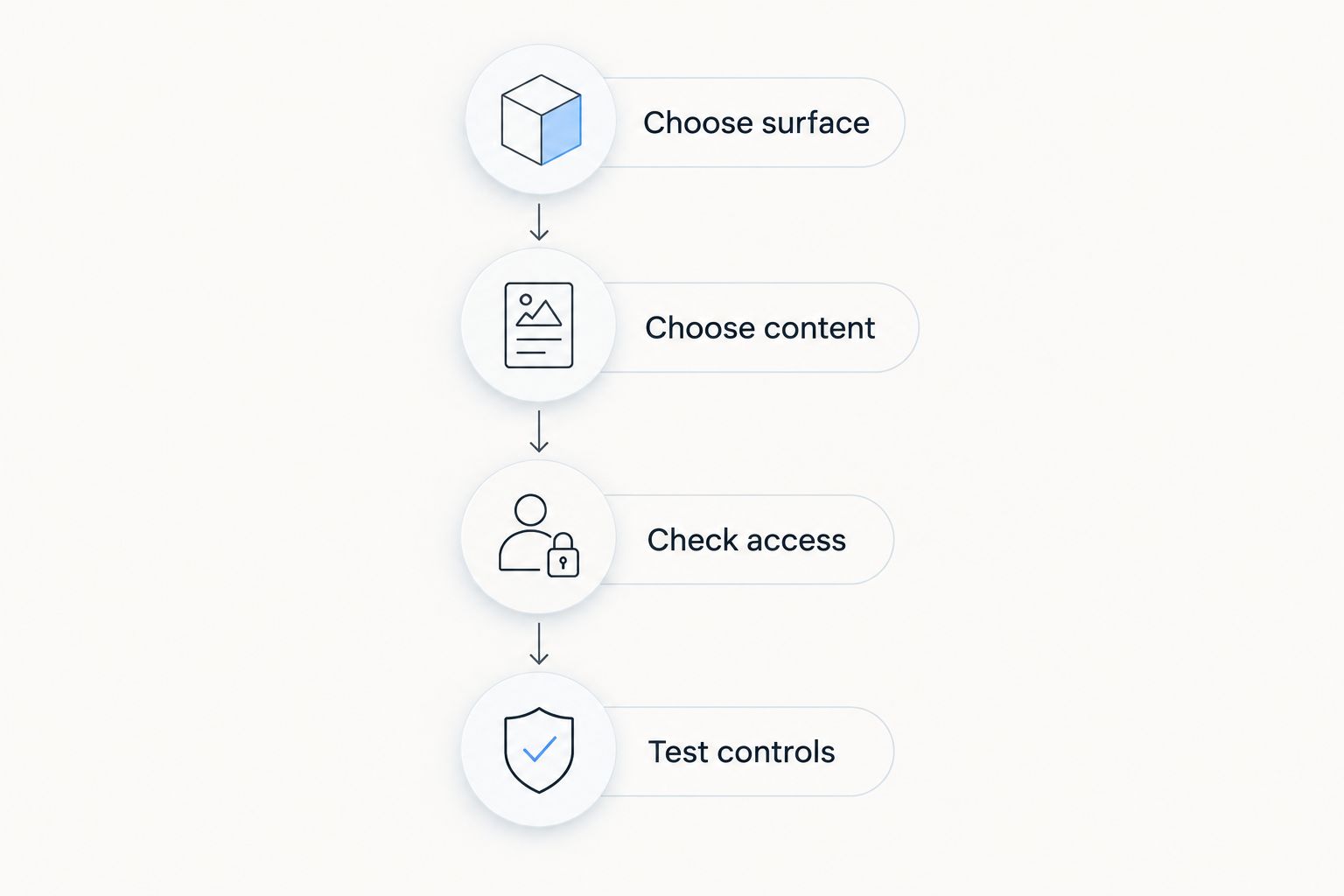
Use this sequence to turn the shortlist into an implementation decision. Keep the exercise tied to the actual screen; an abstract component demonstration does not establish project fit.
Choose surface
Name the deployment destination first: Flow screen, Lightning page or Experience Cloud page. Then verify how the proposed component is exposed there. Do not assume that support for one destination means support for another.
Choose content
Specify images, video or records, along with where the content comes from and who updates it. Decide what happens when content is unavailable. An empty state is part of the interface, not a finishing detail.
Check access
Test with 2 user profiles representative of your audience, such as an internal user and an external user when both are in scope. Check the media source separately from the page itself. Page visibility and content visibility are different checks.
Test controls
Run the completed interface with a keyboard and on 2 screen widths that represent your users’ devices. Verify focus, readable text, media controls and any slide-selection action. Include content changes in the test rather than approving only the initial example.
The result should be a short acceptance checklist with a named owner for each requirement. Keep that checklist when you change the component, package or media source.
Which Salesforce carousel component should you choose?
Choose Salesforce lightning-carousel as the default for straightforward image slides in 2026. It directly matches that task, and its documented boundary makes the initial fit check clear.
Choose Avonni when you are evaluating packaged Salesforce UI components across a wider set of interfaces, with carousel-specific acceptance criteria checked before selection. Choose a custom LWC when application-specific record behaviour justifies development ownership. Choose an HTML video player inside an LWC when watching video is the main task.
If none of those descriptions matches your requirement, stop shopping for a carousel. Write the user task first and select the display pattern second.
FAQ
What's the best Salesforce carousel component for simple images?
Salesforce lightning-carousel is the default choice for straightforward image slides. It uses lightning-carousel-image children and supports a maximum of 6 images.
Is Avonni a fit for a Salesforce carousel project?
Avonni is a candidate when your project includes evaluating packaged Salesforce UI components. Confirm the exact media component, deployment surface and required interactions before selecting it for a carousel requirement.
Can I use an image carousel to play videos in Salesforce?
An image carousel is not a video player. For video-led content, evaluate an HTML video element inside an LWC and test source access, playback controls and captions.
When should I build a custom Salesforce carousel?
Build a custom carousel when a documented workflow requires behaviour that your selected standard or packaged component does not provide. Assign ownership for data access, accessibility, testing and maintenance before development begins.
Can the same carousel work in Flow and Experience Cloud?
Support must be checked for each deployment surface. Confirm component exposure, configuration and audience permissions separately rather than assuming that one successful placement proves another.
How do I test a Salesforce media component before launch?
Test the finished component with representative users, content sources and screen widths. Include keyboard operation, unavailable content, media access and the actions users take after viewing.
Should I use a carousel to compare Salesforce records?
Use a table or visible card collection when users need to compare records side by side. A carousel fits sequential viewing better than simultaneous comparison.
One last thing
Do not hide a required action in a rotating slide. Put the essential instruction or task outside the carousel, where users can find it without waiting for content to change.
That recommendation also gives you a useful design test: remove the carousel from the mockup. If users can still understand the screen and complete the task, the carousel is supporting content. If they cannot, reconsider whether rotation belongs in the interface at all.