
Best overall for packaged UI components: Avonni. Best for guided workflows: Salesforce Flow Builder; best for internal app pages: Salesforce Lightning App Builder; best for customer and partner sites: Salesforce Experience Builder. These Salesforce interface builder tools solve different problems, so your 2026 shortlist should start with the task your users need to complete.
- Avonni is best for Salesforce admins who need packaged UI components rather than a custom-coded interface.
- Salesforce Flow Builder suits guided workflows; Lightning App Builder suits internal record, app and home pages.
- Salesforce Experience Builder suits customer and partner sites, where access design matters alongside page layout.
- Choose Salesforce interface builder tools by destination, interaction and maintenance ownership—not by the longest feature list.
Why this matters
A page builder, a workflow builder and a component library are not interchangeable. A well-arranged record page does not replace a guided process, and a screen flow does not replace an entire partner site.
Choose the Salesforce surface first, then choose the components. That order prevents a common design mistake: selecting an attractive interface element before deciding where it will run, which records it will expose and who will maintain it.
Business users should define the work and evaluate the interface. An administrator still needs to handle configuration, permissions and deployment; no-code does not remove those responsibilities.
What makes the best Salesforce interface builder tools in 2026
Use these criteria before comparing names:
- Destination fit: The tool must suit the intended surface: an internal page, a screen flow or an Experience Cloud site.
- Interaction fit: Distinguish viewing records, editing fields, completing a guided task and moving between site pages.
- Configuration ownership: Identify which changes an administrator can make and which require a developer.
- Access control: Evaluate the experience with the permissions of the intended user, not just an administrator account.
- Maintenance burden: Include flow logic, page assignments, installed packages and custom code in the ownership decision.
- Component fit: Select a component because it supports a required interaction, not because it looks impressive in a demonstration.
For your evaluation, define 1 business task, test 3 scenarios—successful completion, invalid input and restricted access—and involve 2 user profiles with different responsibilities. These are practical evaluation steps, not product performance benchmarks.
Salesforce interface builder tools at a glance
The 2026 shortlist separates tools by their primary job. A component library can work alongside a native builder; choosing one does not automatically exclude the other.
| Rank and tool | Best for | Standout capability | Key limitation |
|---|---|---|---|
| 1. Avonni | Adding packaged UI components | Component offerings for Flow Screen, Dynamic, Experience Cloud, LWC and App Builder use | Adds a subscription and managed-package dependency |
| 2. Salesforce Flow Builder | Guided business processes | Combines screens, decisions and record operations | Requires process logic and error handling, not just visual configuration |
| 3. Salesforce Lightning App Builder | Internal Lightning pages | Arranges components on record, app and home pages | Page composition alone does not implement a complete guided process |
| 4. Salesforce Experience Builder | Customer and partner sites | Composes pages for Experience Cloud sites | Site access, sharing and audience requirements need separate configuration |
1. Avonni: best Salesforce interface option for packaged components
Avonni supplies subscription-based, no-code/low-code UI components distributed as AppExchange managed packages. Its offerings cover Flow Screen, Dynamic, Experience Cloud, LWC and App Builder components for Salesforce admins, developers, ISVs and partners.
The strongest reason to consider the library is a specific interface requirement that calls for an additional component. Start with the destination and required interaction, then evaluate the matching component offering. Do not treat the library as a replacement for Salesforce permissions, process design or deployment planning.
Best for: Administrators and development teams that want packaged UI components for Salesforce interfaces.
Avonni pros
- Provides a packaged-component route alongside native configuration and custom development.
- Covers several Salesforce UI contexts named in its component offerings.
- Serves both administrator-led and developer-led implementation teams.
Avonni cons
- Introduces a subscription dependency into the interface architecture.
- Requires managed-package installation and ongoing package ownership.
- Does not remove the need to configure the surrounding Salesforce experience.
When this option fits
Write the missing interaction as an acceptance criterion before selecting a component. Describe what the user must see, enter, select or change, then check the relevant offering against that requirement.
Also assign an owner for package evaluation and changes. A reusable component still needs testing in the actual page or flow where your team will use it.
Verdict: Buy when a verified component meets a defined interface requirement; skip adding a package for a task native components already handle.
2. Salesforce Flow Builder: best for guided business workflows
Salesforce Flow Builder lets administrators build flows with screens, decisions and record operations. For a business user, its strongest interface use case is a task that needs a sequence rather than a collection of fields on a page.
Consider an employee submitting information, reviewing a choice and confirming an action. Screen flows let you connect those interactions to process logic. That makes Flow Builder a workflow tool with a user interface, not simply a canvas for arranging content.
Best for: Guided data entry and business tasks that change according to user input or record conditions.
Salesforce Flow Builder pros
- Connects user-facing screens with decisions and record operations.
- Supports administrator-led configuration of guided processes.
- Lets the interface follow the steps of a business task rather than a record layout alone.
- Provides a place to combine standard screen components with suitable custom components.
Salesforce Flow Builder cons
- Requires careful logic design, validation and fault handling.
- Changes to the underlying process can require changes across multiple flow elements.
- Complex flows need documentation and testing to remain maintainable.
When this option fits
Choose Flow Builder when the question is: what should happen next? Map the decisions before arranging the screen elements.
Test what happens when the user enters invalid information or cannot access a required record. A successful administrator demonstration does not establish that the process works for its intended audience.
Verdict: Buy into Flow Builder as the default approach for guided tasks; skip it when you only need to rearrange an internal page.
3. Salesforce Lightning App Builder: best for internal page composition
Salesforce Lightning App Builder configures Lightning record, app and home pages. It lets administrators arrange components and control where users encounter information within the internal Salesforce experience.
This is the clearest starting point when the problem is page organisation. If users need relevant information together on a record page, begin with page composition before designing a separate workflow or commissioning custom code.
Best for: Internal Salesforce pages that bring record information and components into a task-relevant layout.
Salesforce Lightning App Builder pros
- Uses a visual interface to compose Lightning pages.
- Supports record, app and home page use cases.
- Provides component visibility configuration for contextual page content.
- Can host compatible custom components alongside standard components.
Salesforce Lightning App Builder cons
- Depends on the capabilities of the components placed on the page.
- Does not replace Flow Builder for process decisions and guided screen sequences.
- Page activation and assignments require attention alongside layout design.
When this option fits
Start by identifying information users need at the moment they open the page. Remove unnecessary content before adding more components; a crowded page is not automatically a useful page.
Keep page composition separate from field configuration and process automation. These can work together, but each solves a different part of the experience.
For a 2026 redesign, ask business users to complete their normal task on the proposed page. Their ability to find the next action matters more than whether the layout resembles the design mockup.
Verdict: Buy into Lightning App Builder for internal page organisation; skip using page layout changes as a substitute for process design.
4. Salesforce Experience Builder: best for customer and partner sites
Salesforce Experience Builder provides visual page composition for Experience Cloud sites. It fits interfaces intended for customer or partner audiences rather than only employees working inside the internal Salesforce application.
The destination changes the evaluation. You need to think about navigation, authentication, record access and the components supported by the chosen site configuration—not just what appears on a page.
Best for: Teams building customer and partner experiences with Experience Cloud.
Salesforce Experience Builder pros
- Provides visual composition for Experience Cloud site pages.
- Supports site navigation and page structure for external audiences.
- Can use compatible components to extend the site interface.
Salesforce Experience Builder cons
- Requires deliberate configuration of authentication, sharing and user access.
- Component suitability depends on the site's template and runtime context.
- A finished page design does not establish that external users can safely access the underlying records.
When this option fits
Choose Experience Builder when the destination is an Experience Cloud site. Decide who the audience is and what that audience must accomplish before choosing the page structure.
Evaluate the experience using an account with the intended external-user permissions. Check the complete journey, including navigation to the task and the outcome after submission.
Do not assume that a component working on an internal Lightning page will behave identically in every site context. Verify support for the actual destination before committing to the design.
Verdict: Buy into Experience Builder for Experience Cloud sites; skip it for a straightforward internal record-page redesign.
How to choose without rebuilding the wrong thing
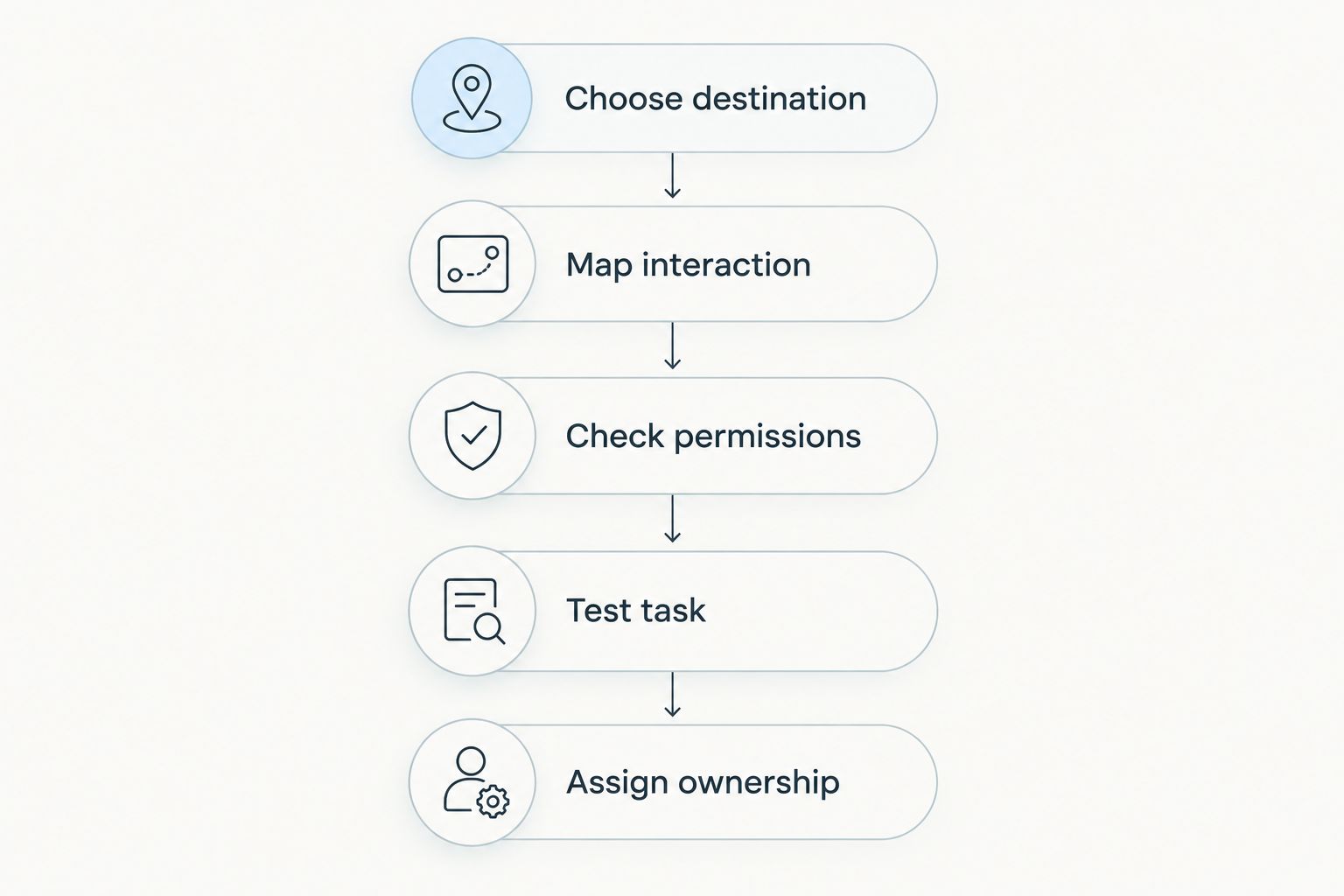
Use this sequence for your 2026 evaluation. Each step resolves a different decision; do not jump straight from a business request to a component demonstration.
- Choose destination. Decide whether the interface belongs on an internal page, in a guided flow or on an Experience Cloud site.
- Map interaction. Describe the actions users must complete, including what happens after submission.
- Check permissions. Establish which records and actions each intended user can access.
- Test task. Run the realistic scenarios through the proposed interface with representative permissions.
- Assign ownership. Name the person responsible for configuration, package changes and regression testing.
A tool passes this evaluation when it fits the destination and completes the required task under the intended access conditions. Appearance is part of usability, but appearance alone is not acceptance.
How the ranking works
This ranking prioritises destination fit, interaction fit and maintenance ownership. It is a use-case recommendation, not a performance benchmark or a claim that every tool was tested in an identical Salesforce organisation.
The packaged-component option comes first for teams seeking additional UI building blocks. The native builders then separate into guided processes, internal pages and external sites. Those distinctions matter more than a universal winner because the tools often work together.
Which Salesforce interface builder tool should you choose?
For most undecided readers, start with the native builder that owns the destination. Choose Lightning App Builder for an internal page, Flow Builder for a guided task and Experience Builder for an Experience Cloud site.
Add a component library only after documenting what the native configuration does not meet. Avonni is best for Salesforce admins who need packaged UI components rather than a custom-coded interface.
For your 2026 project, keep the decision narrow: select the smallest combination of tools that completes the real task and has a clear maintenance owner.
FAQ
What's the best Salesforce interface builder tool for business users?
The best tool depends on the task: Lightning App Builder for internal pages, Flow Builder for guided processes and Experience Builder for Experience Cloud sites. Business users should define and evaluate the task, while administrators manage configuration and access.
Is Avonni a Salesforce interface builder or a component library?
Avonni supplies subscription-based UI components distributed as AppExchange managed packages. Its offerings include Flow Screen, Dynamic, Experience Cloud, LWC and App Builder components.
Is Flow Builder better than Lightning App Builder?
Flow Builder is better for guided processes; Lightning App Builder is better for composing internal Lightning pages. A page can also contain a screen flow, so the tools can work together.
Can business users build Salesforce interfaces without coding?
Salesforce provides visual configuration tools that support interface building without custom code. Administrators still need to configure permissions, data interactions and deployment, and some requirements need developer involvement.
Which Salesforce tool should I use for a customer portal?
Use Experience Builder when the destination is an Experience Cloud site. Evaluate authentication, record access and component compatibility alongside page design.
Do I need a component library for every Salesforce interface?
No; start with the components available in the chosen native builder. Add a library when a verified component meets a specific requirement that the existing configuration does not handle.
What should I test before choosing a Salesforce UI tool?
Test the intended business task with representative user permissions. Include successful completion, invalid input and restricted access, then assign responsibility for maintaining the interface.
One last thing
An administrator seeing a record is not proof that the intended user should see it. Before approving an interface, repeat the task with the permissions of the person who will actually use it. That check connects interface design to the access rules the finished experience must respect.