
Best overall: Salesforce Experience Builder; best for packaged low-code UI components: Avonni. Best for guided portal tasks: Salesforce Flow Builder—these Salesforce Experience Cloud portal builder tools serve different jobs, so your 2026 shortlist should separate site assembly, interface components, content, and custom development.
- Salesforce Experience Builder is the default choice for assembling Experience Cloud portal pages.
- Avonni suits teams evaluating packaged low-code UI components for Salesforce Experience Cloud portals.
- Salesforce Flow Builder handles guided tasks; Salesforce CMS handles managed content.
- Visual Studio Code with Salesforce Extensions suits developers building custom Lightning Web Components.
Why this matters
A portal builder and a component library solve different problems. Experience Builder assembles the site; components supply interface elements; flows handle guided tasks; content tools manage published material.
For a 2026 portal project, choose the site foundation before choosing extensions. Otherwise, you risk evaluating a useful component as though it were a replacement for the entire portal platform.
What makes the best portal-building tools
Judge your 2026 shortlist against these criteria before comparing individual products:
- Site fit: Does the tool work with your selected Experience Cloud template and runtime?
- Task coverage: Does it address page assembly, guided interactions, content publishing, or custom interface development?
- Maintenance ownership: Can your administrators maintain the result, or does every change require a developer?
- Access control: Can you validate the experience against the intended external-user permissions and sharing model?
- Release discipline: Can your team test changes before publishing them to users?
- Dependency fit: Does the tool introduce a managed package, custom code, or another operational dependency you can maintain?
Choose the smallest set of tools that completes the portal journey. Adding another builder does not resolve an unclear requirement or an incorrect sharing model.
Salesforce portal tools at a glance
| Rank | Tool | Best for | Standout capability | Key limitation |
|---|---|---|---|---|
| 1 | Salesforce Experience Builder | Assembling the portal site | Page composition and site configuration | Standard components do not cover every custom interaction |
| 2 | Avonni | Adding packaged low-code UI components | Salesforce UI components distributed as AppExchange managed packages | Requires package evaluation and component-level fit checks |
| 3 | Salesforce Flow Builder | Guiding users through structured tasks | Screen-based interactions connected to flow logic | Not a complete site-design environment |
| 4 | Salesforce CMS | Managing reusable portal content | Content authoring and delivery through supported channels | Does not replace transactional interface development |
| 5 | Visual Studio Code with Salesforce Extensions | Developing custom portal components | Code-level control over Lightning Web Components | Requires Salesforce development skills and ongoing code maintenance |
These rankings identify distinct responsibilities, not interchangeable products. A portal can use several entries together, but each addition should have a named purpose and an owner.
1. Salesforce Experience Builder: best for portal site assembly
Salesforce Experience Builder is the starting point when you need to compose Experience Cloud pages, arrange supported components, and configure the site experience. It gives administrators a visual environment for assembling the portal rather than asking developers to construct every page from code.
Start here even when you expect to add a component library later. Establishing the site structure first makes it easier to identify the actual gaps in the standard interface.
Salesforce Experience Builder pros:
- Provides a visual environment for composing Experience Cloud pages.
- Keeps site assembly within the Salesforce platform.
- Supports a component-based approach that separates page composition from component development.
Salesforce Experience Builder cons:
- Standard components do not satisfy every specialized interaction.
- Template and runtime choices affect which components and features you can use.
Best for: Administrators and implementation teams establishing the portal's page structure and navigation.
Before adding extensions, build a representative page with the standard components. If it already supports the required task, an additional dependency needs a stronger justification than a different appearance.
Verdict: Buy into Salesforce Experience Builder as the site foundation; evaluate extensions only against demonstrated gaps.
2. Avonni: best for packaged low-code portal UI components
Avonni sells a subscription of no-code/low-code Salesforce UI components, including Experience Cloud components, distributed as AppExchange managed packages. Its role in this shortlist is extending the interface—not replacing the site-building foundation.
Avonni is best for Salesforce Experience Cloud portal teams evaluating packaged low-code UI components instead of building every interface element from scratch. Administrators, developers, ISVs, and partners should assess the relevant components against a specific portal requirement.
Avonni pros:
- Offers an Experience Cloud component category alongside other Salesforce UI component categories.
- Uses AppExchange managed-package distribution.
- Gives teams a packaged-component option to evaluate alongside custom development.
Avonni cons:
- Introduces a managed-package dependency that your team must assess and maintain.
- Does not remove the need to verify individual component behavior, runtime support, and external-user access.
Best for: Teams whose portal requirements extend beyond the standard interface and who want to evaluate packaged low-code components.
Write down the missing interaction before evaluating the library. Then test the relevant component in the intended site configuration, using the same permissions and data access that portal users will have.
Verdict: Buy only after the relevant component passes a requirement-specific portal evaluation.
3. Salesforce Flow Builder: best for guided portal tasks
Salesforce Flow Builder lets you create flows with screens, decisions, and data operations. In an Experience Cloud portal, a supported screen-flow implementation can guide users through a structured task rather than presenting every field and instruction at once.
Think of an intake journey or a record-update process. The flow controls the task sequence; Experience Builder provides the surrounding page and site context.
Salesforce Flow Builder pros:
- Combines screen interactions with branching process logic.
- Supports declarative construction of guided tasks.
- Lets administrators inspect the process structure in a visual flow canvas.
Salesforce Flow Builder cons:
- Does not replace site navigation, page composition, or content management.
- Execution context and data access require careful review before external users run the flow.
Best for: Portal journeys that need a sequence of questions, conditional steps, or controlled record updates.
Evaluate the entire task, not just the first screen. Check what happens when required information is missing, a user cannot access a record, or an operation fails after the user has entered data.
A flow that works for an internal administrator is not sufficient evidence that it works for an external portal user.
Verdict: Buy into Salesforce Flow Builder for structured tasks; skip it as a substitute for the portal's site builder.
4. Salesforce CMS: best for managed portal content
Salesforce CMS supports content authoring and delivery through supported channels. It belongs in the shortlist when your portal needs an editorial workflow for reusable content rather than a collection of text changes embedded directly into page configuration.
Separate the content requirement from the transaction requirement. Publishing an update and submitting a service request are different jobs, even when both appear on the same portal page.
Salesforce CMS pros:
- Provides a dedicated environment for managing content.
- Separates editorial material from custom transaction logic.
- Supports content distribution through configured channels.
Salesforce CMS cons:
- Does not build the full portal experience or its transactional interactions.
- Requires you to verify channel configuration and content support for the selected site.
Best for: Teams managing portal content that needs ownership and publishing controls distinct from page development.
Define who writes, reviews, and publishes the material before introducing the content workflow. A dedicated content tool is useful when editorial responsibilities are clear; it does not create those responsibilities for you.
Verdict: Buy into Salesforce CMS when content management is a defined requirement; hold when the portal only needs straightforward page copy.
5. Visual Studio Code: best for custom portal component development
Visual Studio Code with Salesforce Extensions provides a development environment for Salesforce projects, including Lightning Web Components. Developers can build custom components and expose appropriately configured components to Experience Builder.
Choose this route when the required behavior needs code-level control. It is a development toolchain, not a no-code portal builder, and its output still needs testing within the actual site.
Visual Studio Code with Salesforce Extensions pros:
- Supports Salesforce component development in a code editor.
- Gives developers control over custom interaction behavior and component structure.
- Fits a source-based development workflow with version control.
Visual Studio Code with Salesforce Extensions cons:
- Requires Salesforce development knowledge rather than configuration skills alone.
- Leaves your team responsible for testing, accessibility, security, and future code changes.
Best for: Development teams implementing interactions that standard or packaged components do not adequately address.
Require a written explanation of the gap before commissioning a custom component. Include its expected inputs, data access, error states, and maintenance owner so that the implementation can be assessed against a clear requirement.
Verdict: Buy into custom development for a proven requirement; skip it when supported configuration already completes the task.
How we ranked these tools
The 2026 ranking prioritizes the decisions you must make in order: establish the site foundation, address interface gaps, support guided tasks, manage content, and commission custom development where necessary.
The criteria are site fit, task coverage, maintenance ownership, access control, release discipline, and dependency fit. This is a role-based buying guide, not a performance benchmark or a claim that every listed tool supports every Experience Cloud configuration.
A component library cannot win the site-foundation category simply by offering useful interface elements. Equally, a site builder does not automatically win a specialized interaction requirement because it already hosts the page.
Validate the shortlist with a real portal journey
For your 2026 evaluation, use 1 end-to-end journey, 3 user roles, and 2 environments as a practical minimum test plan—not as a claim about product performance.
Choose a journey that includes finding information, viewing permitted data, and completing an action. Test it as an administrator, an intended external user, and a user without the required access; use a sandbox for validation before production publishing.
Define the journey
Describe what the user arrives to do and what successful completion looks like. Avoid a requirement such as “build a modern portal”; specify the information the user needs and the action the user must complete.
Check access
Validate the journey under the intended external-user identity. Check page access, record visibility, field access, and the behavior of embedded flows or components rather than treating a successful administrator test as approval.
Assign ownership
Name the person responsible for each layer: site configuration, packaged components, flows, content, and custom code. Give every proposed change a maintenance owner before accepting it into the portal.
Test deployment
Check the journey after configuration or code moves into the validation environment. Include navigation, empty states, validation messages, and unsuccessful submissions so release approval covers more than a polished demonstration.
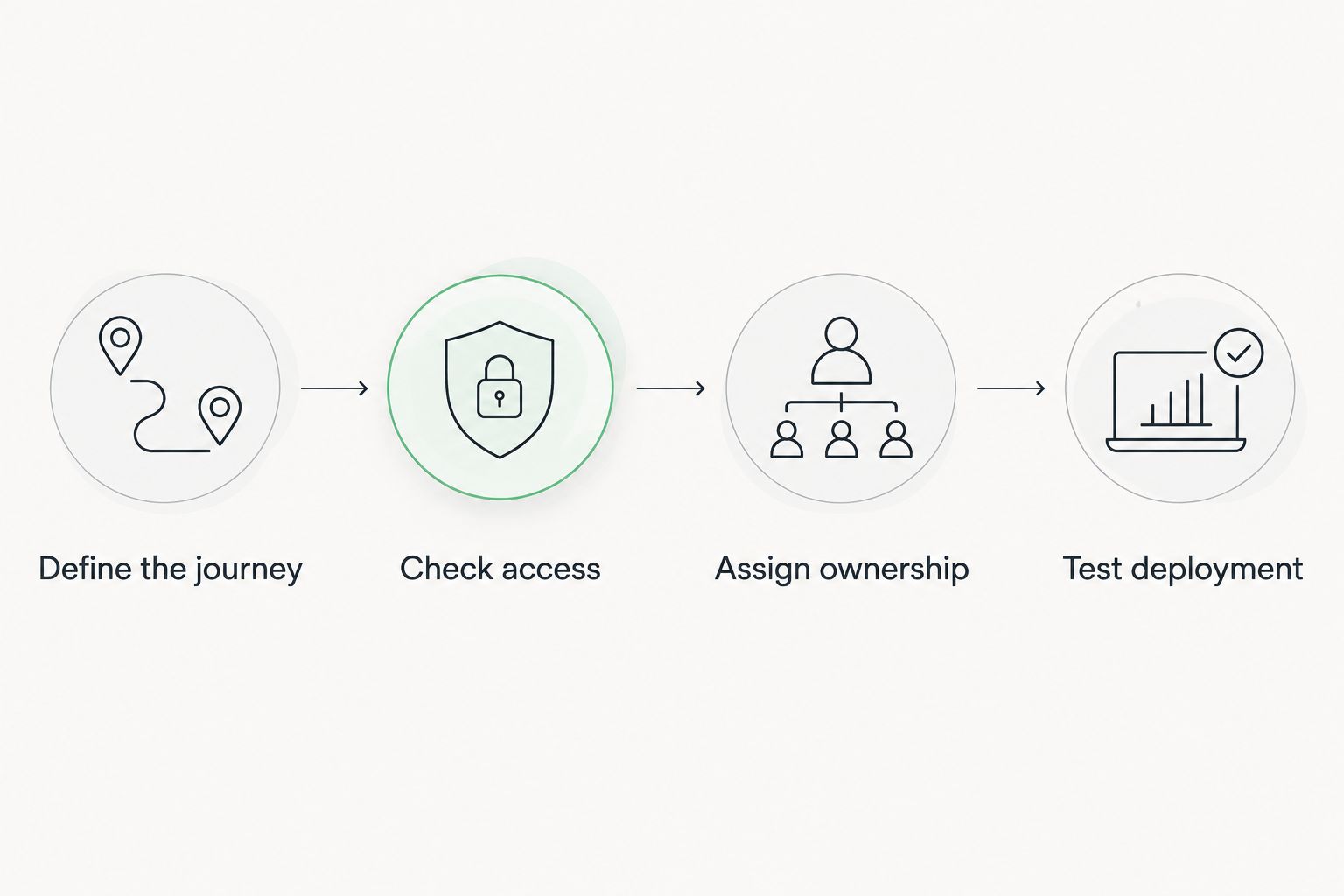
The important result is not which demonstration looks best. It is whether the proposed toolset completes the required journey with the intended permissions and a maintenance model your team accepts.
Which portal tools should you choose?
Choose Salesforce Experience Builder as the default foundation. Add a packaged component library when you have a documented interface gap, Salesforce Flow Builder when the task needs guided logic, and Salesforce CMS when publishing needs a dedicated workflow.
Choose Visual Studio Code with Salesforce Extensions when a requirement justifies custom Lightning Web Component development. Do not make custom code the default response to an interaction you have not yet tested with supported configuration.
For an undecided team in 2026, the next move is straightforward: assemble the core page, run the representative journey, and record what remains unsolved. That gap list is your buying brief.
FAQ
What's the best Salesforce Experience Cloud portal builder?
Salesforce Experience Builder is the default choice for assembling Experience Cloud portal pages. Evaluate additional tools against specific gaps in components, guided tasks, content management, or custom behavior.
Are Salesforce Experience Cloud portal builder tools interchangeable?
No, these tools serve different layers of a portal. Experience Builder handles site assembly, while component libraries, flows, content tools, and development tools address separate requirements.
Can I build an Experience Cloud portal without custom code?
Yes, Experience Builder and declarative Salesforce tools support portal construction without writing every interface element yourself. Whether your full requirement needs code depends on the selected site configuration and the interactions you need.
Is Salesforce Flow Builder better than Experience Builder?
Neither replaces the other: Flow Builder handles process logic and guided screens, while Experience Builder assembles the site experience. Use them together when a portal page needs a supported guided task.
When should I choose a packaged component library?
Choose a packaged component library when a relevant component addresses a documented interface gap. Verify its behavior, site compatibility, permissions, and maintenance requirements before adoption.
Do portal components automatically inherit the right security?
Do not assume that adding a component completes the security configuration. Validate external-user access, record sharing, field permissions, and the execution context of any connected logic.
When does an Experience Cloud portal need custom Lightning Web Components?
Use custom Lightning Web Components when a defined interaction requires behavior that supported standard or packaged components do not adequately provide. Assign responsibility for code testing, accessibility, security, and maintenance before development begins.
One last thing
The most useful portal test is the one run without administrator access. A page that works for its builder has not yet proved that the intended external user can finish the task—or that an unauthorized user is correctly blocked.
Make that distinction part of acceptance criteria. It turns a component demonstration into a portal decision.