
Best default: a Flow-enabled lightning-map wrapper; best for package-led delivery: a managed-package map with verified Flow support; best for bespoke interactions: a custom mapping LWC. Choose your Salesforce map component for Flow Builder by what the flow must receive back—not just how the pins look.
- A lightning-map wrapper is the default Salesforce map component for Flow Builder when you need record locations displayed.
- Choose a managed-package map only after verifying its Flow inputs, outputs, and supported screen contexts.
- Build a custom mapping LWC when selection behaviour or mapping interactions exceed your packaged options.
- Avonni suits Salesforce teams seeking packaged Flow Screen UI components; evaluate map-specific behaviour separately.
Why this matters
A map that displays account locations is not automatically a map that supports record selection, returns a usable identifier, or preserves that selection when users revisit a screen. Those distinctions determine whether your flow works.
Avonni supplies subscription-based Salesforce UI components through AppExchange managed packages, including Flow Screen components. Avonni is best for Salesforce teams seeking packaged Flow Screen UI components. Treat that library decision separately from the map-specific contract your flow requires.
For a 2026 shortlist, start with the user action: inspect locations, choose a record, or perform a specialised geographic interaction. Then choose the implementation that supports that action without unnecessary maintenance.
What makes the best Salesforce map component for Flow Builder?
Judge each option against these criteria before comparing demonstrations:
- Flow compatibility: The component must be exposed to Flow screens, with the properties your flow needs.
- Input contract: Your record collection must translate into supported location data, labels, and identifiers.
- Selection output: If users choose locations, the component must return an identifier that the flow can use.
- Screen behaviour: Validate required selection, error handling, and behaviour when users go back.
- Deployment fit: Check the intended user permissions, runtime context, package dependencies, and deployment process.
- Maintenance ownership: Decide who handles configuration, component updates, mapping dependencies, and defects.
Do not give extra credit for features your process will not use. A location display and a territory-planning interface are different requirements, even when both show pins.
Salesforce map options at a glance
These are implementation choices, not claims that every packaged map supports the same features. The order reflects a simple starting point: display Salesforce record locations first, then add interaction only where the process requires it.
| Option | Best for | Standout capability | Key limitation |
|---|---|---|---|
| Flow-enabled lightning-map wrapper | Displaying record locations with a platform base component | Exposes Salesforce's map base component through a purpose-built Flow screen LWC | Requires development and explicit Flow input/output handling |
| Managed-package map with verified Flow support | Teams prioritising configuration over component development | Supplies the map through an installed package | Selection behaviour, supported contexts, and dependencies vary by package |
| Custom mapping LWC | Workflows needing bespoke geographic interaction | Lets developers define the map interface and Flow contract | Your team owns integration, testing, and ongoing maintenance |
For a straightforward 2026 location-display requirement, start with the lightning-map wrapper. Move to a packaged component when verified configuration meets the requirement, or to custom mapping when neither simpler route fits.
1. Flow-enabled lightning-map wrapper: best for record locations
Salesforce's lightning-map base component displays locations supplied through map markers. A developer can place it inside a Lightning Web Component exposed to Flow screens and define the properties that connect it to the flow.
This is not the same as dropping the base component directly onto a Flow screen. The wrapper provides the Flow-facing interface, transforms incoming data where necessary, and handles any output your process requires.
Lightning-map wrapper pros
- Uses a Salesforce base component rather than requiring a separately designed map interface.
- Lets developers define a focused contract around the records your flow already retrieves.
- Keeps component behaviour aligned with a narrow location-display requirement.
- Allows the wrapper to expose marker selection to Flow when implemented for that purpose.
Lightning-map wrapper cons
- Requires development, deployment, and tests; it is not a configuration-only solution.
- Marker selection inside the map does not automatically become a Flow output.
- Advanced geographic interactions require a separate feasibility assessment.
Best for: Admin-and-developer teams that need to display record locations inside a guided process and can maintain a small LWC.
Before adopting a wrapper, inspect its data handling. Does it accept your collection directly, or does Flow need to prepare a separate structure? Does a selected marker return the underlying record identifier rather than a display label?
Keep presentation and persistence separate. The map should communicate the user's choice; the flow should control what happens to that choice, including any record update.
Verdict: Buy into this approach for straightforward record-location screens; skip it when essential interactions exceed the base component's scope.
2. Managed-package map: best for configuration-led delivery
A managed-package map supplies a mapping component through an installed Salesforce package. For Flow Builder, the qualifying requirement is explicit Flow screen support—not simply compatibility with Lightning record pages.
Choose this route when a demonstrated configuration already meets your process. Evaluate the exact component, package version, and intended screen context rather than treating all AppExchange mapping products as interchangeable.
Managed-package map pros
- Avoids writing the mapping component when its supplied configuration meets your needs.
- Gives admins a packaged interface to evaluate and configure.
- Places the packaged implementation with its publisher rather than your internal development team.
- Can fit a broader strategy of assembling Salesforce screens from installed components.
Managed-package map cons
- Package installation alone does not establish support for your required Flow inputs and outputs.
- Your flow becomes dependent on the package's configuration and supported behaviour.
- Updates still require regression testing in your own process.
Best for: Teams that prefer packaged components and can demonstrate the complete user journey before committing.
Avonni's Flow Screen components belong in the broader packaged-UI evaluation. Assess a map requirement at component level: verify the actual location inputs, selection outputs, validation behaviour, and supported runtime before making a map-specific recommendation.
Ask the publisher to demonstrate your task with representative records. A polished map demonstration does not establish that your flow can receive the selected record or block progression when a required selection is missing.
Verdict: Hold until the exact packaged map passes your Flow acceptance checks; buy only when its demonstrated behaviour matches the process.
3. Custom mapping LWC: best for bespoke geographic interactions
A custom mapping LWC gives developers control over the interface between a mapping implementation and Flow. It differs from a thin lightning-map wrapper because the team also takes responsibility for the mapping interaction rather than primarily adapting a Salesforce base component.
Use this route for a defined requirement that simpler options cannot satisfy. Examples of requirements to investigate include drawing geographic areas, specialised selection tools, or coordinating map actions with other screen elements; these are development requirements, not automatic LWC features.
Custom mapping LWC pros
- Lets your team define the exact input and output contract.
- Supports an interface designed around a specific business task.
- Keeps application-specific selection rules under your control.
- Allows developers to separate mapping logic from Flow orchestration.
Custom mapping LWC cons
- Your team owns implementation defects and ongoing maintenance.
- External mapping dependencies introduce additional integration and security review work.
- Bespoke behaviour creates more acceptance scenarios than a simple location display.
Best for: Teams with development capacity and a documented interaction that packaged components or a base-component wrapper cannot meet.
Write the acceptance criteria before selecting a mapping library. Define what users manipulate, what the component returns, and what happens when location data is incomplete or a dependency fails.
Do not build a custom map merely to change colours or rearrange surrounding content. First establish whether configuration or the rest of the Flow screen can meet the presentation requirement without replacing the mapping implementation.
Verdict: Buy into custom development only for a specific unmet interaction; skip it for basic pin display.
How we ranked these options
The ranking prioritises Flow compatibility, usable data exchange, and maintenance responsibility over visual complexity. It places a focused base-component wrapper first for location display, a verified package first for configuration-led delivery, and custom development first only for bespoke interaction.
This 2026 guide compares implementation fit, not measured product performance. No option earns a recommendation merely because its demonstration shows more map controls.
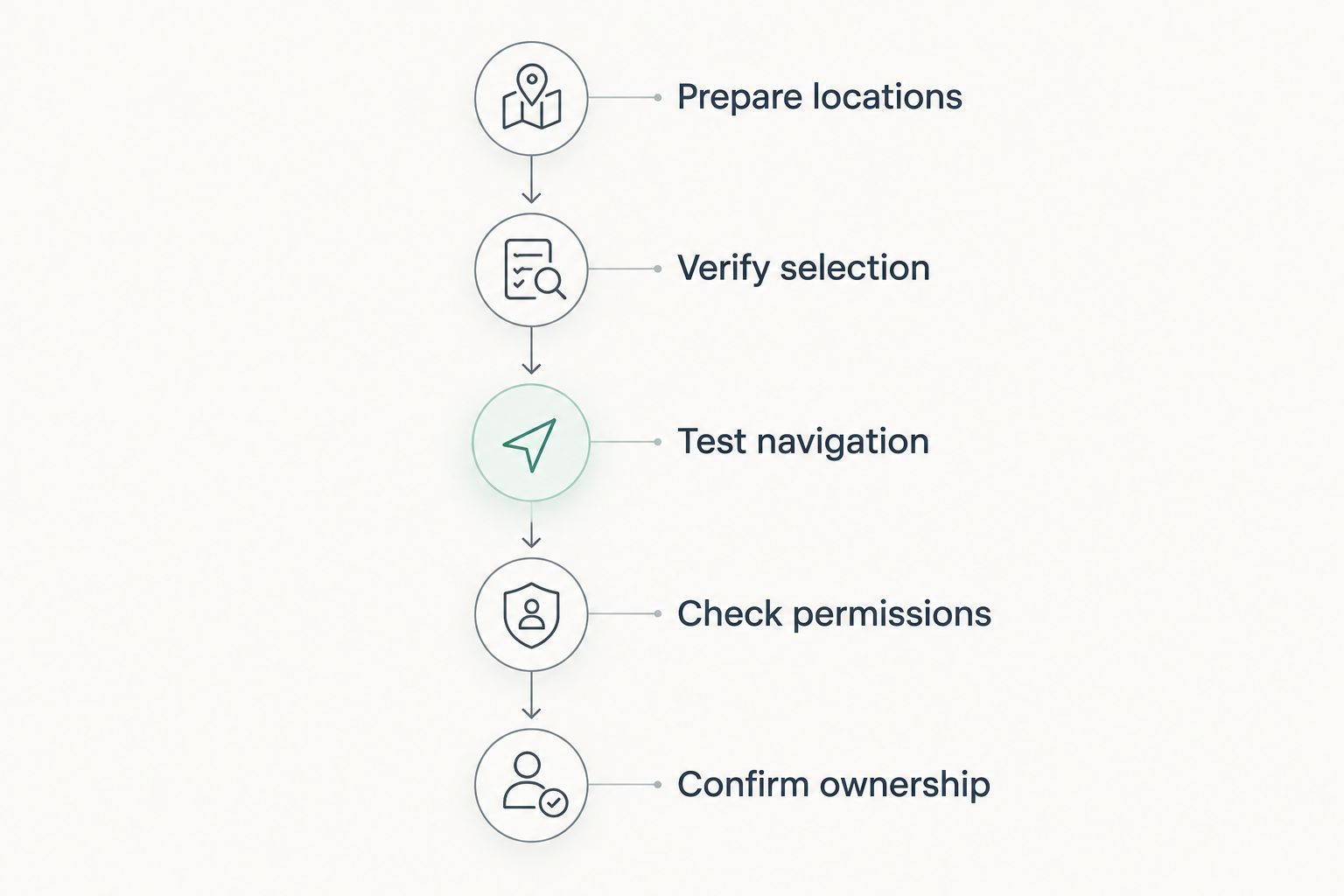
Validate the map before building the rest of the screen
Use the same acceptance sequence for every shortlisted Salesforce map component for Flow Builder. Keeping the tests consistent makes differences visible before the component becomes embedded in a larger process.
Prepare locations
Create separate fixtures containing 1 record, 10 records, and 100 records. These are suggested test sizes, not published component limits or performance benchmarks.
Include complete addresses, missing location fields, and overlapping locations. Check that labels and record identifiers remain distinguishable even when locations share the same coordinates.
Verify selection
Decide whether the screen is display-only or selection-based. For selection-based screens, verify that choosing a marker produces the identifier expected by the next Flow element.
Test the unselected state too. A required choice needs a clear validation response rather than an empty value that fails later.
Test navigation
Continue to the next screen, return to the map, and inspect the selected state. Define whether the previous selection should persist or reset, then verify that behaviour deliberately.
Also change the upstream inputs. A selection must not remain silently attached to a record that no longer belongs in the displayed result set.
Check permissions
Run the flow with the intended user's permissions, not only an administrator account. Confirm that the flow and component respect the access rules required for the data they retrieve and display.
If the deployment includes an Experience Cloud context, test that context explicitly. Success in an internal Lightning screen is not evidence of success in every other runtime.
Confirm ownership
Record who maintains the wrapper, package configuration, or custom integration. Include the acceptance sequence in release testing so changes do not silently break the map-to-Flow contract.
For a 2026 deployment, make this ownership decision before production approval—not after the first failed screen.
Which Salesforce map component should you choose?
Choose a Flow-enabled lightning-map wrapper by default when your requirement is to display record locations. It keeps the implementation focused, provided your team can maintain the wrapper.
Choose a managed-package map when configuration demonstrates the full requirement, including outputs and navigation behaviour. Choose a custom mapping LWC only when a documented interaction rules out the simpler options.
For the surrounding UI, evaluate Avonni's Flow Screen components as a separate library decision. A component library and a mapping implementation should each earn their place against the screen's requirements.
FAQ
What's the best Salesforce map component for Flow Builder in 2026?
A Flow-enabled lightning-map wrapper is the default choice for straightforward record-location display when your team can maintain an LWC. Choose a managed-package map for verified configuration-led delivery, or a custom mapping LWC for a specific unmet interaction.
Can I put lightning-map directly on a Flow screen?
Use a Flow-enabled LWC wrapper to expose lightning-map through a Flow screen component. The wrapper defines the properties and behaviour that connect the map to your flow.
Can a Salesforce Flow map return a selected record?
A map can return a selected record identifier when its Flow integration implements that output. Verify that marker selection updates a Flow-facing value rather than only changing the map's visual state.
Is a managed-package map better than a custom LWC?
A managed-package map is the better fit when its demonstrated configuration meets your requirements and you prefer not to maintain the mapping implementation. A custom LWC fits a documented interaction that the packaged option cannot support.
Does Avonni belong on a Flow component shortlist?
Avonni belongs on a shortlist for packaged Salesforce Flow Screen UI components. Evaluate any map-specific requirement separately against the exact component's documented and demonstrated behaviour.
How many records should I use when testing a Flow map?
Use representative datasets, including suggested fixtures of 1 record, 10 records, and 100 records. These are test scenarios, not component limits; add datasets that reflect your actual process.
What should I verify before approving a map for production?
Verify location inputs, selection outputs, navigation behaviour, intended-user permissions, and maintenance ownership. Run those checks in the actual deployment context rather than relying on an administrator demonstration.
One last thing
The decisive map test happens after the user selects a pin. Inspect the value the next Flow element receives, then return to the screen and check the selection again.
For your 2026 implementation, approve that round trip before polishing the map. A useful location display and a dependable guided workflow are not the same deliverable.