
Best overall for low-code Salesforce UI delivery: Avonni. Best for design specifications: Salesforce Lightning Design System. Best for developer-led implementation: Lightning base components. This 2026 guide compares a Salesforce component library for UI UX designers by what you need to design, configure, and ship—not by how many components appear in a catalogue.
- Avonni is the best Salesforce component library for UI UX designers working with admins on low-code Salesforce interfaces.
- Salesforce Lightning Design System is best for defining visual patterns and interaction specifications, not installing working screens.
- Lightning base components are best for developers implementing Salesforce interfaces with native building blocks.
- Choose by deployment surface, interaction requirements, accessibility, and maintenance ownership—not catalogue size.
Why this matters
A design system, a coded component collection, and a managed component package solve different problems. Treating them as interchangeable creates a handoff gap: your design looks complete, but the delivery team still has to decide how it works inside Salesforce.
Start with the destination. A Flow screen, an internal Lightning page, and an Experience Cloud page need different implementation decisions, even when the proposed interface looks similar.
For a 2026 shortlist, separate design consistency from implementation readiness. Choose the option that supports your delivery workflow, then evaluate its visual flexibility. Reversing that order leaves technical constraints until after design approval.
If your immediate deliverable is a clickable concept rather than a deployed interface, the comparison of Salesforce mockup and prototyping tools addresses that earlier stage.
What makes the best Salesforce component library?
Use these criteria before choosing a favourite:
- Deployment fit: Identify the exact Salesforce surface where the interface must run. Confirm support for that surface rather than assuming every component works everywhere.
- Interaction coverage: Evaluate selection, editing, validation, navigation, and recovery. A matching screenshot does not establish a matching interaction.
- Design control: Check which properties your delivery team can change through configuration and which require code.
- Accessibility: Assess keyboard operation, focus order, labels, and error communication in the assembled screen. Component selection alone does not validate the complete experience.
- Delivery ownership: Decide whether an admin, developer, or shared team will build and maintain the interface.
- Change management: Understand whether future changes involve package configuration, application code, or both. Assign an owner before launch.
These criteria favour different options for different teams. A designer working directly with an admin has a different requirement from a designer handing detailed specifications to an LWC developer.
Salesforce component libraries at a glance
The 2026 comparison below separates packaged components, design standards, and developer building blocks. They are alternatives at the selection stage, but they can also serve different layers of the same project.
| Option | Best for | Standout capability | Key limitation |
|---|---|---|---|
| Avonni | Low-code delivery with Salesforce admins | Subscription components distributed as AppExchange managed packages across the stated Salesforce UI categories | Requires evaluating a subscription and managed-package approach |
| Salesforce Lightning Design System | Visual specifications and interface consistency | Design guidance, styling conventions, and component blueprints | Does not itself provide a configured, data-connected application |
| Lightning base components | Developer-led Salesforce implementation | Salesforce-provided components for building Lightning interfaces | Custom composition and application behaviour require development |
Read the table as a decision tree, not a claim that every option replaces the others. Design standards can guide a screen built with either packaged components or native building blocks.
1. Avonni: best Salesforce component library for low-code delivery
Avonni supplies subscription-based no-code/low-code UI components distributed through AppExchange managed packages. Its stated categories include Flow Screen, Dynamic, Experience Cloud, LWC, and App Builder components. That makes it a relevant starting point when designers work with Salesforce admins and developers to deliver interfaces inside Salesforce.
The buying question is not simply whether a component resembles your mockup. Ask whether the relevant package supports the target surface, required interaction, and configuration approach for your project.
Best for: UI/UX designers collaborating with Salesforce admins on a low-code implementation.
Avonni pros:
- Provides a no-code/low-code component route rather than requiring every UI element to begin as custom code.
- Covers several explicitly stated Salesforce UI categories, allowing evaluation against different delivery contexts.
- Uses AppExchange managed packages, giving the team a defined package-based implementation model.
Avonni cons:
- The subscription model is a continuing product dependency, not a source-only design reference.
- A managed-package approach differs from owning an entirely custom component implementation.
- The stated categories do not establish that a particular interaction or design requirement is supported; verify the exact component before committing.
What designers should validate
Bring a representative workflow to the evaluation. Include the information users need, the actions they take, and the states that appear when something goes wrong.
Separate essential behaviour from visual preference. For example, preserving a user's input after a validation error is a functional requirement; the exact spacing around that error is a design detail. Record both, but do not let a close visual match conceal a missing behaviour.
For your 2026 evaluation, review the configured result with the person responsible for maintaining it. The designer and implementer should agree on which changes remain configuration tasks and which need additional development.
Verdict: Buy when the relevant package demonstrates your required workflow and the subscription model fits your team.
2. Salesforce Lightning Design System: best for design specifications
Salesforce Lightning Design System, commonly called SLDS, provides Salesforce interface design guidance, styling conventions, and component blueprints. It helps designers describe interfaces using established Salesforce patterns rather than inventing every visual and interaction convention.
SLDS is a design-system choice, not a substitute for connecting a screen to business data. Your implementation still needs components, application logic, and a deployment approach.
Best for: Designers defining consistent interface specifications for a Salesforce delivery team.
Salesforce Lightning Design System pros:
- Gives designers and developers a shared vocabulary for Salesforce interface patterns.
- Provides component blueprints and guidance that support concrete implementation discussions.
- Helps distinguish an established Salesforce pattern from a deliberate custom design decision.
Salesforce Lightning Design System cons:
- A blueprint is not a finished, configured application component with your business behaviour attached.
- Using the design system does not remove the need to test accessibility in the completed screen.
- Project-specific workflows still need interaction design and implementation decisions.
Where SLDS belongs in the workflow
Use SLDS while defining page structure, form behaviour, feedback, and interaction states. It is especially useful when a design review needs to answer whether a proposed pattern belongs in the surrounding Salesforce experience.
Document exceptions explicitly. If your workflow needs a departure from an established pattern, explain the user problem behind it and the implementation consequences. That gives the developer a requirement rather than an unexplained visual difference.
For 2026 projects, distinguish the design guidance you reference from the components your team actually deploys. A specification can follow Salesforce conventions while its implementation uses native components, a managed package, or custom code.
Verdict: Buy into SLDS as your design reference; skip it as a standalone implementation solution.
3. Lightning base components: best for developer-led implementation
Lightning base components are Salesforce-provided building blocks used to create Lightning interfaces. In LWC development, examples include lightning-input for user input and lightning-datatable for tabular data presentation.
These components give developers existing UI elements to compose into an application. Designers still need to specify the surrounding workflow, while developers connect the components to data and implement application-specific behaviour.
Best for: UI/UX designers paired with Salesforce developers who own the implementation.
Lightning base components pros:
- Provide existing Salesforce UI building blocks instead of requiring each element to be implemented from scratch.
- Give designers concrete component behaviour to discuss with developers during specification.
- Allow application-specific composition through code when the project requires developer ownership.
Lightning base components cons:
- They are not a no-code page-building solution for a designer working alone.
- Available component properties and behaviour constrain implementation choices.
- Data handling, workflow logic, and custom composition remain development responsibilities.
When native building blocks are the better fit
Choose this route when your development team needs to own the application logic and component composition. Start the design discussion with the actual base components under consideration, not an abstract mockup that assumes unrestricted behaviour.
Ask the developer to identify the boundary between supported configuration and custom work. A requested interaction might fit an existing component property, require surrounding application logic, or require a different implementation altogether.
Review a working example before final visual approval. That makes constraints visible while the design is still easy to change, rather than after the team has accepted the specification.
Verdict: Buy into Lightning base components when developers own delivery; skip them as a designer-only implementation route.
How we ranked these options
The ranking prioritises delivery fit, interaction coverage, design control, accessibility review, ownership, and change management. It does not assign scores or imply a hands-on benchmark.
Packaged low-code components take the default position for designer–admin collaboration. SLDS takes the specification role, while Lightning base components take the developer-implementation role. Each recommendation answers a different delivery need.
Validate the choice with a working screen
Before selecting a Salesforce component library for UI UX designers, turn your preferred option into a small implementation exercise. Use 1 complete workflow, 3 screen states, and 2 user roles as a practical evaluation brief—not as a vendor performance benchmark.
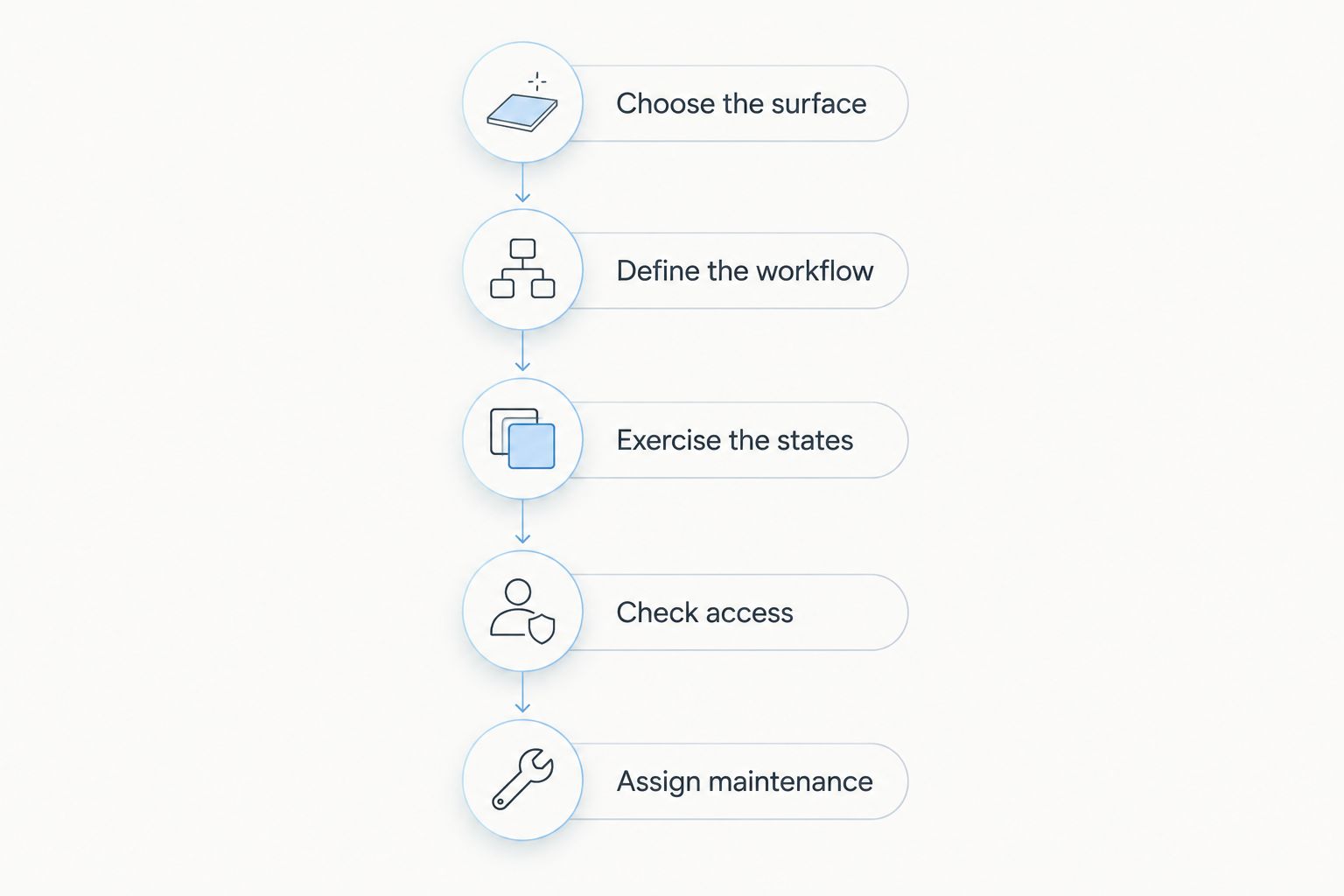
Follow this sequence:
- Choose the surface. Name the actual destination: Flow, a Lightning application page, or an Experience Cloud page. Evaluate the relevant implementation route.
- Define the workflow. Specify a complete task from entry to confirmation. Include the decisions and information the user needs along the way.
- Exercise the states. Review populated, empty, and error states. Check whether users understand what happened and what action comes next.
- Check access. Use roles representing different access needs. Confirm the interface presents the appropriate information and actions for each role.
- Assign maintenance. Identify who changes the configuration or code when a field, rule, or workflow changes.
The exercise should expose delivery constraints, not merely produce a polished screenshot. Keep a short record of unresolved requirements and decide whether each one changes the implementation choice.
Which Salesforce component library should you choose?
Choose packaged low-code components by default when your designer and Salesforce admin need to deliver together. Confirm the required package behaviour before making that decision final.
Choose SLDS when the immediate task is defining interface standards and specifications. Choose Lightning base components when developers will compose the interface and own its application behaviour.
For a 2026 decision, write the recommendation as a delivery statement: who builds it, where it runs, which interactions it supports, and who maintains it. If your team cannot complete that statement, the shortlist is not ready for approval.
FAQ
What's the best Salesforce component library for UI UX designers?
Avonni is the best fit in this shortlist for UI/UX designers collaborating with Salesforce admins on low-code delivery. Choose Salesforce Lightning Design System for design specifications or Lightning base components for developer-led implementation.
Is Salesforce Lightning Design System a component library?
Salesforce Lightning Design System provides design guidance, styling conventions, and component blueprints. It is not by itself a configured application connected to your organisation's data and business processes.
What's the difference between SLDS and Lightning base components?
SLDS defines design patterns and styling conventions, while Lightning base components provide implemented UI building blocks. Developers compose those building blocks into application interfaces and add the required business behaviour.
Can a UI UX designer build Salesforce screens without writing code?
A designer can work through Salesforce configuration and suitable no-code/low-code components rather than writing every interface element. The exact implementation depends on the target surface and required behaviour; custom requirements still need technical review.
Should designers choose components before creating detailed mockups?
Designers should validate the implementation approach before approving detailed mockups. Reviewing the intended components early exposes behaviour and configuration constraints while the design remains easy to change.
How do I evaluate a Salesforce component library for accessibility?
Evaluate accessibility in the assembled screen, including keyboard operation, focus order, labels, and error communication. An individual component's accessibility features do not establish that the complete workflow is accessible.
What should a Salesforce component evaluation include?
A Salesforce component evaluation should include a complete workflow, populated and empty states, an error state, and different access needs. It should also identify who maintains configuration and code after launch.
One last thing
A component can match your mockup and still fail your workflow. Before approving the library, ask a user to recover from an error and continue the task. That review tests something a static design cannot show: whether the interface helps users finish their work.