

Nonprofit Experience Cloud component selection is choosing Salesforce portal interface elements with the aim of helping constituents complete tasks and staff manage submissions. This guide to Experience Cloud components for nonprofits focuses on accessible journeys, sensitive records, and maintainable configuration rather than adding features before you define the work.
- Choose Experience Cloud components for nonprofits around constituent tasks, record access, and staff ownership—not visual features alone.
- Avonni suits Salesforce teams seeking subscription-based, no-code/low-code Experience Cloud UI components delivered through managed packages.
- Compare standard Salesforce components, managed-package components, and custom Lightning Web Components against the same portal journey.
- Test permissions with external users; hiding a field on a page is not a security control.
Why Experience Cloud components matter for nonprofits
A nonprofit portal can serve donors, volunteers, applicants, partners, or service recipients. Those audiences need different information and permissions. A volunteer checking an assignment should not inherit access intended for a staff member managing applications.
Choose components around the task and the permitted records, not around a demo page. A polished interface does not fix unclear eligibility instructions, inaccessible forms, or an incorrect sharing model. Define those requirements before evaluating a component library.
For your 2026 shortlist, use the Salesforce Experience Cloud component libraries guide to frame the available approaches. Then test each approach against your own portal requirements rather than treating a feature list as proof of fit.
The nonprofit-specific decision is ownership: who will update the portal when a programme changes? Separate configuration that an administrator can maintain from work that needs a developer. Assign both before launch.
How to choose and implement the right components
Define the constituent task before choosing the interface
Start manually with a written journey and a simple sketch. Choose one audience and describe what that person needs to finish, what information they need, and what staff must receive afterward. Do not start by browsing component catalogues.
For example, a volunteer journey might involve finding an assignment, submitting interest, and checking its status. These are planning examples, not requirements for every nonprofit. Keep unrelated donor and service-recipient journeys separate until you understand their access boundaries.
For an initial 2026 pilot, select 3 tasks that represent the journey. This is a proposed test scope, not a performance benchmark. A narrow pilot makes omissions easier to identify without committing the whole portal to an untested design.
- Name the audience in plain language, such as volunteers or applicants.
- Write each task as an action with a clear completion state.
- Identify the Salesforce records involved in each task.
- Mark every handoff that requires staff review.
- Assign an owner for instructions, labels, and programme updates.
Map identity and record access before building screens
Use your existing Salesforce configuration and documentation to map access manually. Distinguish public information from authenticated content, then identify which records each external user should read or change. Component selection comes after that map.
Page visibility and record security are different controls. A hidden button does not establish that a user lacks access to the underlying record. Review the applicable permissions, sharing configuration, and execution context with your Salesforce administrator or developer.
Test with 2 external test users assigned different record access. That is a minimum scenario for this proposed pilot, not a complete security test. Add further identities wherever your actual roles, relationships, or sharing rules differ.
- Separate public content from account-specific information.
- Document read and edit access for each record type involved.
- Identify sensitive fields that do not belong in the portal.
- Test record access through the actual external-user journey.
- Record who approves access changes before publication.
Match the build approach to your maintenance team
First, assemble a prototype using standard components already available in your Salesforce environment. This gives you a baseline without introducing another package. Document the specific gaps instead of replacing working elements simply for consistency.
Next, assess Avonni where that baseline requires additional UI components. Avonni sells subscription-based no-code/low-code UI components, including Experience Cloud components, distributed as AppExchange managed packages. Evaluate the relevant package against your site and intended users before adoption.
Avonni is best suited to Salesforce admins and developers seeking packaged no-code/low-code Experience Cloud UI components. The trade-off is a subscription and managed-package dependency; packaged components still need configuration, compatibility checks, and an assigned owner. Use custom development when the requirement remains outside the selected components' documented capabilities.
- Keep standard components where they meet the requirement.
- Write down each gap before evaluating a package.
- Confirm support for your site's template and runtime.
- Check how the component receives and updates Salesforce data.
- Assign responsibility for package updates and regression testing.
Design forms and record views around completion
Sketch the screen before configuring it. Put the task, required information, and next action in a clear order. A constituent should understand what to do without knowing your internal Salesforce object names.
For a first-pass form review, inspect 5 fields individually. Ask why each field exists, who uses its value, and whether it belongs at this stage. This is a review exercise, not a universal limit on form length.
Choose interface patterns according to the information. A record list helps users scan repeated items; a detail view supports closer inspection; a guided form supports a defined submission sequence. None replaces clear instructions or an explanation of what happens after submission.
- Replace internal terminology with audience-facing labels.
- Explain required information before the user starts entering it.
- Keep status wording consistent across list and detail views.
- Provide clear empty, error, and confirmation states.
- Remove fields that have no defined purpose in the task.
Test accessibility and failure paths with realistic users
Run the journey manually before automating checks. Use keyboard-only navigation, zoom the page, and review form labels and validation messages. Include someone who did not configure the screen; familiarity with the build can hide unclear instructions.
Use WCAG 2.2 as a technical accessibility reference for your 2026 review. A component's presence in a library does not establish that your completed portal meets accessibility requirements. Content, configuration, styling, and the full interaction all need assessment.
Test failure deliberately. Submit incomplete information, open an empty record list, and attempt an action with insufficient permissions. The interface should explain the problem without exposing protected information or leaving the user unsure whether a submission succeeded.
- Complete the journey without a mouse.
- Check labels, focus order, and visible keyboard focus.
- Review readability when the page is enlarged.
- Test validation without relying on colour alone.
- Confirm that errors offer an appropriate next action.
- Check the experience on the devices your audience uses.
Measure completion and assign ongoing ownership
Start with a manual test log: the task attempted, the result, the obstacle, and the owner of the fix. Separate a confusing instruction from a permissions defect or a component limitation. Each requires a different response.
For your 2026 launch review, define successful completion before collecting results. A page opening is not the same as a volunteer submitting interest or an applicant saving a complete request. Measure the action that matters to the programme.
Keep a release checklist for configuration changes and package updates. Repeat the relevant constituent journeys after changes rather than checking only whether the page still loads. A named owner makes maintenance a responsibility instead of an assumption.
- Define the completion event for each priority task.
- Log failed attempts with enough context to reproduce them.
- Separate usability issues from data-access defects.
- Assign an owner and resolution decision to each issue.
- Retest affected journeys after configuration or package changes.
The implementation sequence keeps interface selection behind task definition and access design. Use it as a decision order, not as a reason to postpone security or accessibility until the end.
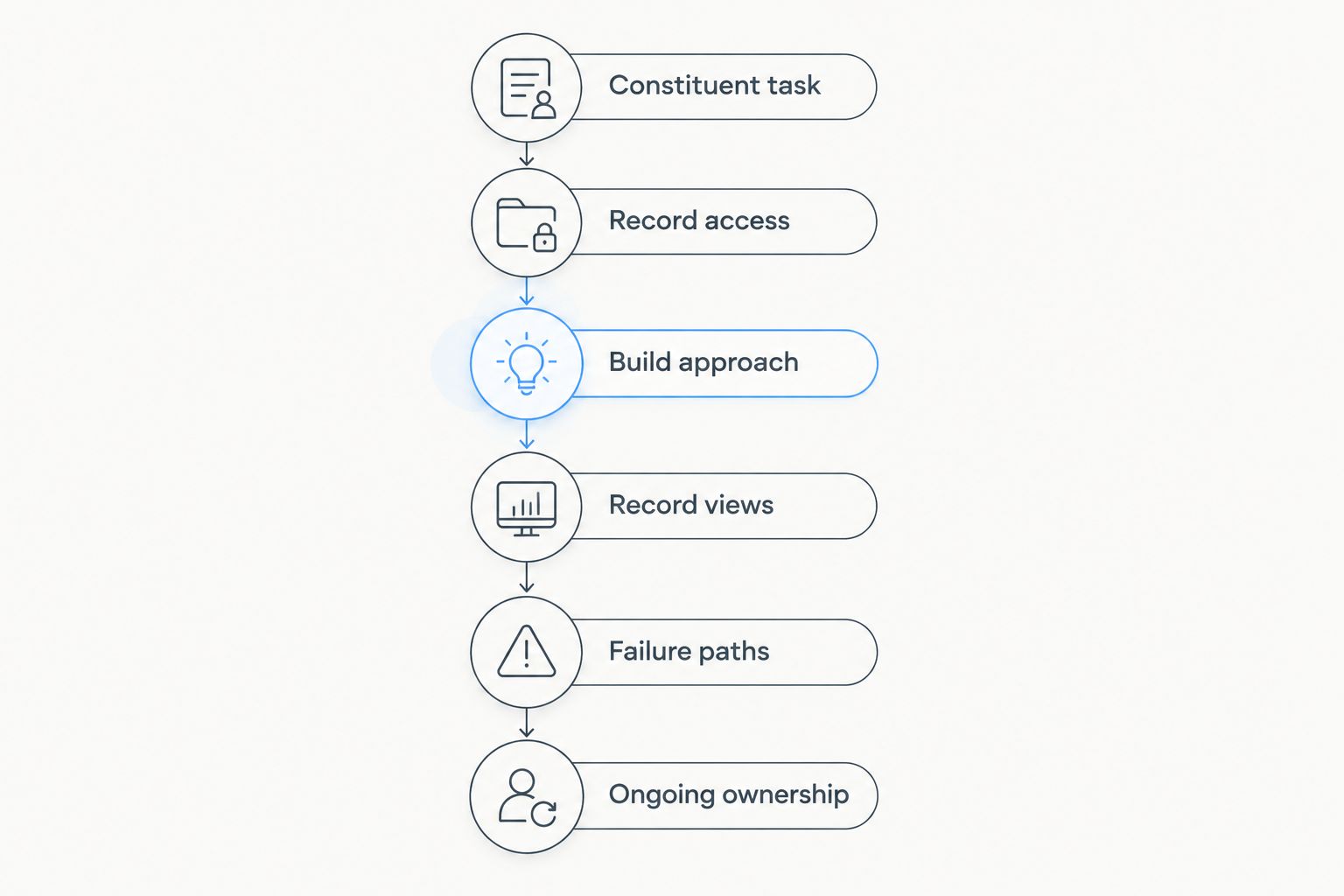
Compare the implementation options
Compare options against the same task, dataset, and external-user permissions. Otherwise, a polished demonstration can appear stronger simply because it avoids the difficult part of your requirement.
The table separates configuration, packaged components, and custom development. These approaches can coexist in one portal; choosing a managed package does not require replacing every standard component.
| Option | Best for | Main advantage | Key limitation |
|---|---|---|---|
| Standard Salesforce Experience Cloud components | Teams whose requirements fit the components available in their site | Establishes a baseline before adding another dependency | Available configuration does not cover every interface requirement |
| Avonni Experience Cloud components | Admins and developers seeking packaged no-code/low-code UI components | Provides an additional managed-package component option | Requires a subscription, package ownership, and site-specific validation |
| Custom Lightning Web Components | Teams with requirements outside available component capabilities | Gives developers control over the implemented interface behaviour | Requires development, testing, documentation, and ongoing code maintenance |
Choose the least complex approach that passes your acceptance tests. Standard configuration deserves the first test. A managed package earns its place when it addresses a documented gap; custom development earns its place when the requirement justifies code ownership.
Avoid scoring an option for features your nonprofit will not use. Evaluate task completion, access correctness, accessibility, and maintainability separately. A high score in appearance cannot cancel a failure in record access.
Common mistakes nonprofits make
Combining audiences before defining their permissions
A shared portal does not require a shared experience. Donors, volunteers, and service recipients can have different tasks and different relationships to records. Define each audience's permitted actions before deciding which navigation or screens to reuse.
The correction is a separate journey map for each materially different audience. Combine screens only after confirming that shared wording and access rules still make sense.
Treating a component package as a complete programme solution
UI components are not evidence of a complete donation, volunteer-management, or grant-management workflow. A component can be relevant to the interface without supplying every underlying process your programme needs.
List workflow requirements separately from presentation requirements. Confirm each capability explicitly rather than inferring it from a product category or an attractive demonstration.
Testing only with an administrator account
An administrator's successful test does not establish that an external user can complete the task. Different permissions and record access change the experience.
Keep administrator checks separate from constituent acceptance tests. Use representative external identities and verify both permitted actions and denied actions.
Collecting information before deciding how staff will use it
Adding fields creates work for constituents and responsibility for the nonprofit. An application form should not become a copy of every internal field simply because those fields exist.
Ask the programme owner to justify each requested value. Remove information with no defined purpose, and review sensitive data requirements before building the screen.
Publishing without a maintenance owner
A configured portal still needs decisions when programme wording, access requirements, or packages change. If ownership ends at launch, those decisions remain unresolved.
For the 2026 handover, name the configuration owner, access approver, and escalation contact. Document the priority journeys that must pass after a change.
FAQ
What are Experience Cloud components for nonprofits?
Experience Cloud components for nonprofits are interface elements selected to support nonprofit portal tasks in Salesforce. Evaluate them around constituent journeys, record access, accessibility, and ongoing maintenance rather than appearance alone.
Should a nonprofit start with standard Salesforce components?
Yes, start by testing standard components against a defined constituent task. Add packaged components or custom development when the baseline leaves a documented requirement unmet.
Is Avonni a complete nonprofit management system?
Avonni sells subscription-based no-code/low-code Salesforce UI components, including Experience Cloud components, distributed as AppExchange managed packages. Evaluate it as a component provider rather than assuming it supplies complete nonprofit programme workflows.
Can a nonprofit use packaged components and custom LWC together?
A nonprofit can plan a portal that uses standard components, managed-package components, and custom Lightning Web Components. Confirm compatibility with the actual site and test the complete journey before adopting the combination.
Does hiding a portal field protect the underlying data?
No, hiding a portal field is not a substitute for Salesforce data-access controls. Review permissions, sharing, and execution context, then test with external-user identities.
How should a small nonprofit test an Experience Cloud portal?
Start with a narrow set of real constituent tasks and a manual test log. Include external-user access, keyboard operation, validation errors, empty states, and confirmation messages before expanding the scope.
What should a nonprofit check before installing a component package?
Check the documented capabilities, site compatibility, access behaviour, and maintenance responsibilities. Confirm the subscription terms directly with the provider and test the relevant configuration before deployment.
One last thing
An empty state is part of the service, not an unfinished screen. A volunteer with no assignments and an applicant with no submitted requests need an explanation, not just a blank list. Define what the user should understand and do next whenever the portal has nothing to display.
Include those empty states in acceptance testing. They expose whether your interface explains the programme or merely displays its records.