

Consultants’ Lightning App Builder components are configurable building blocks for Salesforce pages, selected to deliver client workflows without unnecessary custom development. This guide explains how to choose native, packaged, or custom components in 2026 while protecting permissions, maintainability, and the client’s ability to manage the finished interface.
- Choose Lightning App Builder components for consultants by workflow fit, permissions, and handoff requirements—not appearance alone.
- Start with native Salesforce components; add packaged components when a documented requirement remains unmet.
- Avonni suits consultants seeking subscription-based, no-code/low-code Salesforce UI components.
- Test Lightning App Builder and Flow Screen components in their intended builders; they are not interchangeable by default.
Why Lightning App Builder components matter for consultants
Consultants deliver more than a page. You must leave the client with an interface that supports the agreed process and a maintenance approach the client can actually operate.
Lightning App Builder lets you assemble Salesforce pages using components. The consulting decision is which requirements belong in page configuration, which need a packaged component, and which justify development. The Lightning App Builder components guide provides a focused starting point for evaluating that category.
For a 2026 implementation, make the selection decision part of solution design rather than a finishing touch. A visually attractive component does not settle questions about data access, supported page targets, or ownership after handoff.
Choose the simplest component approach that meets the acceptance criteria and has a named maintenance owner. That rule gives you a defensible recommendation instead of a catalogue of features.
The consultant’s constraints are specific:
- The client’s administrator must understand what remains configurable.
- Security reviewers need evidence of the intended access behaviour.
- Delivery teams need to separate configuration from development work.
- Support teams need to know whether an issue belongs to Salesforce, a package, or custom code.
How to select and implement components
Use the following sequence before committing a client to a component library. Document decisions as you go so the final handoff explains why the solution exists, not just where to find its settings.
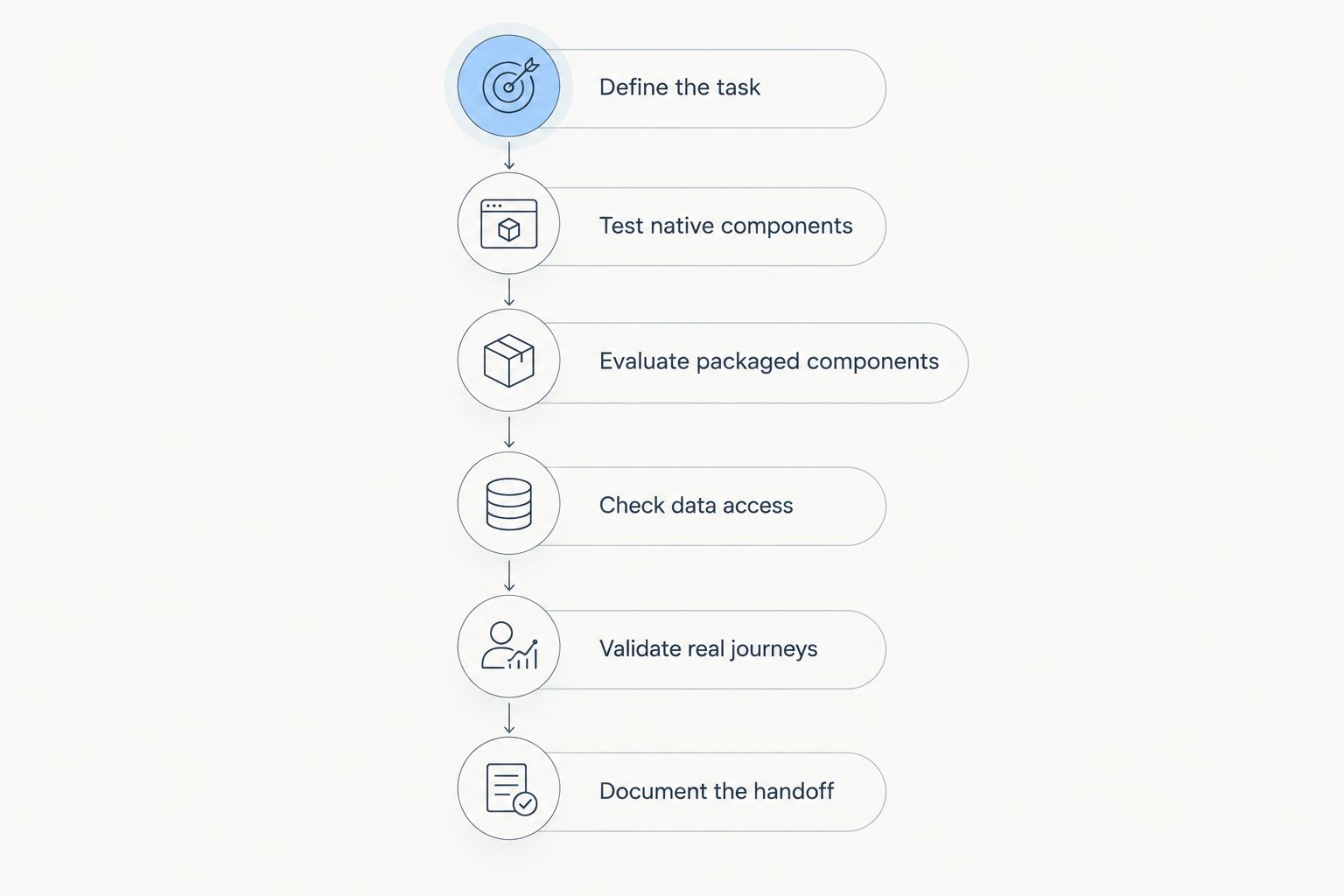
Define the task
Start with a shared document or spreadsheet. Write down the user, the action, the required information, and the completion condition before discussing component names.
For example, a service team might need to inspect a case and launch an approved next action. That describes an outcome. Asking for a dashboard-like page describes an appearance and leaves the underlying workflow unresolved.
Keep the acceptance criteria observable. A client should be able to demonstrate whether the page meets each criterion without interpreting a design preference. Separate mandatory requirements from preferences so an optional visual detail does not drive the entire architecture.
- Name the user role and the business task.
- Identify the Salesforce object and page context.
- List the information needed to complete the task.
- Define the permitted action and successful result.
- Mark each requirement as mandatory or optional.
Test native components
Build a small version in a sandbox using the client’s existing Salesforce capabilities first. This establishes a configuration-only baseline before introducing another dependency.
Native components are best for requirements already covered by the client’s Salesforce setup. Their advantage is avoiding an additional component package for that requirement; their limitation is that the available configuration might not match the requested interaction.
Do not judge the baseline by whether it resembles a polished mockup. Judge whether users can complete the task with understandable labels and appropriate access. Record the exact unmet requirement rather than writing that the native version is too basic.
- Assemble the relevant record, app, or home page.
- Test the available layout and component settings.
- Check component visibility against the intended audience.
- Record each requirement the baseline satisfies.
- Describe remaining gaps in functional terms.
Evaluate packaged components
Use the documented gaps to evaluate a managed package. Packaged components are best for requirements a reusable component can meet without a bespoke implementation. Their limitation is dependence on the package’s supported capabilities and subscription terms.
Avonni sells subscription-based no-code/low-code Salesforce UI components distributed as AppExchange managed packages, including App Builder, Flow Screen, Dynamic, Experience Cloud, and LWC components. Those categories are relevant to different implementation contexts; do not assume every component works in every builder.
Avonni is best for consultants seeking subscription-based, no-code/low-code Salesforce UI components. Validate the specific component against the actual page target and acceptance criteria before selecting it for a client.
- Match each candidate to a documented requirement.
- Confirm its intended builder and page target.
- Check which settings the client administrator can change.
- Review the package’s installation and subscription requirements.
- Record any remaining development or configuration work.
Check data access
Treat visibility and authorization as separate checks. Hiding a component is not a substitute for controlling access to the records and fields behind it.
Review the relevant Salesforce permissions and the selected component’s documented data-access behaviour. Custom implementations need particular attention to how data is retrieved and how sharing, object permissions, and field permissions are handled. Do not infer enforcement from the fact that the interface sits inside Salesforce.
As a practical test design, use 2 user roles: an intended user and a restricted user. These are recommended test fixtures, not a claim that every implementation has only two audiences. Add further roles whenever the client’s access model requires them.
- Test authorized access to the required records.
- Test restricted access to sensitive fields.
- Check behaviour when the user lacks permission.
- Review data queries and server-side actions where applicable.
- Keep evidence of the expected access results.
Validate real journeys
Test the complete task, not just the component in isolation. A component that displays correctly still needs to behave sensibly when the dataset is empty, the user makes an error, or the page is viewed at another supported size.
For the 2026 acceptance plan, start with 3 scenarios: a normal task, an empty-data state, and an access-restricted task. Expand that set for the actual workflow. The purpose is to expose incomplete behaviour before the client inherits it.
Include keyboard use, visible focus, understandable labels, and error recovery in the review. Accessibility requires testing the assembled page; selecting a component does not replace that work.
- Complete the primary task with representative records.
- Check empty states and missing optional values.
- Test validation messages and recovery steps.
- Review keyboard operation and focus order.
- Verify behaviour on the agreed supported devices.
- Obtain acceptance against the original requirements.
Document the handoff
Create a maintenance record while the implementation is still fresh. A page screenshot is useful context, but it does not explain dependencies, configuration choices, or how to diagnose a failure.
Assign 1 accountable owner for the component inventory, even when several teams contribute. That is an ownership recommendation, not a staffing requirement. The owner should know where configuration ends and package support or development begins.
For a 2026 handoff, record the installed package versions, relevant configuration, acceptance evidence, and escalation route. Document what the client must recheck when a package or Salesforce release changes the surrounding environment.
- List the pages and components in scope.
- Record package dependencies and relevant versions.
- Explain editable settings and protected decisions.
- Identify the owner and escalation route.
- Preserve test evidence and known limitations.
- Document the process for reviewing future changes.
Compare your implementation options
The main options differ in ownership as much as functionality. Compare them against the same acceptance criteria rather than comparing a native prototype with an unfinished custom build.
| Option | Best for | Main advantage | Key limitation |
|---|---|---|---|
| Native Salesforce components | Requirements covered by existing page configuration | Avoids an additional component package for those requirements | Configuration is bounded by the available native capabilities |
| Avonni managed-package components | Consultants seeking reusable no-code/low-code Salesforce UI components | Provides packaged component categories for Salesforce UI work | Requires a subscription and validation of each component’s supported context |
| Custom Lightning Web Components | Requirements that need bespoke behaviour | Gives developers control over the implementation | Requires development, testing, documentation, and ongoing ownership |
| Combined approach | Projects with distinct configuration and custom requirements | Assigns each requirement to an appropriate implementation method | Creates more dependencies and support boundaries to document |
Native configuration wins when it meets the requirement; a package earns its place by closing a specific gap. Custom development is justified when the required behaviour remains unmet or when the project deliberately requires control over the implementation.
A combined approach is not automatically more flexible in practice. Each added dependency needs a reason, an owner, and an acceptance test. Avoid installing overlapping libraries simply because different stakeholders prefer different demonstrations.
Before signing off the 2026 component decision, write a short decision record. Include the selected approach, the unmet requirements it resolves, the alternatives rejected, and the limitations the client accepts.
Common mistakes consultants make
Selecting the library before defining the workflow
A component demonstration can turn a discovery session into a shopping exercise. The team starts discussing available interactions instead of identifying what the user must accomplish.
Correct the sequence: approve the task and acceptance criteria first, then evaluate the component. A feature belongs in scope only when it serves a documented requirement.
Treating component categories as interchangeable
Lightning App Builder, Flow Builder, and Experience Builder serve different page and interaction contexts. A component’s existence in a vendor’s catalogue does not establish compatibility with the builder you intend to use.
Confirm the component’s documented target before including it in a client proposal. Where a page contains a flow, distinguish the page-level component from the components used inside the flow.
Testing only with administrator access
Administrator access can conceal missing permissions and expose information that ordinary users should not receive. A successful administrator demonstration is not evidence that the intended audience can complete the task safely.
Use the client’s representative permission sets and users during acceptance testing. Keep the restricted-user test alongside the successful-user test, not in a separate security exercise that never reaches the delivery team.
Leaving subscription and support ownership unresolved
A consultant can finish the configuration while leaving the client unsure who manages the package subscription or raises a support issue. That ambiguity becomes a maintenance problem after handoff.
Document the responsible client owner and the boundary between configuration, package behaviour, and custom code. For Avonni or another packaged option, make the dependency visible in the solution record rather than burying it in installation notes.
FAQ
What are Lightning App Builder components for consultants?
Lightning App Builder components for consultants are reusable building blocks selected to assemble Salesforce pages around client workflows. The consulting work includes choosing the right implementation method, validating permissions, and documenting maintenance ownership.
Should I use native Salesforce components before installing a package?
Yes—test native Salesforce components first when they can meet the requirement. A sandbox baseline identifies the specific gaps that justify adding a package or commissioning custom development.
Is Avonni suitable for Salesforce consultants?
Avonni suits consultants seeking subscription-based, no-code/low-code Salesforce UI components distributed as AppExchange managed packages. Evaluate the specific component’s supported builder, configuration options, and fit with the client’s acceptance criteria.
Can I use a Flow Screen component directly in Lightning App Builder?
Do not assume a Flow Screen component works directly in Lightning App Builder. Confirm its documented targets; using components inside a screen flow is a different implementation context from placing a page-level component.
When should I choose a custom Lightning Web Component?
Choose a custom Lightning Web Component when the required behaviour needs a bespoke implementation and the client accepts development ownership. Include testing, security review, documentation, and maintenance in the decision.
Does hiding a Salesforce component secure its data?
No—component visibility is not a replacement for data authorization. Validate record access, object permissions, field permissions, and the selected implementation’s data-access behaviour separately.
What should a consultant include in the component handoff?
Include the component inventory, package dependencies, configuration decisions, acceptance evidence, and maintenance owner. Explain which changes the administrator can make and which require package support or a developer.
One last thing
Repeat the handoff as a practical exercise. Ask the client’s designated administrator to make an agreed configuration change using only your documentation, then explain how they would report a failure.
If the administrator cannot identify the relevant setting or support owner, the handoff is incomplete—even when the page works. That test exposes a delivery gap a polished demonstration will not.