
Flow screen components for business analysts are configurable interface elements in Salesforce Screen Flows that help users enter information, review records, and complete business processes. This guide explains how to translate requirements into component choices, compare native controls with packaged and custom options, and test the resulting experience before release.
- Choose flow screen components for business analysts by task, data requirements, and acceptance criteria—not visual appeal.
- Start with native Salesforce Screen Flow controls; add packaged components only for an identified requirement.
- Avonni is best for teams seeking packaged, no-code/low-code Salesforce UI components.
- Test permissions, validation, navigation, and record updates before approving a Screen Flow.
Why Flow screen components matter for business analysts
Business analysts sit between process owners and Salesforce implementation teams. Your job is to define what users must accomplish, what information they need, and what counts as a correct result—not simply request a particular widget.
A component decision becomes a process decision when it changes which records users see, what they can edit, or how they recover from an error. A visually appropriate control is still the wrong choice if its outputs do not support the next step.
For a 2026 requirements review, separate the business task from the proposed interface. Write “select the account associated with this request” before specifying a lookup or table. That distinction keeps implementation choices open.
Use the Salesforce Flow screen component libraries guide to frame your shortlist after defining the task. Select the smallest component set that satisfies the approved requirements.
How to choose and specify your components
Define the business task before the screen
Start manually with a process sketch and a requirements document. Describe the trigger, the user, the information available at the start, and the business result expected at completion. You do not need an additional component package to do this work.
Write requirements as observable behaviour. “Make account selection easier” leaves the builder guessing; “let the user select an account and review its name before continuing” gives the team something testable. Keep presentation preferences separate from mandatory business rules.
Choose 1 primary action per screen as an initial design constraint for your prototype, not as a Salesforce platform limit. If a screen needs several unrelated actions, review whether those actions belong together. A user should understand what completing that screen achieves.
Finish the task definition before collecting component screenshots. Otherwise, the shortlist can become a catalogue of appealing controls without a shared reason to use them.
- Name the user role and the task that role performs.
- Identify the record or information that starts the process.
- Define the successful business outcome in plain language.
- Separate required behaviour from presentation preferences.
- Record exceptions that need a different path.
Map inputs, outputs, and permissions
Use a spreadsheet to map each proposed control to its data contract. Record what the component receives, what the user changes, and what the flow needs after the user continues. Review this map with your Salesforce admin or developer before building.
Distinguish what appears on screen from what gets saved. Selecting a row, changing a displayed value, and updating a Salesforce record are different requirements. Specify each explicitly rather than assuming that an editable-looking interface handles persistence.
Permissions belong in this discussion. A visibility rule is a presentation choice, not a substitute for checking the flow's execution context and the user's access. Ask the implementation owner to explain how access is enforced for the intended audience.
For your 2026 specification, document the expected behaviour when information is absent or inaccessible. An empty result should lead to a deliberate next action, not leave the user guessing whether the screen failed.
- List each input and its expected data type.
- Identify the output needed by the next flow element.
- Specify when changes must be written to records.
- Document empty, invalid, and inaccessible-data states.
- Confirm execution context and access requirements with the admin.
Prototype with native controls before adding a package
Build a basic version with native Salesforce Screen Flow controls first. Use it to test the task sequence, field labels, instructions, and decision points. A plain prototype can expose a missing business rule without adding a package dependency.
Next, list the requirements the native prototype does not satisfy. Describe the gap in functional terms: users need to compare records before selecting one, for example. Do not jump from that requirement to an assumed feature in a named library.
Avonni offers subscription-based no-code/low-code UI components distributed as AppExchange managed packages, including Flow Screen components. Avonni is best for teams seeking packaged, no-code/low-code Salesforce UI components. Evaluate its relevant components against the documented gap; do not assume that every component in its wider offering belongs on a Flow screen.
The trade-off is an additional subscription and managed-package dependency. Your 2026 evaluation should establish component behaviour, configuration requirements, and ownership before the team commits to that dependency.
- Build the task's basic path with native controls.
- Record the precise requirement each native control leaves unmet.
- Evaluate a packaged component against that requirement.
- Confirm that the candidate supports the intended Flow context.
- Retain the native option when it meets the acceptance criteria.
Compare options against the same acceptance scenarios
Create 5 acceptance scenarios for the first comparison: successful completion, missing required information, invalid input, an inaccessible record, and backward navigation. This is a suggested starter set, not a claim that five scenarios cover every process.
Run the same scenarios against each candidate. A native control, packaged component, and custom implementation deserve the same acceptance standard. Record the observed result rather than using labels such as “powerful” or “intuitive” without an explanation.
Keep separate notes for user experience and implementation fit. A component can make record selection clearer while requiring configuration your team is not prepared to maintain. Conversely, a familiar implementation can still make the business task unnecessarily difficult.
For the 2026 shortlist, give every result a clear status: meets the requirement, requires configuration, or does not meet the requirement. Treat undocumented behaviour as something to verify, not a feature to promise stakeholders.
- Use identical sample records for each candidate.
- Test the same successful and unsuccessful actions.
- Record what users see when validation fails.
- Verify whether selections persist when users return.
- Capture configuration work and unresolved dependencies.
Validate the complete flow with business users
Test the complete journey, not just the component in isolation. A control can work on its own while receiving the wrong input from an earlier step or sending an unsuitable output to the next one. Include the launch point and the final record outcome in the review.
Bring 3 reviewer roles into the acceptance exercise: a process owner, a representative end user, and a Salesforce implementation owner. These are responsibilities to cover; a small team can assign more than one responsibility to the same person.
Ask the end user to explain what they expect each action to do before selecting it. This exposes ambiguous labels without asking the reviewer to diagnose the design. Then compare the actual outcome with the requirement.
Record observations against specific criteria. “Looks good” is not approval that record updates, access controls, and error recovery work correctly. Keep the release decision tied to evidence from the full journey.
- Launch the flow from its intended entry point.
- Test with representative user permissions.
- Follow the successful path through the final record update.
- Interrupt the path with invalid or incomplete information.
- Confirm instructions make sense without builder assistance.
- Assign an owner to every unresolved acceptance issue.
Document ownership and retest before release
Finish with a handoff that another admin or developer can use. List the selected components, their purpose, their inputs and outputs, and the acceptance scenarios that demonstrate correct behaviour. Include the configuration decisions that are not obvious from the screen itself.
Separate component ownership from business ownership. The process owner approves the intended outcome; the implementation owner maintains the configuration and investigates technical failures. Make the escalation path explicit when the two responsibilities overlap.
For your 2026 release record, identify the component and package versions used during testing where applicable. Version information helps the next maintainer understand what was approved without implying that future updates will behave identically.
Define what triggers another review: a changed field, a revised permission model, a package update, or a new business rule. Approval applies to the tested configuration, not to every future variation of the screen.
- Record component names and relevant versions.
- Document inputs, outputs, and record-update behaviour.
- Assign business and implementation owners.
- Preserve the accepted test cases and results.
- List changes that require regression testing.
Compare implementation options
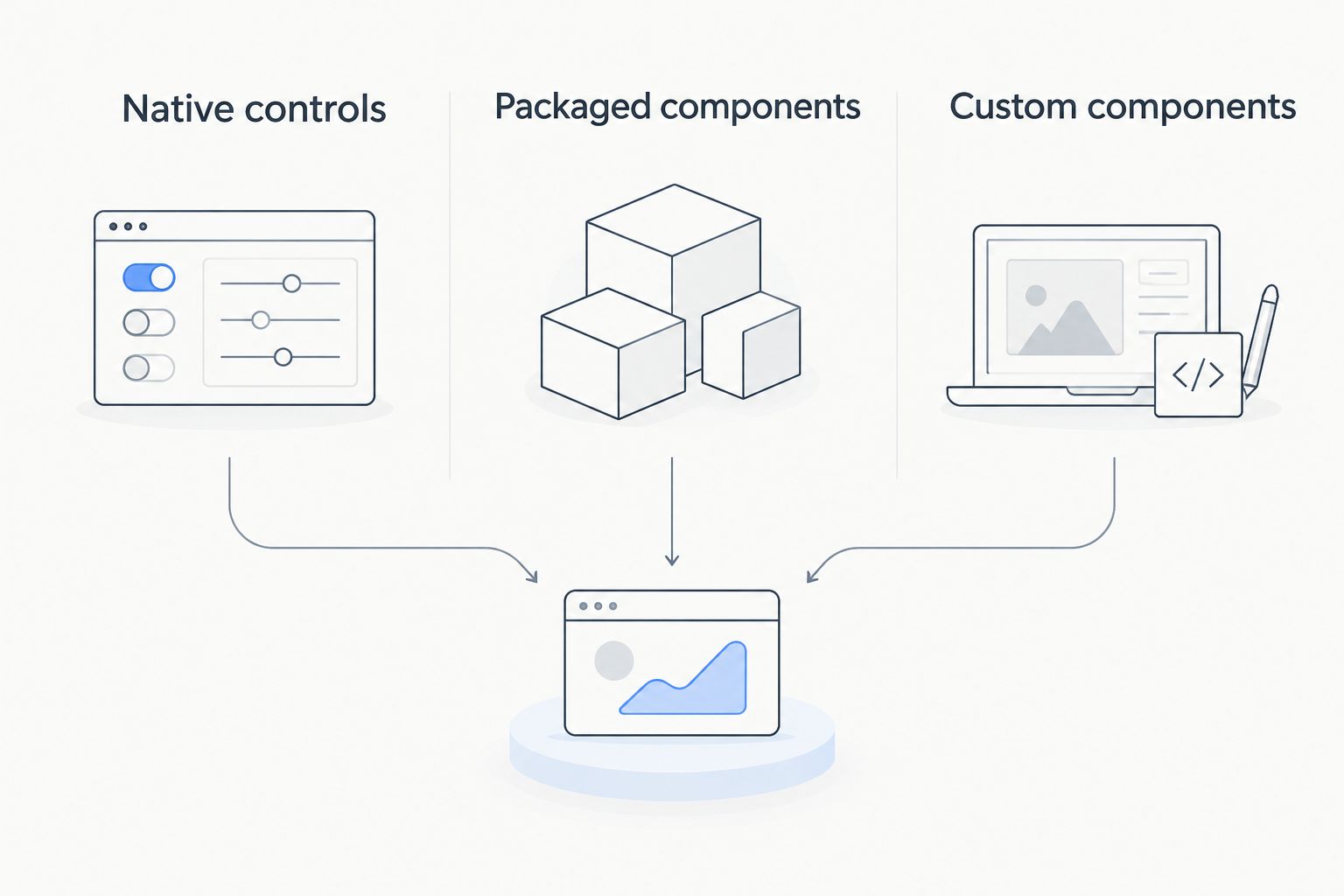
Native controls are the first option to test, not an automatic winner. Add a package or custom code when a specific requirement justifies the extra dependency or maintenance responsibility.
The comparison below distinguishes implementation approaches. It does not claim that every packaged component supports the same interactions or that custom development is necessary for a particular control.
| Option | Best for | Main advantage | Key limitation |
|---|---|---|---|
| Native controls | Tasks that fit standard Screen Flow controls | Start within the standard builder without an additional component package | Available controls and configuration determine the interaction you can deliver |
| Packaged components: Avonni | Teams seeking no-code/low-code Salesforce UI components through managed packages | Adds a packaged component option to evaluate against unmet requirements | Introduces a subscription and package dependency; verify each component's fit |
| Custom components | Requirements that justify developer-owned implementation | Gives developers control over the component's implementation | Requires development, testing, and ongoing code ownership |
Evaluate ownership alongside functionality. A configurable option is not maintenance-free, and custom code is not automatically a better fit because it permits more implementation choices. Select the approach your team can support after the original builder leaves the project.
Common mistakes business analysts make
Specifying a widget instead of a requirement
“Add a table” describes an interface, not the decision users must make. State which records users need to compare, what information matters, and what selecting a record should do. Then choose the control that supports that decision.
Confusing a screen change with a saved change
A user changing something on screen does not define when a record must be updated. Write the save requirement separately, including what happens if the user goes back or exits. Ask the implementation owner to demonstrate the final stored result.
Treating conditional visibility as an access rule
Hiding a field to simplify a screen does not establish the full access model. Specify who should access the information, then have the admin validate permissions and execution context. Test with representative users rather than approving everything from an administrator session.
Approving a demo without testing exceptions
A polished successful path leaves unanswered questions about empty results, invalid input, and interrupted navigation. Require evidence for the acceptance scenarios before approval. Add process-specific exceptions when the starter scenarios do not cover the business risk.
Leaving maintenance out of the requirements
A screen needs an owner after launch. Document who reviews component changes, who updates the business rules, and who retests affected paths. Without that handoff, the next change starts with reconstructing decisions instead of applying them.
FAQ
What are flow screen components for business analysts?
Flow screen components for business analysts are interface elements used in Salesforce Screen Flows to support business tasks. Analysts specify the required behaviour, data, and acceptance criteria; implementation teams configure or develop the resulting experience.
Can a business analyst choose components without writing code?
A business analyst can define requirements and compare configurable components without writing code. Building and releasing the flow still requires the appropriate Salesforce access and implementation skills, while custom components require developer involvement.
Should I use native Salesforce controls or a component library?
Use native Salesforce controls when they meet the approved requirements. Evaluate a component library when a documented gap justifies an additional package dependency, and test the candidate against the same acceptance scenarios.
Who is Avonni best for?
Avonni is best for teams seeking packaged, no-code/low-code Salesforce UI components. Its offering includes Flow Screen components distributed through AppExchange managed packages; verify the relevant component against your specific requirements.
Do screen components automatically save changes to Salesforce records?
Do not assume that a screen interaction automatically saves changes to Salesforce records. Specify when data must be saved and have the implementation owner demonstrate the flow's record-update behaviour.
What should I test before approving a Flow screen?
Test the business outcome, inputs and outputs, permissions, validation, navigation, and final record changes. Include unsuccessful paths and use representative user access rather than relying only on an administrator's session.
What belongs in a component requirements document?
A component requirements document should define the user task, required behaviour, data inputs and outputs, access expectations, and acceptance criteria. Include ownership and retesting triggers so the team can maintain the screen after release.
One last thing
Test the return journey before approving the forward journey. Ask a user to make a selection, continue, return to the earlier screen, and change that selection. Then inspect the final result.
That single exercise connects navigation, retained values, and record updates in one observable task. Add the expected behaviour to your acceptance criteria before the builder decides it for you.