

Enterprise IT teams’ Salesforce UI components are reusable interface elements configured or developed to support business workflows, with the aim of delivering consistent experiences under shared IT controls. This 2026 guide explains how to choose between standard Salesforce features, packaged components and custom development when security, release ownership and reuse matter as much as the interface itself.
- Choose Salesforce UI components for enterprise IT teams by workflow, permissions and maintenance ownership—not appearance alone.
- Avonni suits teams seeking subscription-based, no-code/low-code Salesforce UI components delivered through AppExchange managed packages.
- Start with standard Salesforce features; assess packaged components when the required interaction remains unmet.
- Approve reusable patterns only after testing permissions, accessibility, failure handling and deployment.
Why Salesforce UI components matter for enterprise IT teams
An enterprise interface decision extends beyond the person building the screen. You need to establish who can see records, who can change them, who maintains the configuration and who responds when a release changes behaviour. A visually complete screen is not a production-ready workflow.
Avonni sells subscription-based no-code/low-code components for Flow Screen, Dynamic, Experience Cloud, LWC and App Builder use cases. Those delivery contexts make the distinction between buying reusable building blocks and commissioning a bespoke interface especially relevant to enterprise IT teams.
The decision is not whether every screen needs a component package. It is whether a reusable component meets your requirements with an acceptable maintenance obligation. Start with the workflow gap, not a catalogue of interface elements.
For your 2026 evaluation, require evidence at the workflow level: a permitted user completes the task, a restricted user cannot exceed their access, and the support team can explain a failure. Treat these as acceptance conditions, not finishing touches.
How to choose and govern Salesforce UI components
1. Define the workflow before selecting components
Start manually with a workflow brief using your existing documentation tools. Describe the user’s task, the records involved, the information needed for a decision and the result that proves completion. Do not begin by requesting a table, calendar or card layout.
For example, an internal approval task and an external customer update can display similar fields while requiring different access controls and error messages. Document the differences before deciding whether they should share an implementation.
Set a measurable acceptance condition without inventing a productivity target. You can require a successful record update, a visible validation message and a documented recovery path. Establish timing targets only after measuring your existing workflow.
- Name the business task and its owner.
- Identify the records and fields the task needs.
- Separate required interactions from visual preferences.
- Write the completion condition in plain language.
- Document what happens when the task fails.
2. Test standard Salesforce features first
Build a small baseline using the standard features already available in your Salesforce environment. Use that baseline to identify the actual gap rather than assuming a purchased package or custom component is necessary. Keep the scope to a representative workflow.
A standard implementation gives your reviewers something concrete to compare. Ask whether the remaining limitation affects task completion, accessibility or maintainability—or whether it is simply a preference for a different appearance.
For a 2026 component assessment, record each unresolved requirement alongside the baseline. This prevents demonstrations from expanding the project into interactions your users never requested. Buy or build only against a documented gap.
- Create a baseline in a non-production environment.
- Test the required task with representative records.
- Record interactions the baseline cannot support.
- Separate configuration problems from missing capabilities.
- Keep the baseline available for later comparison.
3. Match the component approach to the delivery surface
Choose the implementation context before choosing a library. A screen inside a guided process, an internal application page and an external-facing experience have different audiences and acceptance criteria. A component’s presence in a catalogue does not establish its suitability for every context.
Avonni is best for Salesforce teams seeking subscription-based, no-code/low-code UI components delivered as AppExchange managed packages. That fit describes the delivery model; your team still needs to validate the individual component against its requirements.
For guided processes, use the Salesforce Flow screen component libraries guide to frame the evaluation. Check the exact inputs, outputs and interactions your workflow needs rather than treating library breadth as proof of fit.
- Specify Flow Screen, App Builder, Experience Cloud or a developer-led context.
- Identify whether admins, developers or both will maintain the implementation.
- Verify the required interaction in the intended surface.
- Document data inputs and expected outputs.
- Reject options that require an unapproved delivery context.
4. Validate security and data access explicitly
Create a permission test matrix before adding realistic business data. Include at least 3 user roles: a permitted user, a restricted user and an administrator. Test the same workflow under each role rather than using administrator access as the default demonstration.
Treat screen visibility, record access and update permission as separate questions. Hiding an action is not an adequate substitute for enforcing the underlying permission. Review the complete implementation, including configuration, flows and any custom code around the component.
Your 2026 security review should follow the data from retrieval to display to update. For external experiences, test the actual audience and access model separately from internal users. Package installation is not a substitute for this review.
- Test record access with each defined role.
- Check field visibility and update restrictions independently.
- Review configuration, flows and custom code together.
- Verify failure behaviour when access is denied.
- Document the security reviewer and approval decision.
5. Test the full interaction, including failure
Use a written task script before polishing the interface. Ask a representative user to complete the task without coaching, then record where the interaction breaks down. A successful demonstration by the builder does not establish usability for the intended audience.
Test 4 workflow outcomes: success, no results, invalid input and denied access. Add network or service failure scenarios where they apply to your implementation. Check that messages explain what happened and what the user should do next.
Include keyboard operation and focus behaviour in the same test plan. A screen that works only with a pointer does not meet the needs of users who rely on keyboard interaction. Verify the finished configuration, not just the underlying component.
- Run the task without builder assistance.
- Test success and empty-result states.
- Submit invalid or incomplete input.
- Check keyboard access and focus order.
- Confirm that errors preserve useful user input where required.
6. Assign release and maintenance ownership
Create a release record using your existing delivery process. Capture the component dependency, its configuration, associated permissions and the workflow it supports. Assign an owner who can explain the implementation after the original builder moves on.
For packaged components, include package changes in your release review. For custom development, include source ownership and regression coverage. Neither approach removes the need to test the complete business workflow before production changes.
Use 2 release gates: approval in a test environment and approval for production deployment. Keep rollback or recovery instructions alongside the release record. Your 2026 operating model should name who makes the decision when a change fails acceptance testing.
- Record the implementation owner and backup.
- Track package and configuration dependencies.
- Define regression tests for the supported workflow.
- Document deployment and recovery steps.
- Assign responsibility for reviewing future changes.
7. Standardize only after the pilot passes
Turn a successful pilot into a reusable pattern, not an instruction to copy the screen everywhere. Document the use case, permissions, configuration choices and known limitations. Another team should understand when the pattern applies without needing the original builder to explain it.
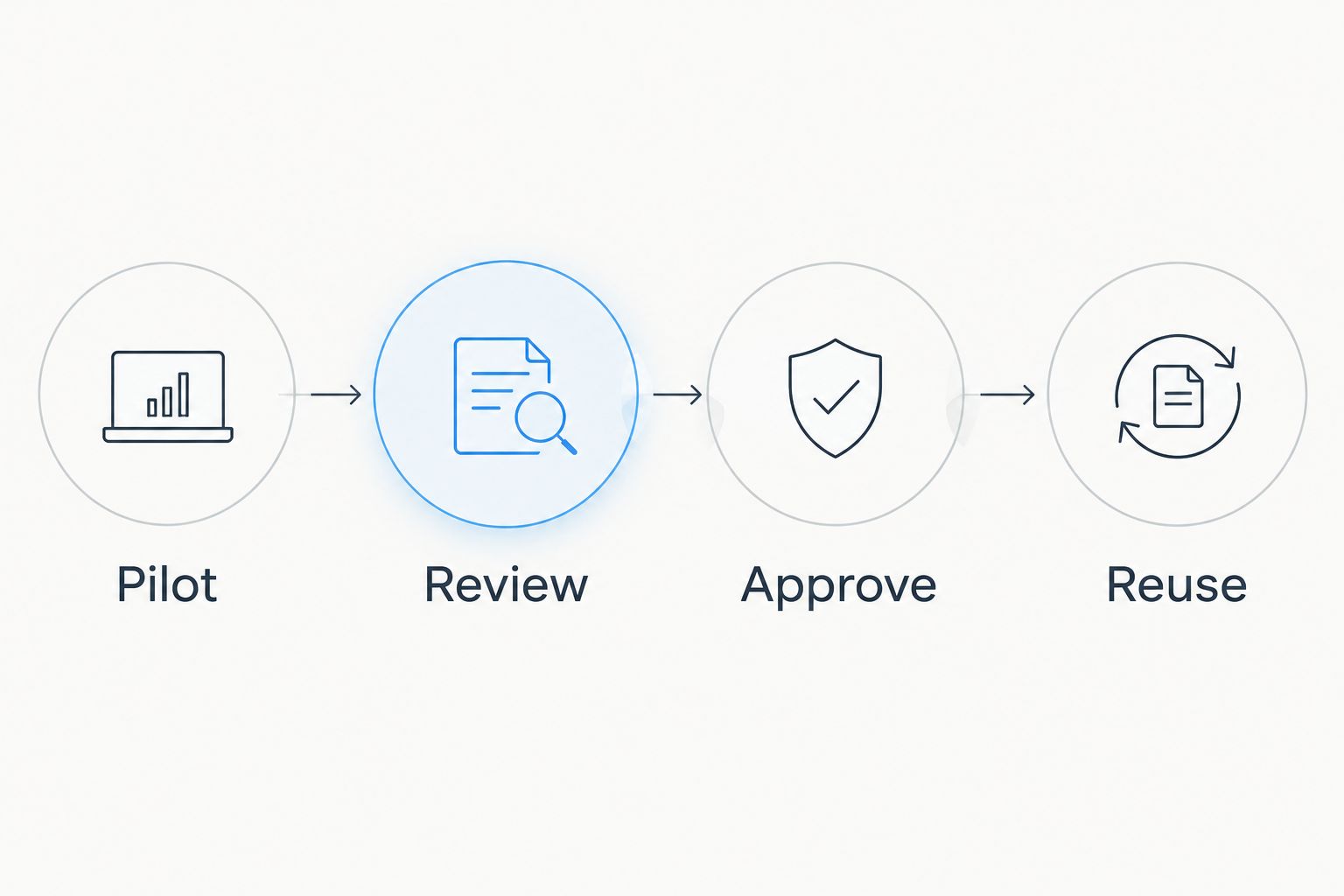
Use a simple sequence: Pilot, Review, Approve, Reuse. The review should confirm that the pattern meets its acceptance conditions and that a named owner accepts the maintenance responsibility.
A shared catalogue is useful only when it distinguishes approved patterns from experiments. Include an exception route for requirements that genuinely differ; otherwise teams will either force the wrong pattern into place or create undocumented alternatives.
- Pilot: validate a bounded business workflow.
- Review: examine security, usability and maintenance evidence.
- Approve: assign ownership and record accepted limitations.
- Reuse: publish the pattern with configuration guidance.
Compare the implementation options
Use the least complex approach that satisfies the workflow and its controls. Standard features, packaged components and custom development are implementation choices, not a ranking of sophistication. A mixed approach is appropriate when each dependency has a clear purpose and owner.
| Option | Best for | Main advantage | Key limitation |
|---|---|---|---|
| Standard Salesforce features | Workflows that fit the capabilities available in your environment | Establishes a baseline without selecting an additional component package | Requirements must fit the available features and configuration |
| Avonni components | Teams seeking subscription-based no-code/low-code components across the supplied Salesforce UI contexts | Provides packaged building blocks for admins and developers | Requires subscription, dependency and component-fit assessment |
| Custom Lightning Web Components | Requirements that need developer-controlled behaviour | Lets your development team define the implementation | Your team owns development, testing and maintenance |
| Mixed implementation | Workflows combining standard, packaged and bespoke interactions | Lets each requirement use a suitable implementation approach | Adds boundaries and dependencies that require documentation |
Do not select a package because it avoids writing code in the first demonstration. Select it when the finished workflow meets your controls and the maintenance arrangement is acceptable. Likewise, do not commission custom development merely because your organisation has developers.
When comparing options, give every candidate the same task script and permission matrix. Record unresolved requirements explicitly. A limitation discovered during evaluation is useful evidence; a limitation discovered after organisation-wide adoption becomes a support problem.
Common mistakes enterprise IT teams make
Approving the administrator demo
An administrator completing a workflow proves only that the administrator can complete it. It does not validate the permissions of service staff, managers, partners or customers. Require the intended user roles to pass the same acceptance test before approval.
Keep the evidence attached to the workflow record. Otherwise a later team can mistake an attractive demonstration for a reviewed implementation.
Treating no-code as no-maintenance
A configured interface still has dependencies, permissions, input assumptions and release behaviour. Assign ownership to the complete workflow, including the configuration surrounding a packaged component.
The correction is operational: identify who reviews changes, who tests them and who handles incidents. Do this before the original builder hands over the work.
Standardizing a visual pattern instead of a task pattern
A consistent table or card layout does not guarantee consistent behaviour. Two screens can look alike while handling validation, permissions and recovery differently.
Publish the intended task, configuration rules and accepted limitations with every approved pattern. Reuse the decision logic behind the interface, not just its appearance.
Ignoring external-user differences
An internal workflow is not evidence that an external experience is ready. The audience, data access and recovery route need their own review.
For your 2026 roadmap, keep internal and external acceptance records separate even when they share a component approach. Shared building blocks do not eliminate audience-specific testing.
FAQ
What's the best way to choose Salesforce UI components for enterprise IT teams?
Choose Salesforce UI components against a documented workflow, permission model and maintenance plan. Start with standard features, then assess packaged components or custom development for the remaining requirements.
Is Avonni suitable for enterprise Salesforce UI projects?
Avonni fits teams seeking subscription-based no-code/low-code Salesforce UI components distributed as AppExchange managed packages. Enterprise suitability still depends on validating the chosen component, security configuration and release process against your requirements.
Should enterprise IT teams use standard Salesforce features or a component library?
Use standard Salesforce features when they satisfy the workflow and its controls. Assess a component library when a documented interaction gap remains and the package meets your acceptance criteria.
When should we build a custom Lightning Web Component?
Build a custom Lightning Web Component when the requirement needs developer-controlled behaviour that your approved alternatives do not provide. Assign development, testing and maintenance ownership before committing to the build.
Does a managed package replace security testing?
No, a managed package does not replace security testing of your implemented workflow. Test record access, field permissions and update behaviour with the actual user roles and surrounding configuration.
What should we include in a Salesforce UI component pilot?
Include a representative task, a permission matrix, failure scenarios and a named maintenance owner. Approve reuse only after the pilot meets its documented acceptance conditions.
Can admins and developers share responsibility for a Salesforce interface?
Yes, admins and developers can share responsibility when the boundaries are explicit. Document who owns configuration, custom code, permissions, deployment and incident response for the complete workflow.
One last thing
Test the handover before approving the component. Give an uninvolved maintainer the workflow record and ask them to identify its dependencies, explain its permission model and locate its recovery instructions.
If they cannot do that, improve the implementation record before expanding adoption. A reusable interface is not just a screen another team can copy; it is a workflow another team can maintain.