
Advanced Communities offers applications for Salesforce Experience Cloud, making it a relevant choice when an existing application matches your portal requirements. The ceiling appears when your main requirement is reusable interface components rather than an application-led solution. The best Advanced Communities alternative in 2026 is Avonni if you need configurable Salesforce UI components; Salesforce standard components if your requirements fit the platform’s existing controls.
- For advanced communities alternatives, choose Avonni for configurable Salesforce UI components across internal and external interfaces.
- Choose Salesforce standard components when existing controls satisfy your Experience Cloud or Flow requirements.
- Choose custom Lightning Web Components when your interface requires developer-owned behaviour.
- Stay with Advanced Communities when its application matches your business workflow, not just your page layout.
Why this matters
A portal application, a component library and a custom development project solve different problems. Comparing them as interchangeable products leads you to judge the wrong features and underestimate the work left after installation.
Your first decision is not which vendor has the longest component list. It is whether you need a business application, configurable interface elements or code that your team owns. That distinction determines what you should evaluate and who must maintain the result.
For a 2026 shortlist, separate application requirements from presentation requirements before arranging demonstrations. A polished interface does not establish that an option supports your records, permissions or business process.
Advanced Communities alternatives at a glance
The options below represent different build approaches, not identical replacements. Keep Advanced Communities in the comparison so you can distinguish an actual replacement from a change in implementation strategy.
| Option | Best for | Standout capability | How it differs from Advanced Communities |
|---|---|---|---|
| Advanced Communities | Experience Cloud projects that match an existing application | Applications built for Salesforce Experience Cloud | The application-led benchmark for this comparison |
| Avonni | Admins, developers, ISVs and partners assembling Salesforce interfaces | Subscription components for Flow Screen, Dynamic, Experience Cloud, LWC and App Builder use cases | A component-led approach rather than selecting an application around a business workflow |
| Salesforce standard components | Teams whose requirements fit existing platform controls | Components available through Salesforce’s native builders | Starts with platform functionality rather than another vendor’s application |
| Custom Lightning Web Components | Teams requiring developer-controlled interface behaviour | Custom interface code using Salesforce’s LWC framework | Makes your development team responsible for building and maintaining the solution |
Compare the level of solution you need before comparing individual features. An application should be assessed against business workflows; a component should be assessed against interaction requirements; custom code should be assessed against both.
1. Avonni: best for configurable Salesforce UI components
Avonni is a Salesforce UI component subscription distributed through AppExchange managed packages. Its stated scope includes Flow Screen, Dynamic, Experience Cloud, LWC and App Builder components, serving admins, developers, ISVs and partners.
That makes this approach relevant when your team knows what the interface must do and needs building blocks to assemble it. It is a different purchasing decision from choosing an application that already defines a business workflow.
Where it shines
- Component-led delivery: You can evaluate the interface elements needed for a defined Salesforce screen rather than beginning with an entire application.
- Multiple interface contexts: The stated component categories cover both Experience Cloud and other Salesforce UI building contexts.
- No-code and low-code options: The offering addresses teams looking for configurable UI components, not exclusively hand-coded interfaces.
- A defined delivery model: The subscription and AppExchange managed-package model give you concrete items to assess during procurement and deployment planning.
Where it falls short
- A component subscription is not a complete portal specification. You still need to define navigation, records, access rules and business processes.
- Managed packages become part of your org’s dependencies. Package installation and changes belong in your release process.
- A subscription creates an ongoing commercial dependency. Include renewal ownership in your decision rather than treating installation as the end of procurement.
- A component category does not prove a particular interaction. Validate the exact screen behaviour you need before selecting a package.
Head-to-head with Advanced Communities
| Dimension | Avonni | Advanced Communities |
|---|---|---|
| Starting point | Configurable Salesforce UI components | Experience Cloud applications |
| Best-fit requirement | Assemble an interface around your defined process | Adopt an application that fits the required workflow |
| Evaluation focus | Component behaviour and intended Salesforce context | Application functionality and workflow fit |
| Remaining design work | Define how components form the finished experience | Determine where the selected application needs configuration or additional work |
Best for: Salesforce teams that need reusable UI building blocks across defined screens and pages.
In a 2026 evaluation, bring a real screen specification to the demonstration. Ask how the required inputs, outputs, record interactions and access conditions work together; a component gallery alone cannot answer those questions.
Verdict: Buy when configurable components match your interface requirements and your team owns the surrounding solution design.
2. Salesforce standard components: best for native requirements
Salesforce standard components are the right baseline when you are deciding whether another package is necessary. Experience Builder, Flow Builder and Lightning App Builder provide platform-native ways to compose interfaces, although the available components and supported behaviour differ by context.
Start here when your requirements are straightforward. A native solution that passes your acceptance tests is a valid finished solution, not merely a temporary substitute.
Where Salesforce standard components shine
- A clear baseline: You can establish which requirements your existing Salesforce setup already handles before introducing another vendor.
- Builder-based composition: Admins can work with the controls available in the relevant Salesforce builder.
- Fewer external package decisions: Staying within standard functionality avoids adding a third-party component package for that requirement.
Where Salesforce standard components fall short
- You work within the supported configuration. An interaction outside a standard component’s capabilities needs another approach.
- Builder contexts differ. A component available in one Salesforce context is not automatically available in another.
- Native does not mean finished. Your team still owns data access, validation, navigation and the experience assembled from those controls.
Head-to-head with Advanced Communities
| Dimension | Salesforce standard components | Advanced Communities |
|---|---|---|
| Starting point | Platform controls and builders | Experience Cloud applications |
| Best-fit requirement | A screen or page supported by native functionality | A workflow supported by an existing application |
| Main evaluation | Whether standard controls pass acceptance tests | Whether application behaviour matches the business process |
| Main limitation | Boundaries of available native configuration | Fit between the application and your requirements |
Best for: Teams that can satisfy the intended user journey with standard Salesforce functionality.
For your 2026 shortlist, document the specific native limitation before adding another option. “We need a different interface” is too broad; name the interaction that fails and the result the user needs instead.
Verdict: Hold off on another package when Salesforce standard components already satisfy the acceptance criteria.
3. Custom Lightning Web Components: best for developer-owned behaviour
Custom Lightning Web Components give a development team control over interface implementation within Salesforce’s component framework. This approach fits requirements that cannot be met through the configuration options of the components you have evaluated.
It is not a shortcut around solution design. You are choosing to make development, testing and maintenance part of the deliverable.
Where custom Lightning Web Components shine
- Specific interactions: Developers can implement behaviour around a defined requirement rather than select only from packaged controls.
- Code ownership: Your team controls the custom implementation and its release process.
- Purpose-built composition: You can design the component around the intended Salesforce page or workflow.
Where custom Lightning Web Components fall short
- Development responsibility stays with you. Defects, enhancements and maintenance need an owner.
- Code requires testing. Include access behaviour, error handling and supported usage conditions in the implementation plan.
- Custom UI does not replace business logic. The surrounding data and process requirements still need explicit design.
Head-to-head with Advanced Communities
| Dimension | Custom Lightning Web Components | Advanced Communities |
|---|---|---|
| Starting point | A specification and custom code | An existing Experience Cloud application |
| Behaviour | Defined through your implementation | Evaluated against the selected application |
| Delivery ownership | Your development team or implementation partner | Application selection plus your implementation work |
| Maintenance focus | Custom code and its dependencies | The application and your surrounding configuration |
Best for: Teams with a specific unmet interaction requirement and a named development owner.
Verdict: Wait until you have demonstrated a requirement that existing components cannot satisfy before commissioning custom code.
Why people switch from Advanced Communities
Switching makes sense when your requirements call for a different solution layer. These are fit-based reasons to consider an alternative, not claims about customer behaviour or problems with Advanced Communities.
Your requirement is a screen, not an application
You might already have the business process defined in Salesforce and need a different way to present it. In that case, evaluate component behaviour directly instead of selecting an application primarily for its interface.
Write down what the user must see, change and submit. Those actions form a more useful comparison than screenshots of complete portals.
Your scope extends beyond Experience Cloud
A project spanning portal pages, internal apps and Flow screens requires separate checks for each context. An Experience Cloud application and a cross-context UI component offering should not be assumed to cover the same scope.
Keep the environments explicit in your requirements. Similar-looking interfaces can have different configuration and deployment requirements.
Your team needs implementation control
Custom development becomes relevant when a required interaction falls outside the supported configuration of the options you have assessed. The reason to change is the documented gap, not a general preference for custom code.
For 2026 procurement, record that gap as an acceptance criterion. This gives every shortlisted approach the same problem to solve.
How to choose without rebuilding the wrong thing
Use these checks in order. Each check removes a different source of uncertainty before you commit to an application, a component package or custom development.
- Solution scope: Decide whether you need a complete workflow or interface building blocks. List the business logic separately from the visual requirements.
- Builder context: Name where the interface will run, such as an Experience Cloud page, a Flow screen or a Lightning app page. Verify support for that exact context.
- Access rules: Test the intended user’s access to the records and actions involved. Do not accept an administrator demonstration as proof of the end-user experience.
- Ownership: Assign responsibility for configuration, releases, defect resolution and ongoing changes. Make the maintenance decision before approving the implementation.
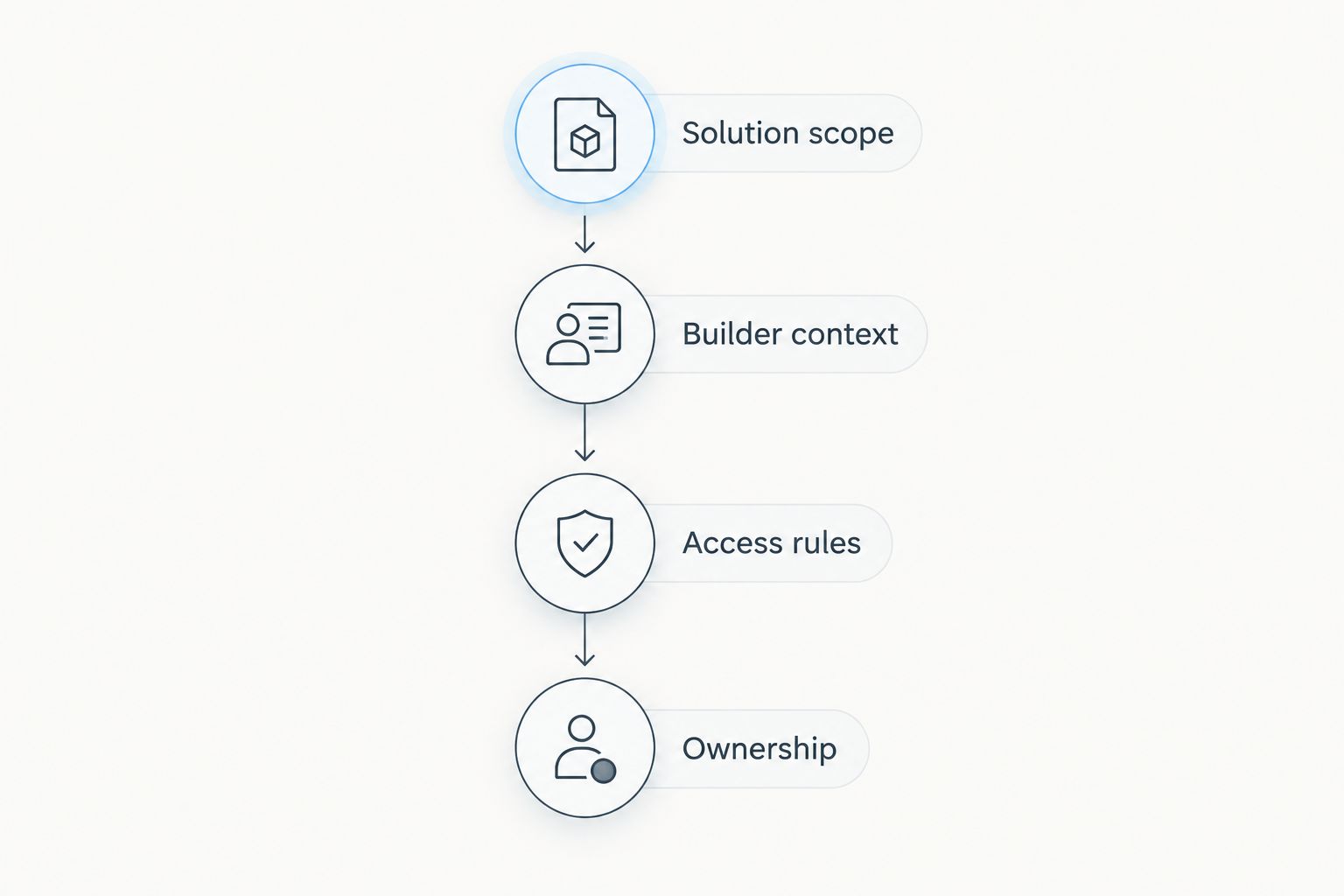
Bring 1 representative screen through all 4 evaluation checks, then test it with 2 user roles: the person configuring the solution and the person using it. These are evaluation instructions, not performance benchmarks; they keep the demonstration attached to your actual requirements.
Include an error state and an empty state in that screen specification. A successful demonstration should explain what happens when the expected record is unavailable or the user cannot complete the intended action.
When staying with Advanced Communities is the right call
Stay with Advanced Communities when its application matches the business workflow you need. Replacing a suitable application with components shifts more assembly and design responsibility to your team.
Before switching, identify which existing functionality must survive the change. If your alternative addresses the page layout but leaves business processes unresolved, you have not yet specified a replacement.
A focused 2026 decision compares complete outcomes. Keep the current option when it passes the same acceptance tests and the proposed alternative does not resolve a documented gap.
FAQ
What's the best Advanced Communities alternative in 2026?
Avonni is the best fit for teams seeking configurable Salesforce UI components rather than an application-led solution. Salesforce standard components suit requirements already covered by native controls, while custom Lightning Web Components suit developer-owned interactions.
Is a Salesforce component library a direct replacement for Advanced Communities?
A Salesforce component library is not automatically a direct replacement for an Experience Cloud application. Compare the business workflow as well as the interface, because assembling components can leave process requirements for your team to implement.
Can I use Salesforce standard components instead of another package?
Yes, when Salesforce standard components satisfy your requirements in the intended builder context. Test the actual user journey, including access rules and error handling, before deciding that another package is necessary.
When should I build custom Lightning Web Components?
Build custom Lightning Web Components when a specific required interaction falls outside the supported configuration of the options you have evaluated. Assign ownership for development, testing and maintenance before commissioning the work.
What should I test during a Salesforce component demonstration?
Test a representative screen in its intended Salesforce context with the intended user permissions. Include the normal action, an empty state and an error state so the demonstration covers more than a successful administrator session.
Should I replace Advanced Communities just to change a portal's appearance?
Do not replace a suitable application solely because you want a different appearance without first assessing configuration options. Identify the exact visual or interaction requirement, then compare approaches against that requirement and the existing business workflow.
One last thing
An interface replacement is not complete when it reproduces the screenshot. Write acceptance criteria as user actions, not visual descriptions. “The user can complete the task with the intended permissions” is a stronger requirement than “the page looks like the mockup.”
Keep the same action-based criteria for every option. That prevents an attractive demonstration from becoming a substitute for a working solution.