Salesforce Lightning Design System gives developers Salesforce interface guidelines, styling resources and component blueprints. Its ceiling is implementation: a blueprint is not a configured Flow screen or a working business interface. The best Salesforce Lightning Design System alternative in 2026 is Avonni if you need packaged no-code/low-code Salesforce UI components; Lightning base components if you need a native foundation for developer-built interfaces.
- Salesforce Lightning Design System alternatives solve different problems: packaged interfaces, native component development or custom behaviour.
- Lightning base components suit developers who need functional Salesforce controls rather than design blueprints.
- Custom Lightning Web Components suit requirements that need application-specific code and a named maintenance owner.
- Keep Salesforce Lightning Design System as your design reference when implementation, not visual consistency, is the problem.
Why this matters
Searching for a design-system alternative mixes together tools that do different jobs. A design system defines interface patterns. A component library supplies building blocks, while a custom component implements behaviour specific to your application.
Choose the wrong layer and you still have the original problem. Replacing styling guidance does not supply data handling, screen logic or a deployment process.
This comparison separates 3 implementation routes: packaged components, native base components and custom Lightning Web Components. For a broader shortlist of packaged options, see the guide to Salesforce component libraries.
Salesforce Lightning Design System alternatives at a glance
For your 2026 shortlist, compare who builds the interface, where it runs and who maintains it. Do not treat a design reference and a deployable component package as interchangeable products.
| Option | Best for | Standout capability | Difference from Salesforce Lightning Design System |
|---|---|---|---|
| Salesforce Lightning Design System | Teams defining Salesforce-aligned interface patterns | Design guidance, styling resources and component blueprints | The reference point; it does not implement your application logic |
| Avonni | Admins, developers, ISVs and partners seeking packaged UI components | No-code/low-code components distributed through AppExchange managed packages | Supplies implementation components rather than design guidance alone |
| Lightning base components | Developers composing interfaces from native Salesforce controls | Functional components available through the Lightning framework | Provides controls you can use in application code |
| Custom Lightning Web Components | Teams with application-specific interaction requirements | Direct control over component behaviour and composition | Requires your team to implement and maintain the interface |
These options can coexist. A custom Lightning Web Component can use Lightning base components and follow the design system; a packaged component can sit alongside custom work in the same Salesforce implementation.
1. Avonni: best for packaged Salesforce UI components
This Salesforce component subscription serves admins, developers, ISVs and partners building Salesforce interfaces. Its stated scope includes Flow Screen, Dynamic, Experience Cloud, LWC and App Builder components distributed as AppExchange managed packages.
The distinction is practical: you evaluate configurable components instead of starting with interface blueprints alone. That makes this route relevant when your requirement is a working Salesforce UI rather than a new visual design language.
Where Avonni shines
- Multiple Salesforce contexts: The stated component scope spans Flow screens, Experience Cloud, LWC and App Builder.
- No-code/low-code positioning: The offering addresses teams looking for configurable UI building blocks.
- Managed-package distribution: You assess a packaged dependency rather than taking responsibility for authoring every component.
- Mixed technical audiences: The product explicitly serves admins as well as developers, ISVs and partners.
Where Avonni falls short
- It introduces a subscription dependency. Include that commitment in your procurement decision.
- It introduces managed packages. Your organisation needs an installation, validation and release process for those dependencies.
- A component catalogue is not proof of fit. Validate the specific interaction and Salesforce surface before committing to an implementation.
- It is not a replacement for interface governance. Your team still needs consistent labels, layouts, accessibility checks and error handling.
Head-to-head with the design system
| Dimension | Packaged component approach | Salesforce Lightning Design System |
|---|---|---|
| Primary deliverable | No-code/low-code UI components | Design guidance, styling resources and blueprints |
| Distribution | AppExchange managed packages | Design-system resources |
| Intended users | Admins, developers, ISVs and partners | Designers and developers applying Salesforce interface patterns |
| Main evaluation question | Does the component fit the required screen? | Does the implementation follow the intended design pattern? |
Avonni is best for Salesforce teams that need packaged no-code/low-code UI components rather than design blueprints alone. That recommendation depends on fit with your actual screen, not the breadth of a category label.
Best for: Teams seeking configurable components across the stated Salesforce UI contexts.
Verdict: Buy only after a representative screen passes your acceptance checks.
2. Lightning base components: best for native developer building blocks
Lightning base components are functional Salesforce components used in Lightning development. They include familiar interface controls such as inputs, buttons and data tables, allowing developers to compose interfaces without implementing each control from a design blueprint.
Choose this route when your team can write the surrounding application code. It narrows the gap between design and implementation, but it does not remove development work.
Where Lightning base components shine
- Functional controls: Developers work with component APIs rather than styling blueprints alone.
- Native development model: Base components belong to Salesforce's Lightning development framework.
- Composition: Developers can combine controls into application-specific interfaces.
- Documented boundaries: Component documentation identifies supported attributes, events and target restrictions.
Where Lightning base components fall short
- They are not a complete business interface. Your team still implements the required data flow and behaviour.
- They require development skills. A collection of controls does not become a no-code screen builder.
- Customisation has boundaries. Supported APIs and styling mechanisms define what you can change.
- Surface support needs checking. Do not assume every component works in every Salesforce context.
Head-to-head with the design system
| Dimension | Lightning base components | Salesforce Lightning Design System |
|---|---|---|
| Primary role | Functional interface controls | Interface guidance and blueprints |
| Implementation work | Compose controls and write application logic | Implement the interface and its logic |
| Behaviour | Exposed through component APIs | Defined by your implementation |
| Best evaluator | Salesforce developer | Designer and developer together |
For a 2026 project, start with the required interaction rather than a catalogue tour. Identify the controls you need, check their documented support, then determine how much custom logic remains.
Best for: Developers who want native controls and accept responsibility for the surrounding code.
Verdict: Buy into this approach when native controls cover the interaction and your team owns development.
3. Custom Lightning Web Components: best for specific behaviour
Custom Lightning Web Components let your team implement application-specific interfaces using Salesforce's component framework. This route is appropriate when a requirement cannot be expressed through the configuration and supported APIs of your chosen components.
Custom does not mean abandoning the design system. Your developers can use Lightning base components and Salesforce design patterns inside the custom implementation.
Where custom Lightning Web Components shine
- Specific interactions: Your team defines the required behaviour in code.
- Component composition: Custom interfaces can combine native controls with application-specific logic.
- Code ownership: Your team controls the implementation and its release process.
Where custom Lightning Web Components fall short
- Development remains your responsibility. You need implementation, testing and maintenance capacity.
- Accessibility needs deliberate validation. Custom behaviour needs checks beyond visual similarity.
- Ownership cannot be temporary. Assign responsibility for defects, changes and release validation.
Head-to-head with the design system
| Dimension | Custom Lightning Web Components | Salesforce Lightning Design System |
|---|---|---|
| Main purpose | Implement application-specific behaviour | Define consistent interface patterns |
| Deliverable | Deployable component code | Design resources and blueprints |
| Maintenance owner | Your development team | Your team maintains the implementation built from the guidance |
Best for: Requirements with a clear functional gap and a team accountable for the code.
Verdict: Hold until you can explain why configuration or native component composition is insufficient.
How to choose without rebuilding the wrong layer
Evaluate 1 representative screen before choosing an implementation route. Use a screen that includes a meaningful user task, a real permission boundary and an error state—not just a visually attractive layout.
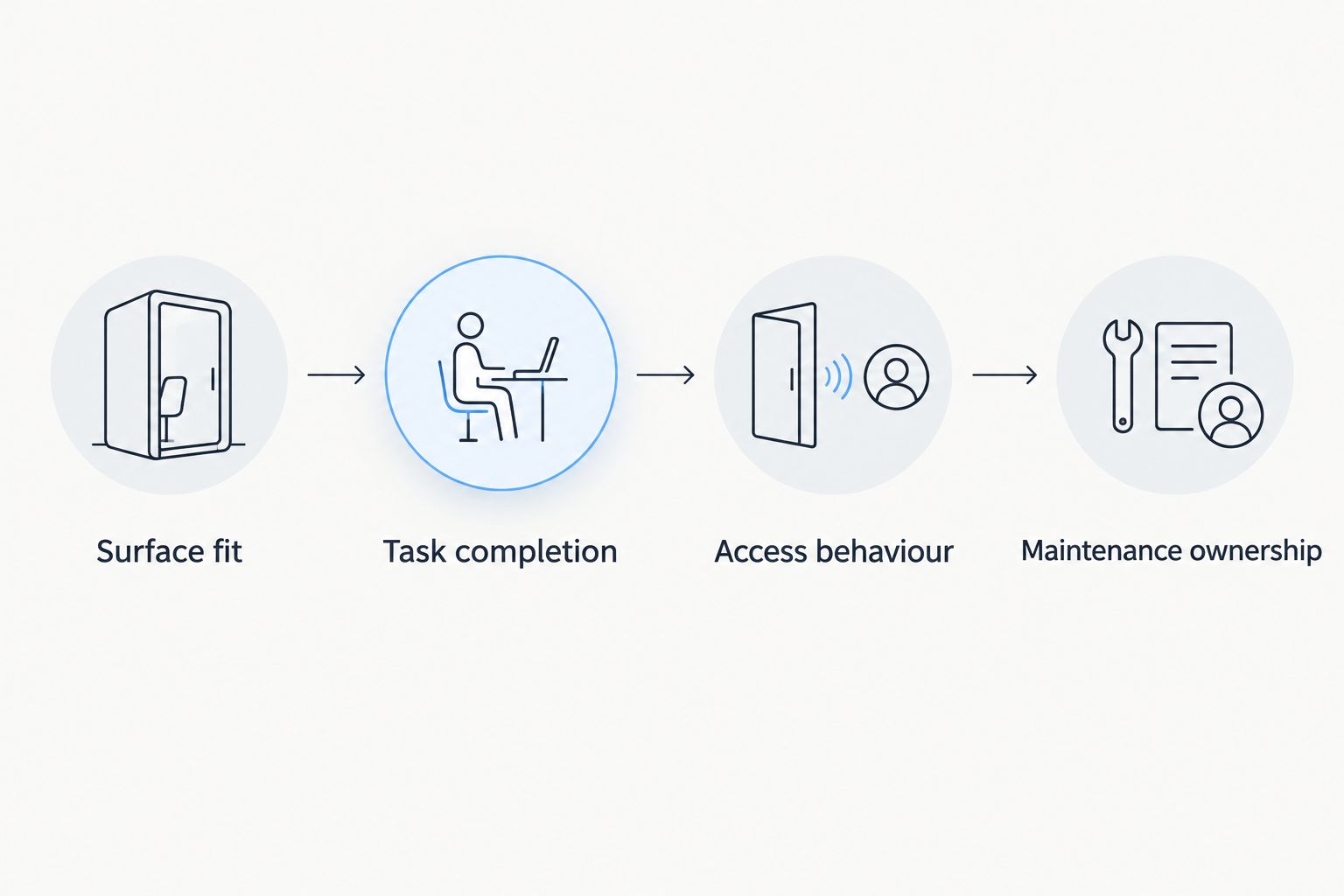
Apply these 4 acceptance checks to the same screen across your shortlist:
- Surface fit: Confirm the required component works in the intended context, such as a Flow screen, an app page or an Experience Cloud page.
- Task completion: Check that the user can finish the actual business task, including validation and recovery from an error.
- Access behaviour: Test with the permissions and record access of the intended user, not only an administrator.
- Maintenance ownership: Identify who configures, tests, releases and fixes the interface after launch.
Write down the failed check, not just a preference. A component that looks right but cannot support the required user task has not passed; a custom implementation without a maintenance owner has not passed either.
For a 2026 evaluation, keep design approval separate from functional acceptance. You need both, but passing one does not establish the other.
Why people switch from Salesforce Lightning Design System
The specific reason to move beyond the design system is an implementation requirement that design guidance does not fulfil. That is a gap between categories, not evidence that the design system is defective.
- You need configurable screens. A packaged component approach addresses a different requirement from a visual blueprint.
- You need working controls. Lightning base components provide functional building blocks for developer composition.
- You need specific behaviour. Custom Lightning Web Components put that implementation in your team's codebase.
- You need a defined deployment dependency. A managed package and an internally maintained component have different ownership models; choose deliberately.
None of these reasons requires changing your visual language. Preserve the design patterns that help users understand the interface, then change the implementation layer that blocks the task.
When staying with the design system is right
Stay with Salesforce Lightning Design System when your team needs a shared reference for layout, interaction patterns and visual consistency. It remains relevant when developers already have an implementation approach and the unresolved issue is design alignment.
Keep it alongside your selected components when consistency matters across custom and packaged interfaces. Do not replace a design system to solve a component-delivery problem.
The right 2026 decision can be additive: retain the design reference and introduce only the implementation capability your screen lacks. Avoid a broader rewrite unless the requirements justify it.
FAQ
What's the best Salesforce Lightning Design System alternative in 2026?
Avonni is the best fit when you need packaged no-code/low-code Salesforce UI components across its stated product scope. Choose Lightning base components for native developer building blocks, or custom Lightning Web Components for application-specific behaviour.
Is Salesforce Lightning Design System a component library?
Salesforce Lightning Design System provides design guidance, styling resources and component blueprints, rather than a configured business application. Functional Lightning base components are a separate implementation resource.
Are Lightning base components better than Salesforce Lightning Design System?
Lightning base components are better suited to implementing functional controls; Salesforce Lightning Design System addresses design patterns and consistency. They serve different purposes and can be used together.
Can I build Salesforce interfaces without writing custom components?
You can use declarative Salesforce tools and configurable packaged components for interfaces that fit their supported capabilities. Validate the required surface, interaction and access behaviour before deciding custom code is unnecessary.
Do custom Lightning Web Components replace the design system?
Custom Lightning Web Components do not have to replace Salesforce Lightning Design System. Developers can follow the design system and use native base components within a custom implementation.
What should I test before choosing a Salesforce UI component library?
Test a representative screen for surface fit, task completion, access behaviour and maintenance ownership. Use the intended user's permissions and include validation and error recovery.
Can I use the same components in Flow and Experience Cloud?
Component support depends on its documented Salesforce targets and capabilities. Check Flow and Experience Cloud support separately rather than treating support for one surface as proof of support for the other.
One last thing
A screen can look Salesforce-native and still fail the user's task. Before approving your shortlist, ask someone with the intended permissions to complete the representative workflow and recover from an error without administrator intervention.
Keep the option that passes the task and has a clear owner. A familiar appearance is a design outcome, not proof of a finished interface.