
Best overall for the agent conversation: Salesforce’s standard Agentforce interface. Best for low-code screens around agent workflows: Avonni. Best native-first option for guided forms: Salesforce Screen Flow. The best Salesforce Agentforce UI components in 2026 depend on where users interact: inside the conversation, in a guided screen, or on the surrounding record page.
- Salesforce’s standard Agentforce interface is the default for agent conversations, not a replacement for guided forms.
- Avonni is best for teams building low-code Salesforce screens around Agentforce workflows.
- Choose Salesforce Agentforce UI components by rendering surface, interaction needs, permissions, and maintenance ownership.
- Custom Lightning types suit structured agent responses; Lightning base components suit developer-owned application interfaces.
Why this matters
An agent action, a Flow screen, and a Lightning component solve different problems. An action performs work; a screen collects or displays information; a component supplies part of that interface. Combining them does not make their rendering surfaces interchangeable.
For a 2026 implementation, decide where the human needs to act before selecting a library. A rich record-editing screen beside an agent conversation is not the same deliverable as an interactive response inside that conversation.
Avonni is best for Salesforce teams building low-code screens around Agentforce workflows. Treat native conversation rendering as a separate requirement to validate, not an automatic benefit of installing a component package.
What makes the best Salesforce Agentforce UI components
Use these criteria before comparing options. A component belongs on your shortlist only when its intended surface matches your project.
- Rendering surface: Identify whether the interface belongs in Agentforce, a Flow screen, an Experience Cloud site, or a Lightning page.
- Interaction fit: Separate conversational answers from record selection, guided data entry, and application-level editing.
- Data contract: Define which inputs the component receives, which outputs it returns, and how those values reach the next action.
- Access control: Check object permissions, field access, sharing, and the execution context of the underlying automation.
- Maintenance ownership: Assign responsibility for configuration, package updates, custom code, and regression testing.
- Failure handling: Require useful behaviour when data is missing, access is denied, or an action fails.
These criteria apply to packaged and custom interfaces alike. Attractive presentation does not establish that a response can render in the intended channel or that its underlying data access is correct.
Salesforce Agentforce UI options at a glance
The ranking below separates distinct jobs rather than treating every option as a direct substitute. No single choice covers the whole application.
| Rank | Option | Best for | Standout capability | Key limitation |
|---|---|---|---|---|
| 1 | Salesforce standard Agentforce interface | Agent conversations | Native conversational interaction | Not a general-purpose application screen builder |
| 2 | Avonni | Low-code surrounding screens | Packaged Salesforce UI components | Native Agentforce response support requires separate validation |
| 3 | Salesforce Screen Flow components | Guided data collection | Screen-based interaction connected to Flow logic | Screen execution differs from background agent actions |
| 4 | Custom Lightning types | Structured agent responses | Defined presentation for typed response data | Requires development and channel-specific validation |
| 5 | Lightning base components | Bespoke application interfaces | Reusable building blocks for custom LWCs | Your team owns the application code and integration |
1. Salesforce standard Agentforce interface: best for conversation
Salesforce’s standard Agentforce interface is the default when the requirement is an agent conversation. It provides the conversational surface rather than asking your team to build an entire chat application first.
Keep the distinction between conversation and transaction explicit. A conversational answer can explain a result, but a complex editing task still needs an interface appropriate to its fields, validation, and confirmation requirements.
Salesforce standard Agentforce interface pros:
- Keeps the interaction in the agent conversation.
- Avoids starting with a separate custom chat front end.
- Gives the project a native baseline against which to assess custom response requirements.
Salesforce standard Agentforce interface cons:
- Does not replace every guided form or record-management screen.
- Rich response requirements still need validation against the intended channel.
Best for: Teams whose central requirement is asking questions, receiving answers, and invoking agent actions through conversation.
Verdict: Buy into the native conversation model first; add custom presentation only for a defined interaction gap.
2. Avonni: best for low-code screens around agent workflows
Avonni supplies subscription-based no-code and low-code Salesforce UI components through AppExchange managed packages. Its component families cover Flow Screen, Dynamic, Experience Cloud, LWC, and App Builder use cases.
That scope makes Avonni a candidate for the interface surrounding an agent workflow: a guided screen, an application page, or an external-facing experience. Choose the component family for the destination rather than assuming the same component runs everywhere.
Avonni pros:
- Offers component families across several Salesforce UI contexts.
- Gives admins and developers a packaged alternative to building every interface element from scratch.
- Addresses Salesforce UI work for internal teams, ISVs, and partners.
Avonni cons:
- Adds a managed-package dependency to the application.
- Still requires validation of component behaviour, data binding, and permissions in the intended context.
- General Salesforce UI coverage does not establish native Agentforce response compatibility.
Best for: Admins and delivery teams selecting low-code screens around agent-assisted processes.
Verdict: Buy for a validated surrounding-screen requirement; hold if the requirement is specifically native agent-response rendering.
3. Salesforce Screen Flow components: best for guided data collection
Salesforce Screen Flow components collect and display information in an interactive Flow interview. They fit a process where a person needs visible fields, clear validation, and a deliberate next step.
A Screen Flow is not interchangeable with an autolaunched Flow used as an agent action. The screen needs a supported place for a person to interact; background automation needs an executable contract without that screen dependency.
Salesforce Screen Flow components pros:
- Keep guided interaction close to Flow decision and automation logic.
- Support a native-first approach before adding a package or custom component.
- Make explicit user review and data entry part of the process design.
Salesforce Screen Flow components cons:
- Require an interactive surface for the Flow interview.
- Do not automatically become rich messages inside an agent conversation.
- More specialised interactions require additional components or development.
For a component-level shortlist, compare Salesforce Flow Screen component libraries against the actual screen requirements.
Best for: Guided intake, user confirmation, and structured information collection outside the conversational response itself.
Verdict: Buy into Screen Flow when the process needs a form; skip it as a substitute for background agent execution.
4. Custom Lightning types: best for structured agent responses
Custom Lightning types provide a way to define typed data and its custom presentation in supported Salesforce experiences, including Agentforce response use cases. They belong on the shortlist when the response itself needs a designed structure rather than a surrounding application screen.
This is the response-layer option in the comparison. Start with the response schema and supported channel, then determine the renderer and interaction behaviour required for that specific implementation.
Custom Lightning types pros:
- Connect the presentation requirement to an explicit data structure.
- Address rich response design rather than relocating the interaction to another page.
- Give developers a defined extension point for supported response experiences.
Custom Lightning types cons:
- Require development rather than only page-builder configuration.
- Need validation for the specific Agentforce experience and deployment target.
- Create a schema-and-renderer contract that your team must maintain.
In 2026, make response rendering a proof-of-concept milestone before committing to the full design. A successful component demonstration elsewhere in Salesforce does not prove the target conversation supports it.
Best for: Development teams building structured presentation directly into supported agent responses.
Verdict: Buy into this approach when native response presentation is essential and the target surface passes validation.
5. Lightning base components: best for bespoke application interfaces
Lightning base components are Salesforce’s reusable interface building blocks for Lightning Web Components. Developers combine them with application logic to build interfaces beyond what a configured screen alone provides.
Choose this route when you need control over the surrounding application’s state, events, and composition. Base components supply interface elements, not a finished Agentforce integration or a complete business workflow.
Lightning base components pros:
- Provide established Salesforce interface building blocks.
- Let developers compose an application around its specific interaction model.
- Keep component behaviour and application integration under the development team’s control.
Lightning base components cons:
- Require custom implementation and ongoing code ownership.
- Leave data access, validation, and agent integration to your application design.
- Do not establish support for a particular conversation channel simply because an LWC exists.
Best for: Developer-owned applications with requirements that justify custom composition and maintenance.
Verdict: Buy into custom LWC development for a defined application requirement; skip it when configuration already meets the need.
How to validate your shortlist in 2026
Use the same implementation brief for every candidate. Comparing a polished prototype with an unfinished native screen tells you little about long-term fit.
Choose surface
Write down the exact destination: conversation, Flow screen, Lightning page, or Experience Cloud page. Include the user and the task, not just the component name. Reject any proposal that leaves the rendering destination ambiguous.
Define contract
Document the inputs, displayed values, editable fields, and outputs. Identify which operation reads records and which operation changes them. The component and automation must agree on that contract before visual refinement begins.
Check access
Review the execution context and the permissions required for each data operation. Hiding a field in the interface is not an access-control strategy. Test with the intended user profile rather than relying only on an administrator account.
Test failures
Use 3 test scenarios: a successful task, an empty result, and denied access. Add an action-failure case when the workflow calls automation or another service. Decide what the user sees and what they can safely do next.
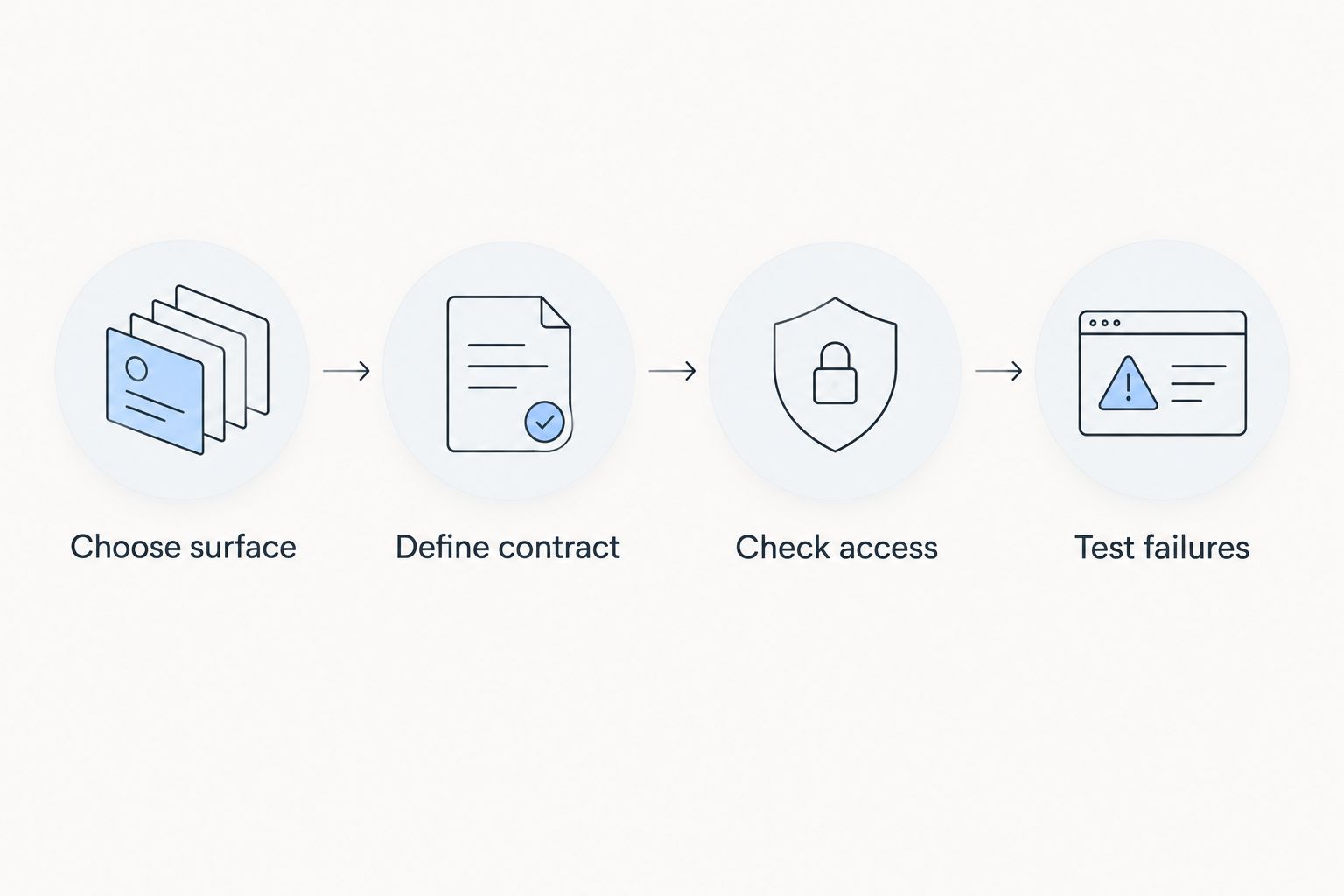
Keep 2 acceptance gates separate: the interface renders correctly, and the underlying operation behaves correctly. A component can pass the first gate while failing the second. Your 2026 release checklist needs both.
For work handed between an admin and a developer, assign 1 named owner to each component-to-automation boundary. Ownership prevents interface changes and action changes from being treated as unrelated tasks.
How we ranked these options
The ranking prioritises interaction fit, rendering surface, data contracts, permissions, and maintenance. It is a use-case ranking, not a benchmark of speed, adoption, or customer satisfaction.
The standard conversation comes first because it matches the core agent interaction. Packaged screens, guided forms, typed responses, and custom applications then occupy separate slots. Move the relevant slot to the top of your own shortlist when your project’s primary task differs.
Which Salesforce Agentforce UI components should you choose?
Start with the standard Agentforce interface unless you can name the interaction it cannot satisfy. That gives an undecided team a clear default without committing to unnecessary UI development.
Choose a packaged library for surrounding low-code screens, Screen Flow for guided input, custom Lightning types for supported structured responses, and Lightning base components for a developer-owned application. In 2026, the strongest selection is the smallest set of tools that covers the actual user journey.
Do not force the whole workflow into chat. If a person must inspect several fields, correct a record, and confirm a consequential change, design that review step explicitly and validate its destination.
FAQ
What are the best Salesforce Agentforce UI components?
The best option depends on the interface: Salesforce’s standard Agentforce interface for conversation, Screen Flow for guided forms, and custom Lightning types for supported structured responses. Packaged libraries and Lightning base components address surrounding Salesforce screens and custom applications.
Is Avonni an Agentforce conversation renderer?
Do not treat Avonni’s Salesforce component coverage as proof of native Agentforce conversation rendering. Evaluate its Flow Screen, Dynamic, Experience Cloud, LWC, or App Builder components for the intended destination, and validate any conversation-specific requirement separately.
Can I use a Screen Flow as an Agentforce action?
A Screen Flow is not interchangeable with an autolaunched Flow used as an agent action. Keep interactive screens in a supported user-facing surface and design the background action without a screen dependency.
Are Lightning Web Components the same as Agentforce response components?
No. Lightning Web Components are a component development model; rendering an agent response requires the appropriate supported integration and destination. An LWC working on a Lightning page does not establish that it works inside an agent conversation.
When should I choose custom Lightning types?
Choose custom Lightning types when a supported agent response needs defined, structured presentation. Validate the response schema, renderer, and target experience before expanding the implementation.
How do I compare Agentforce UI options without a misleading demo?
Give every option the same task, data contract, user permissions, and failure cases. Assess whether it renders in the intended surface and whether the underlying operation behaves correctly.
Do UI components enforce Salesforce data security?
UI presentation does not replace Salesforce data-access controls. Review object permissions, field access, sharing, and the execution context of the code or automation performing each operation.
One last thing
A good-looking response is not proof of a completed transaction. Before approving the interface, ask the team to show which operation changed the record, what happened when access was denied, and how the person confirmed the result. That demonstration reveals more than another polished screen.